Softpedia
 

NEWS CATEGORIES:


NEWS ARCHIVE >>
SOFTPEDIA REVIEWS >>
MEET THE EDITORS >>
TRENDING TODAY
Home > News > Apple > Tips&Tricks

April 22nd, 2010, 13:14 GMT · By

How To: Create New Text File in Finder

SHARE:

Adjust text size:

AppleScript icon
Enlarge picture
Whether you switch from Windows to Mac OS X, or vice versa, there’s going to be at least one thing that felt very comfortable doing on one OS, that doesn’t on the other. In the case of switching from Windows to Mac, there is one handy function that, for one reason or another, Apple refuses to implement with every new release of its OS – the ability to create a simple text file by right-clicking in Finder.

While Windows users have it easy for them – Right click->New->Text Document –, Mac owners are stuck with having to actually fire up TextEdit (or whatever word processor they use) by clicking its icon in the Dock, editing it, and selecting the location where they want it saved. Needless to point out, this is a time-consuming, and annoying process that all Mac users need to endure because of Apple’s stubbornness. Or do they?

Jonas Wisser, whose primary interests include the Mac community, emerging technologies, education, morality, and religion & spirituality, has worked up this cool AppleScript that allows you to get the best of both worlds in three simple steps.

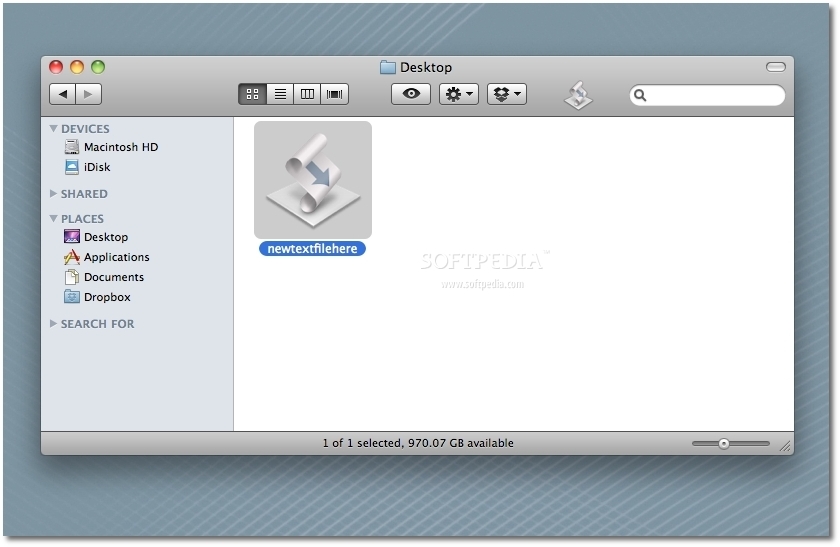
1. Download “NewTextFileHere” toolbar script for Finder (hosted here on Softpedia)
2. Unzip
3. Drag application to Finder toolbar (as shown in the first screenshot below)
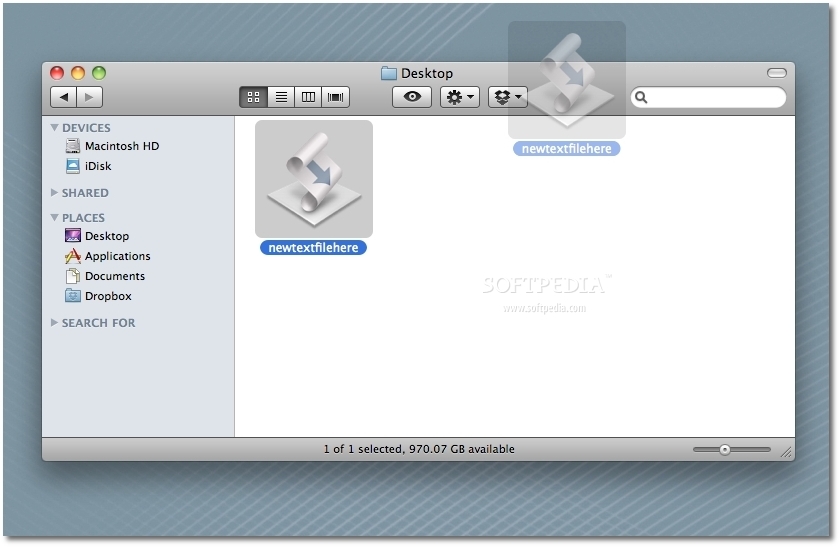

Review image Review image


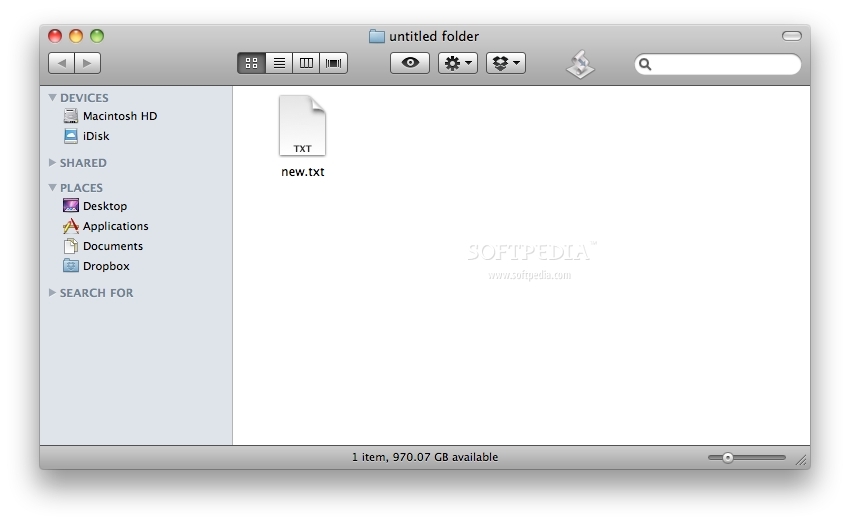
Now, whenever you need to quickly write something down in plain text, you just click on the resulted icon in the toolbar and a file called New.txt will be created in that location, as shown in this third image below.
Review image

Note that this guide has been made with, and for the old (1.0) version of Jonas Wisser’s NewTextFileHere, which simply does what it was originally meant to do – instantly create a .txt file where you’re at. The new version prompts users to specify a name for the file, and then creates it in the frontmost / selected Finder window. Personally, I prefer the original version, because it gets you there faster. Readers are welcome to try them both out and see which one they like best, as well as the NewRTFHere script, which lets you save formatting.

Drop us a line if you found this guide useful.


8,779 hits · 7 comments
Link to this article · Print article · Send to friend

MUST-READ RELATED ARTICLES:


iPhone OS 4.0 Beta 2 Preview - Multitasking Animation

Apple Asks iPad Buyers to Take a 50-Question Survey

Apple Halts Updates on Mac OS X Downloads Page

Intego Finds New Mac OS X Malware - HellRTS

iPhone 4 Teardown Analyzed by iFixit CEO

READER COMMENTS:


Comment #1 by: Peter Chase on 22 Apr 2010, 14:55 UTC reply to this comment

Thank you for sharing this. NewTextFileHere is a great idea. I agree that having to name the text file first seems a nuisance and would love to try version 1.0, but I haven't been able to locate it. Do you know if it is still available?

Thanks again

Comment #1.1 by: August on 06 Nov 2012, 19:45 GMT

Personally, I like typing the file name. I often use this to make empty text files with filenames that tell me the status of things in that directory.

HOWEVER, there is a missing step in the instructions.

You cannot drag the "application" to the toolbar, only a shortcut to the application.


Comment #2 by: Rodney on 23 Apr 2010, 13:13 UTC reply to this comment

The right click option is unnecessary if you use Spotlight for a new text file.

Press "CMD-SPACE' to activate spotlight. Type in the word "text" (without the quotes) - and press enter.

TextEdit opens with no fuss.

Or - a more common scenario... you are on a web page and you want to copy some text. Highlight the text you want to copy, right click, select Services, the "New TextEdit Windows containing selection"....


Comment #3 by: Bogdan on 25 Apr 2010, 19:49 UTC reply to this comment

Great tip!

You will also need a TextEdit replacement (as it saves as rtf, not TXT).
I Use xPad.


http://mac.softpedia.com/get/Word-Processing/xPad.shtml

Comment #3.1 by: Radix on 05 Apr 2011, 20:19 GMT

TextEdit preferences can be setup for txt instead of RTF as default.


Comment #4 by: hmatt on 08 Sep 2010, 01:33 UTC reply to this comment

Is there any way to hide the extension of the new .txt file?


Comment #5 by: PatS on 19 Jul 2012, 07:58 UTC reply to this comment

Thanks for hosting this Softpedia! It looks like the Jonas Wisser original link is down now.

Copyright © 2001-2013 Softpedia. Contact/Tip us at

WindowsGamesDriversMacLinuxScriptsMobileHandheldNews

SUBMIT PROGRAM   |   ADVERTISE   |   GET HELP   |   SEND US FEEDBACK   |   RSS FEEDS   |   UPDATE YOUR SOFTWARE   |   ROMANIAN FORUM