
NEWS CATEGORIES:


NEWS ARCHIVE >>
SOFTPEDIA REVIEWS >>
MEET THE EDITORS >>
Home / News / Webmaster / SEO-Related

SEO-Related


Google Talk Desktop Shortcuts

Direct links to your contacts

By Bogdan Popa, Security and Search Engines Editor

7th of February 2007, 10:22 GMT

Adjust text size:


Google Talk is the instant messenger client provided by the search giant Google that allows you to talk with your friends, family or other users of the application. The downloadable program was released some time ago and it is available with a Google account. Google Talk is based on the XMPP protocol, similar to the Jabber servers, so you can access your ID with multiple utilities for this platform. Even if the service was improved several times since its release, Google Talk remains a simple chat program with a limited
number of functions such as file transfer, VoIP features and avatar support. Some time ago, a Google employee sustained that Google Talk will be improved soon to become a real VoIP client with powerful voice communication features.

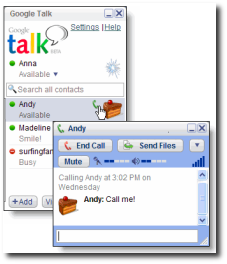
At this time, Google Talk is also available from the Gmail interface that allows you to communicate using Gchat, a simple utility included in the mail solution accessible through the web browser. This tool is quite useful because you can talk with your contacts while you're reading or sending mails. It seems like the downloadable application Google Talk can be configured to open chat windows with certain contacts directly from the desktop.

As Ionut Alex, Google blogger, posted on his blog, Google Talk can be configured with ease by writing some simple codes in the shortcut properties field. All you need to do is to right click on your desktop, select New Shortcut and type:

CODE
gtalk:chat?jid=[Gmail-Username]@gmail.com

You must replace the "username" term with your friend's ID. This command allows you to communicate via text messaging directly from the desktop. Google Talk can be also configured to call a contact using a shortcut, but you must replace the above code with the following one:

CODE
gtalk:call?jid=[Gmail-Username]@gmail.com

Remember that Google Talk must be installed, opened and you must log in. If you want even more customization, you can edit your contacts' photos and add them as the icon of the shortcut.
Read by 4,269 user(s) | Add comment | Link to this article TWEET THIS


Article rating:
Fair (2.7/5) 7 vote(s)    

Subscribe to news | Print article | Send to friend

© Copyright 2001-2009 Softpedia
Contact:


SEARCH THE NEWS ARCHIVE :


Today's News
| Yesterday's News | News Archive


MORE RELATED ARTICLES:


Google Talk Is Now Vista Compatible

Google Talk for Vista Official Changelog

Add Smileys to Your Gmail Chat

Improve Your Google Talk Experience

Tell Google How You Talk

User opinions:

No user comments yet.
Be the first to express your opinion using the form below!

Share your opinion:

Your Name:
Your Email Address:
(will not be used for commercial purposes)
Solve this to prove you're not a bot: =
Your review/opinion:


Windows tabGames tabDrivers tabMac tabLinux tabScripts tabMobile tabHandheld tabGadgets tabNews tab

SUBMIT PROGRAM   |   ADVERTISE   |   GET HELP   |   SEND US FEEDBACK   |   RSS FEEDS   |   ENTER NEWS SITE   |   ENGLISH BOARD   |   ROMANIAN FORUM