Softpedia
 

NEWS CATEGORIES:


NEWS ARCHIVE >>
SOFTPEDIA REVIEWS >>
MEET THE EDITORS >>
TRENDING TODAY
Home > News > Linux > Open Source Software

February 17th, 2011, 19:31 GMT · By

Bleeding Edge: Universal Software Installer for Ubuntu

SHARE:

Adjust text size:

Bleeding Edge 1.0.6
Enlarge picture
Bleeding Edge is a Linux script designed for the popular Ubuntu operating system, for both 32-bit and 64-bit architectures. It installs players, codecs, media players, fonts, drivers, etc. It also cleans up the system.

Bleeding Edge is a graphical software installer, an application that will make your life easier, allowing you to install the most used and popular software. From multimedia codecs and system fonts, media players and web browsers, to docks and burning software, Bleeding Edge can do them all.

So instead of staying all day long and searching through thousands of packages in Ubuntu Software Center or Synaptic, in order to make your brand new Ubuntu system exactly how you dreamed of, you can use now one application to install them all, in one single easy step.

With Bleeding Edge, you can install all the multimedia codecs, system fonts, Flash Player and Mozilla Firefox 4, and it will all take you 5 minutes and 3 mouse clicks.

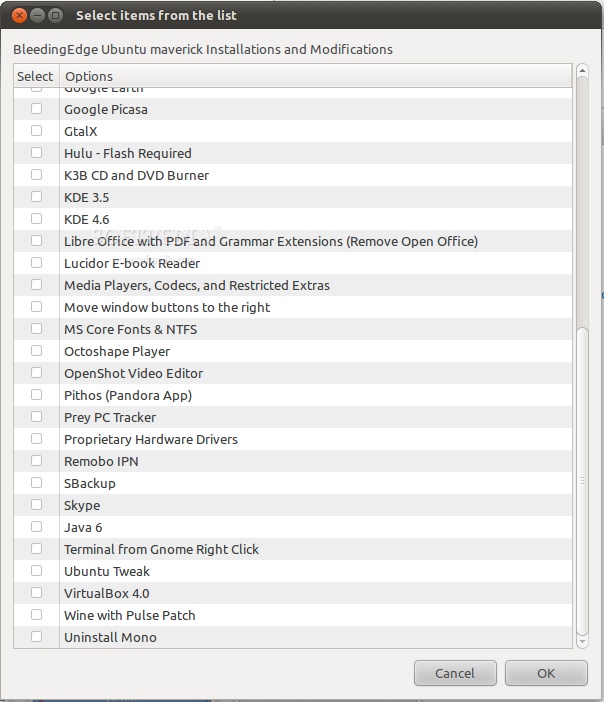
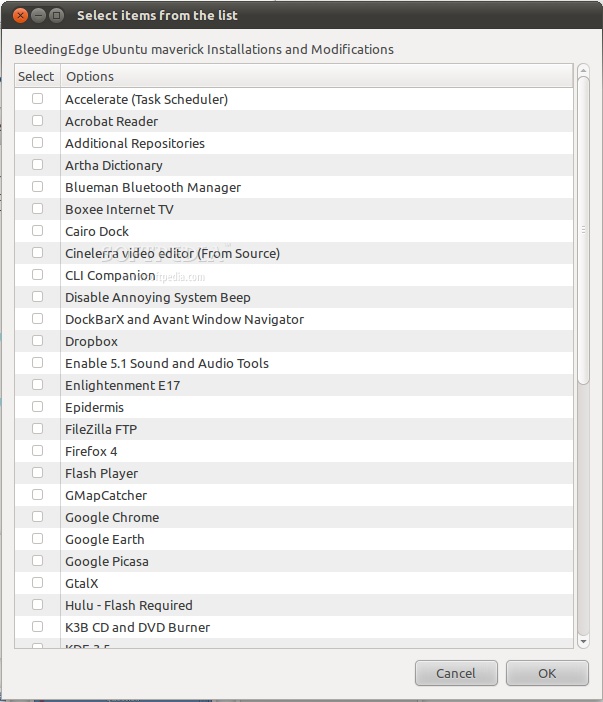
Bleeding Edge can install the following applications:

KDE 3.5;
KDE SC 4.6;
LibreOffice (with Grammar and PDF support);
Mozilla Firefox 4;
Microsoft fonts;
NTFS support;
VirtualBox 4;
Wine (with the Pulse patch);
Ubuntu Tweak;
Enlightenment E17 window manager;
Java Runtime Environment 6;
OpenShot video editor;
Skype;
SBackup;
Boxee Internet TV;
Cairo dock;
DockBarX dock;
Avant Window Navigator dock;
Adobe Acrobat Reader;
Adobe Flash Player;
Accelerate (Task Scheduler);
Artha Dictionary;
Blueman Bluetooth Manager;
Dropbox client;
Google Earth;
Google Picasa;
Cinelerra video editor;
CLI Companion;
Epidermis;
Filezilla FTP client;
GMapCatcher;
Lucidor e-book reader;
Octoshape player;
Pithos (client for Pandora);
GtalX;
Hulu;
K3B CD/DVD burning tool;
Remobo IPN;
Prey PC tracker;
Video and audio codecs.


Bleeding Edge can also install additional software repositories, disable the annoying system beep, enable 5.1 sound support, install restricted extras and media players, move the window buttons to the right, install proprietary hardware drivers, and the "Open in Terminal" extension for GNOME/Nautilus.

Moreover, Bleeding Edge can also clean your system. That means removing locales (language files), removing old kernels, removing apt cache, removing config files for unused .deb packages, and emptying the trash.

How do I install it?

We've tested Bleeding Edge on the latest version of Ubuntu, 10.10 (Maverick Meerkat). The installation process is the same for both i386 and AMD64 architectures, and requires you to download a .sh file from Softpedia (see download link at the end of the article).

When the download is over, right click the BleedingEdge1_0_6.sh file, go to Properties, select the "Permissions" tab, and check the "Allow executing file as program" option. That's it! Now you can double click the file and choose the "Run in terminal" option and follow the on-screen instructions.

It appears that (at the moment) Bleeding Edge only supports the Ubuntu 10.10 (Maverick Meerkat) operating system. We do hope that Bleeding Edge will support more Linux-based operating systems, such as Fedora or Debian, in the near future.

"I began writing BleedingEdge over a year ago to teach my students shell scripting and to help them install items such as Adobe Flash so they could use Cisco's Networking Academy curriculum."

"It is easily adaptable to other Debian distros, and with a little help could be reconfigured to work with RPM based distros." - says Paul Fedele, the developer of Bleeding Edge.

We've prepared a few screenshots of the latest version of Bleeding Edge:
Review image
Review image

Download Bleeding Edge 1.0.6 right now from Softpedia.


12,693 hits · 8 comments
Link to this article · Print article · Send to friend

MUST-READ RELATED ARTICLES:


Ubuntu Developer Week 2011: February 28th - March 4th

Ubuntu 11.04 Release Schedule Changed

Canonical Releases World’s Largest Component Catalog for Linux

How to Install Firefox 4 in Ubuntu 10.10, 10.04 and 9.10

Adobe Flash Player 10.2 Brings Better HD Playback on Linux

READER COMMENTS:


Comment #1 by: ace on 17 Feb 2011, 22:30 UTC reply to this comment

does it install a true and functional libdvdcss?


Comment #2 by: fedelep on 18 Feb 2011, 14:12 UTC reply to this comment

BleedingEdge installs libdvdcss2 (script line 877) from Medibuntu (script line 329).

The entire script is very easy to follow and you are welcome to browse it and make suggestions, fork it for other OSes, etc.

Comment #2.1 by: Fedelep on 20 Feb 2011, 15:29 GMT

Correction: Line 877 that is referred to above is actually line 887.


Comment #3 by: egrpr on 18 Feb 2011, 16:04 UTC reply to this comment

How does it interacts with the standard package management system of Ubuntu. Why if it only works with Ubuntu, it does not comes in a deb file to be install using the regular package management system of Ubuntu?

I ask this because I would not like to have two different package management systems runing at the same time in my computer, and, if one is already running, seems to me that that package management system should have been used to install this, not as a new package management system, but as a complement or extension of it.

Comment #3.1 by: fedelep on 18 Feb 2011, 22:17 GMT

Good question egrpr! BleedingEdge typically downloads using wget and installs .deb files using apt-get install. Sometimes there is no repo, just a package, in which case dpkg -i is used.

Since BleedingEdge is only a non-compiled script, it relies on various postings such as PPA or vendor packages. The repositories are located in /etc/apt/sources.list.d/ and are read by apt. Since adding many repositories to your packaging system can cause conflicts and security issues, BleedingEdge can remove them after installing the desired packages.

Sometimes, there is no .deb at all. In one case, Google Earth, BleedingEdge has to modify the .bin a bit before installation (Script lines 755-756). In another case, Cinelerra, there was not a suitable .deb available, so it is compiled from source. Even so, I haven't successfully compiled it for x64.

Since each program is unique, separate functions are responsible for installing them. Functions also prevent one section of code from interfering with another. Each section is fairly simple to follow for those who have a programming background.

The other parts of BleedingEdge are accomplished by using various facilities of other programs such as gconftool-2 or localepurge. In the end, BleedingEdge is really nothing more than a series of commands, each of which can be run individually at the terminal.


Comment #4 by: dyna on 18 Feb 2011, 17:12 UTC reply to this comment

Script installers do not necessarily make life easier. Inact a lot of them have been found to make life harder.
Use with care.


Comment #5 by: Santtu on 28 Feb 2011, 06:48 UTC reply to this comment

Any chance of a Linux Mint 10 port?
It's based on Maverick. At present the problems that occur are related to the naming (Julia instead of Maverick), so the script does not work.

Comment #5.1 by: fedelep on 02 Mar 2011, 04:00 GMT

Here is the long answer to your question...The original intent of BleedingEdge was to support the easy installation of 'bleeding edge' software that was not available in the Ubuntu repositories. When I first started writing this script, Jaunty was the most recent distro. The advent of Karmick brought some repo issues with it, so I supported both. With Lucid, three distros were supported. The older versions of the script are still on SourceForge for your review.

Each repo and ppa moves at its own pace, and more installers were being added to BleedingEdge, therefore more visits to the sites were required to remain 'bleeding edge'. Some maintainers don't have their repos timed with the releases, creating a support gap that needs to be monitored for updates.

When Maverick came along, I refocused on the original intent. The script is meant to install 'bleeding edge' software. It is supposed to be Sarge instead of Woody. Therefore, I stripped out the legacy code.

That being said, the script should be easy to port to Mint. The variable DISTROBUTION is set on line 33 and can be changed from maverick to anything else. This works fairly well for jaunty, karmick, lucid, etc. I really don't know if Mint uses the same repos and ppa's though.

Direct .deb package downloads, such as those used by Google, full compiles, or other functions of BleedingeEdge should work without modification. Searching through the script for the variable $CODENAME, a Mint user should be able to identify and change out the affected lines very quickly.

If you have any coding experience, open the script. It is non-compiled, linear, and very easy to follow. Change some lines and repost. Forks are encouraged. Send any questions through SourceForge and I will usually answer them within 24 hours.

Copyright © 2001-2013 Softpedia. Contact/Tip us at

WindowsGamesDriversMacLinuxScriptsMobileHandheldNews

SUBMIT PROGRAM   |   ADVERTISE   |   GET HELP   |   SEND US FEEDBACK   |   RSS FEEDS   |   UPDATE YOUR SOFTWARE   |   ROMANIAN FORUM