
Softpedia
 

NEWS CATEGORIES:


NEWS ARCHIVE >>
SOFTPEDIA REVIEWS >>
MEET THE EDITORS >>
Home > News > Apple > Personal Thoughts

January 11th, 2010, 13:53 GMT · By

Apple Magic Mouse Battery Tests Reveal Poor Power Management

SHARE:

Adjust text size:


Magic Mouse
Enlarge picture
Tests carried out by Softpedia have revealed that Apple’s Magic Mouse drains batteries much faster than the previous-generation point-and-click device - Mighty Mouse. It has been revealed lately that a Magic Mouse working alongside an Apple Wireless Keyboard can cause the latter to drain exceeded amounts of juice from its batteries. However, our tests have shown that the Magic Mouse too is a vampire that likes to suck its own blood.

The all-new Magic Mouse, introduced by Apple late last year, doesn’t just impress from a design (hardware) point of view, but also from a software perspective. As noted in our extensive review of the peripheral, Magic Mouse comes with a series of pref. pane enhancements that allow the user to customize the way it behaves and works for them. With the release of Mac OS X 10.6.2 - the second incremental update to its Snow Leopard operating system - Apple included all the necessary additions for compatibility with the peripheral it was yet to introduce. When Magic Mouse was out, early adopters could spot quite a few changes with the Mouse section in the Mac OS X System Preferences.

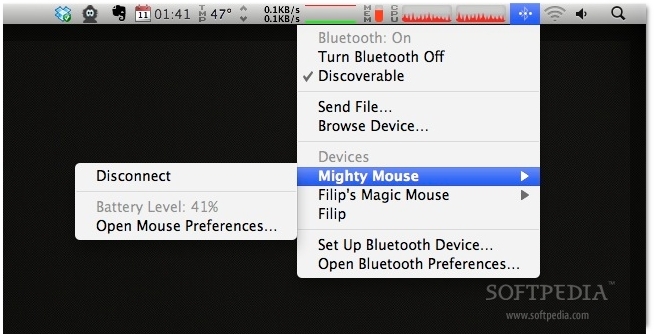
Besides allowing the customer to adjust the magic-ness, the preferences for Magic Mouse include a video preview of each function as the user hovers over it with the cursor, as well as better-defined controls to adjust tracking, scrolling and double-click speed. In the Mac OS X menubar Bluetooth menu, the device is listed by its name. By selecting it, you can go straight to the Mouse prefs, see the current battery level, or disconnect the device altogether.

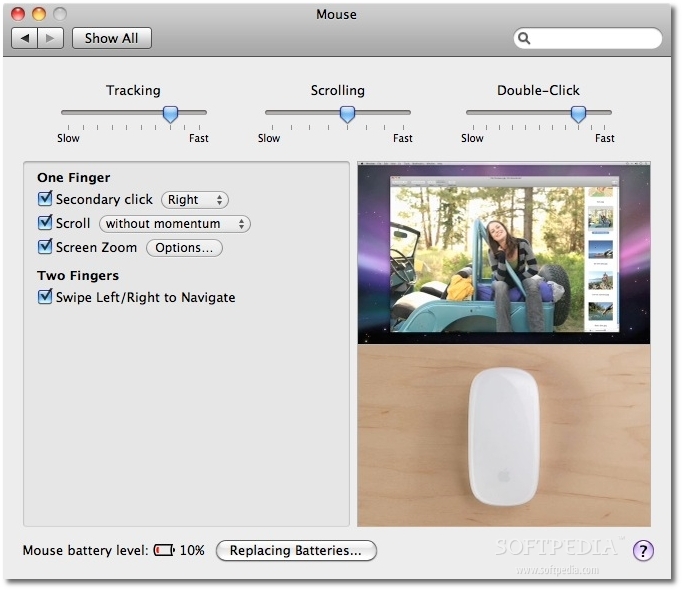
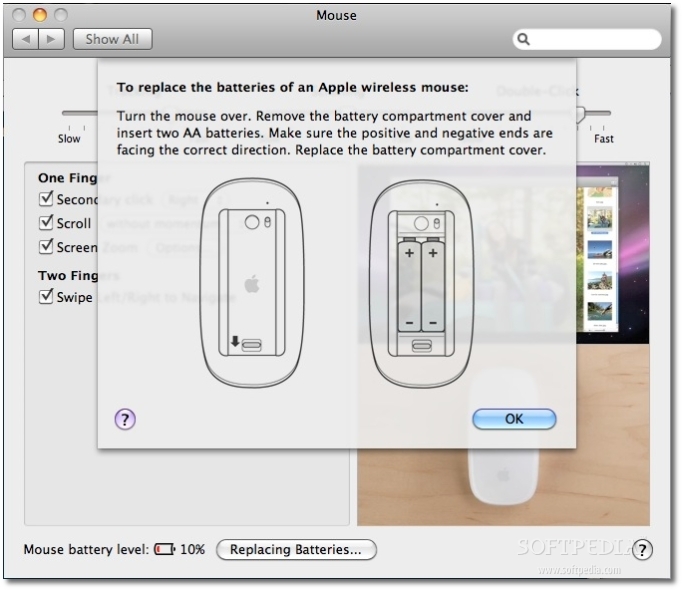
Back to the Mouse prefs., the bottom-left corner of the window also shows you the battery level - a feature that isn’t new to the Mac OS X Mouse prefs. When down to what Apple calls a “critically low” level, a new control appears: “Replacing Batteries...” When the user hits the button, a drop-down menu appears with instructions on how to replace the batteries, complete with imagery.
Review image Review image

Magic Mouse pref. pane screens.
#1 - options, battery level warning (10% level);
#2 - included drop-down guide for replacing the wireless mouse batteries (applies to both the Magic Mouse, and the old Mighty Mouse).

Inevitably, one day I needed to replace the batteries on the Magic Mouse. So, I got two new ones and placed them in. With the help of the built-in battery replacement guide (not really), I was good to go in less than a minute.

For one reason or another, I didn't throw away the old batteries employed by my Magic Mouse, and decided to put them in the Mighty Mouse I used to work with before the magic one came to the scene. What began as a childish curiosity turned into a very interesting find - the two batteries that my Magic Mouse considered completely drained were actually only half dead, as far as Mighty Mouse could sense. A good two hours into using the Mighty Mouse with the old batteries from the Magic Mouse, I was still seeing strong vital signs - the battery life was at 41%.
Review image

The two AA batteries removed from my Magic Mouse after being declared empty by Mac OS X are actually half way into the garbage can. The Mighty Mouse is still able to get a few more days (if not more) of work out of these babies.

Admittedly, this is not thorough benchmarking. I did do a couple more similar tests with pretty much the same results, so it would seem the "magic" nature of Apple’s new rodent comes at a price - battery life. These tests, however, cannot confirm this.

As it generally occurs, new products (especially peripherals) need one or two firmware updates before the hardware is compatible with other hardware. This may well be the case with the Apple Magic Mouse.

A recent TUAW report points out to a group of Apple Discussions users who are very disappointed with the battery life on their Bluetooth keyboards whose batteries started being devoured ever since they began to use a Magic Mouse. “Despite switching to rechargeable batteries and running all pertinent updates, the problem persists,” the unofficial Apple weblog outlines, adding that most of the posters claim to be changing their keyboards’ batteries on a weekly basis. One participant to the discussion even claims to have had a chat with Apple’s tech guys, who allegedly informed him that a firmware fix was on the way. It remains to be seen whether the firmware update (if even in development) will also make the Magic Mouse less power hungry.

On all other levels, the Apple Magic Mouse is very appreciated among Softpedia readers. Most of those having used the device for a while now claim they’ve never employed a better mouse in their lives. With the exception of the seemingly widespread battery issues caused by the device (which are sure to be fixed soon enough), Apple’s Magic Mouse remains a winner in our book.

As usual, readers are highly encouraged to share their own experience.

TELL US WHAT YOU THINK:

24,879 hits · 21 comments · Link to this article · Print article · Send to friend · Subscribe to news

MUST-READ RELATED ARTICLES:


Introducing a Server Mac mini Was a Smart Move, NPD Analyst Says

Apple Settles on Aluminum Enclosure for Tablet PC, Sources Say

Next-Gen iPhone, OS 4.0 Talk Intensifies

Multi-Touch iWork, Complex Gestures for Apple’s Tablet (Rumor)

Apple Reminds iPhone Devs to Use Keywords

READER COMMENTS:


Comment #1 by: Jack on 11 Jan 2010, 20:33 UTC reply to this comment

I love the Magic Mouse. It's a brilliant piece of kit which reflects Apple's addiction to perfection. But I have to change the batteries every two weeks (although I do use the computer a lot).

I'm just shocked that we still have to be so "old-fashioned" to still have to use AA batteries. I would've thought Apple would fix this problem and provide an even higher customer satisfaction rating by taking a page out of the iPod manufacturer's book. Why can't they implement an internal, rechargeable battery with a charging docking station or cable?

It just seems, so, un-Apple....


Comment #2 by: Tim Megaw on 20 Jan 2010, 14:52 UTC reply to this comment

The battery drain is frustrating, but further to your discovery that the batteries are only "half dead", I am finding that one is dead, and the other is still fully charged! Go figure!


Comment #3 by: Jeff Reisberg on 02 Mar 2010, 17:19 UTC reply to this comment

I can confirm this is true. My own testing shows NiMH batteries have at least 600mAH left in them when the magic mouse hits the low power cutoff. That means the mouse is using only 75% of the AA's capacity. Also when I insert a fully charged NiMH battery it reads only about 70% charged. The mouse it seems was designed to run on Alkaline batteries.

Apple, you need to put in the mouse control panel an option to select what chemistry battery is in your mouse. I'm sick of swapping the batteries every week.

--Jeff

Comment #3.1 by: garion on 14 Sep 2010, 23:19 GMT

Yep. This is exactly my frustrating experience. I use my computer a lot, every day tho.

One rechargealbe battery still has energy in it. It drains the rechargeable batteries in a number of days. The batteries that came with mouse were dead in 2 weeks.

My friend told me of how they have mice that sets in a rechargeable unit when not in use. That would be a good idea here.


Comment #4 by: Rizky Syazuli on 13 May 2010, 13:07 UTC reply to this comment

confirmed as well.

ordinary Energizer batteries only survived for a week in my case. even after i switched to the Energizer Ultimate battery (which claims to last 7 times longer than normal Energizers), it only lasted for a month. and weird thing is, the power decrease happens almost immediately. after being stable at 100% for almost a month, suddenly it went down to 20% in a day...

apple really need to resolve this issue as soon as possible. having to buy batteries every week or so is not really convenient for anyone...


Comment #5 by: JackHat on 18 Oct 2010, 12:11 UTC reply to this comment

Can someone tell me why Apple, who invented the mouse, cannot build a good one? This latest iteration of the mouse keeps misinterpreting my finger gestures and moving me forward or backward to another page when I don't want it to -- but when I want to go forward/back it balks. Very frustrating. And it tires my hand very quickly.

Comment #5.1 by: Filip Truta on 18 Oct 2010, 13:26 GMT

@JackHat

While I can't help you with the hand strain (basically it's a matter of which mouse fits your hand best), I am happy to let you in on a little secret:

You can disable the function telling your mouse to move forward and backwards in a web browsing session by accessing System Preferences -> Mouse.

Once there, just untick the option that says "swipe left/right to navigate."

I can imagine you'd rather have the function enabled and working only when you want it to, but this is the best I can think of to improve your experience.

(Off the record) I own a Magic Mouse as well, and I must say I'm very happy with its performance. Admittedly, I sometimes miss a right click or two, but since I don't play games on my Mac, it's rarely a serious issue for me.

All in all, I suggest you give the little rodent a second chance ;)


Comment #6 by: Kenozz on 19 Jan 2011, 18:34 UTC reply to this comment

My experience of the Magic Mouse is that on my new mac with supplied batteries they lasted 3 weeks, in his time I had purchased the Apple charger, with the rechargeable batteries in place my mouse is only showing 50% left after 3 days use, seems I will be changing batteries every week, in contrast my keyboard is still showing 100% on the original batteries (Strange)

Comment #6.1 by: RHH on 16 Feb 2011, 03:47 GMT

Remember that NiMH (nickel metal hydride) batteries operate at only 1.2v while alkalines operate at 1.5v. The mouse assumes that everyone is using alkalines, so when you drop NiMH's in, it will think that they are almost empty! That should be an easy software fix on Apple's part. As stated above, let you select the battery chemistry and base the power remaining on that.


Comment #7 by: Pavlo on 09 Feb 2011, 22:41 UTC reply to this comment

I bought a new 27" iMac and opted to have it delivered with a mouse that doesn't require batteries. I find almost nothing more annoying than having to remove batteries every week or two to recharge them. Using AA batteries - it's archaic. So 90's. I already have enough devices in my life that need recharging (phones, cameras, recording devices, torches). The difference is, with those devices I don't have to actually remove the batteries from the device. This part of Apple's technology is very poorly thought out and executed. Don't need it. Don't want it.


Comment #8 by: teck on 26 Feb 2011, 23:12 UTC reply to this comment

Just receieved my magic mouse yesterday, first set of batteries lasted 4 hrs, second set 5 hrs. Needless to say I'm returning for refund and going back to my reliable microsoft wireless mouse.


Comment #9 by: Perry on 04 Mar 2011, 18:10 UTC reply to this comment

Well, I think in comparison I've been doing pretty good. I find I can get a couple months using Energizer batteries. However, I noticed something the other day. I've begun turning off my mouse using the switch on the bottom nightly. I check the battery meter before I do this and to my surprise when I turn it back on the next day (or even a few minutes later), the battery levels jump up by about 10-20%.


Comment #10 by: Perry on 04 Mar 2011, 18:11 UTC reply to this comment

Turning the mouse off when not in use not only saves battery life, but it tends to give you a 10%-20% bump when you turn it back on!


Comment #11 by: Duende on 30 Mar 2011, 19:44 UTC reply to this comment

Well, I just bought iMac 27 about 2 weeks ago and the mouse battery's life descended from 100 to 70 to 68 to 60 to 53 and miraculously registered 87 today. I noticed however a slower response to my clicks.

Comment #11.1 by: HD Boy on 17 Aug 2011, 18:33 GMT

I installed a pair of Energizer Advanced (lithium) batteries in a new Magic Mouse on May 27. It is now August 17, and my Mac just broadcast a Low Battery (8%) warning this morning. That's nearly 12 weeks of use. I'm thinking of trying rechargeable Energizer lithiums.

I do love Apple's Magic Mouse, though I read one unverified report in early August that a replacement SKU number was entered into some store database somewhere. If Apple updates this product, it could be to add more gesture customizations (software), a battery compartment fix (if the fit-and-finish tolerances need adjustment to accept all battery brands), or to switch to sealed batteries and an inductive charging pad.


Comment #12 by: Peter on 30 Sep 2011, 20:00 UTC reply to this comment

My new magic mouse overheats and is quite hot to touch sometimes. It also discharges in about two weeks. I often have to re boot the computer. Pleas advise.


Comment #13 by: katie on 07 Oct 2011, 14:38 UTC reply to this comment

It's irritating that I have to change batteries every month! I've had my IMac since August and I'm going on my third set of batteries. Any secrets???? I use my computer a lot.


Comment #14 by: katie on 07 Oct 2011, 14:39 UTC reply to this comment

I'm going on my 3rd set of batteries for my moue. It's a little irritating. I bought my IMac mid-August. We do use the Mac a lot tho. Any secrets?

Comment #14.1 by: Pete on 17 Oct 2011, 18:57 GMT

My batteries last between two and three days. I have used the best cells which makes it no difference. Sometimes I have to take them out as the mouse becomes too hot.
I am going to take to a shop and I want a replacement.


Comment #15 by: RawEffect on 03 Jan 2012, 18:32 UTC reply to this comment

So here we are, two years into it, and has anything happened to fix this issue? I picked one of these up just a couple of months ago and have set it aside to use a wired mouse instead. Replacing batteries every couple of days is just not right... then doing some research to find that my issue has been a known issue for years is upsetting.


Comment #16 by: Macbernie on 21 Jan 2012, 01:16 UTC reply to this comment

My magic mouse works OK, but the batteries do not last. I am running Lion, which is another story, but at least I can say my keyboard battery life is good. I would have to give magic mouse a solid 1 out of 10 for design and durability.

Copyright © 2001-2012 Softpedia. Contact/Tip us at

WindowsGamesDriversMacLinuxScriptsMobileHandheldNews

SUBMIT PROGRAM   |   ADVERTISE   |   GET HELP   |   SEND US FEEDBACK   |   RSS FEEDS   |   UPDATE YOUR SOFTWARE   |   ROMANIAN FORUM