
Softpedia
 

NEWS CATEGORIES:


NEWS ARCHIVE >>
SOFTPEDIA REVIEWS >>
MEET THE EDITORS >>
TRENDING TODAY
Home > News > Apple > Apple & Mac Blog

November 30th, 2012, 11:01 GMT · By

BLOG

iTunes 11 Features: Play Purchases from iCloud

SHARE:

Adjust text size:


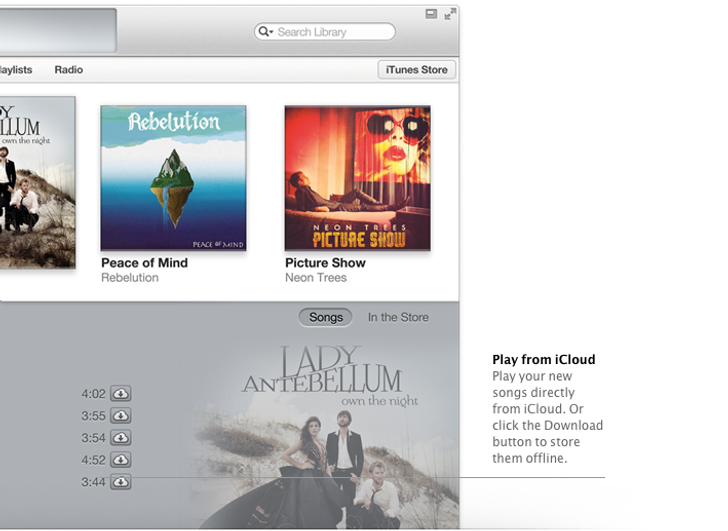
iTunes 11 iCloud features Enlarge picture - iTunes 11 iCloud features
Users of the new iTunes 11 who also happen to own an iCloud account will be able to see all their stuff in the iTunes library, even if the content was never stored on the computer to begin with.

A customer’s music, movie, and TV show purchases in iCloud now appear inside the iTunes 11 library. Which means you can just sign in with your Apple ID and gain instant access to everything.

You can either double-click the song / movie to play it directly from iCloud, or download a copy that you can then sync to a device or play offline (as shown in the image above, courtesy of the Cupertino giant).

This is just one of the many features inside iTunes 11, available as a free download for Mac and Windows (links below).

Download iTunes 11 for Mac

Download iTunes 11 for Windows

TELL US WHAT YOU THINK:

1,238 hits · Link to this article · Print article · Send to friend · Subscribe to news

MUST-READ RELATED ARTICLES:


iMac (Late-2012) Unboxing, Teardown – Video, Photos

Apple Releases New iOS ATV Update with iTunes “Up Next” Support

iTunes 11 Features: Redeem Cards with Your Mac’s Camera

Apple Launches Unlocked iPhone 5

iPad mini – Apple’s Best iPad Yet

READER COMMENTS:


No user comments yet.
Be the first to express your opinion!
Copyright © 2001-2013 Softpedia. Contact/Tip us at

WindowsGamesDriversMacLinuxScriptsMobileHandheldNews

SUBMIT PROGRAM   |   ADVERTISE   |   GET HELP   |   SEND US FEEDBACK   |   RSS FEEDS   |   UPDATE YOUR SOFTWARE   |   ROMANIAN FORUM