
Softpedia
 

NEWS CATEGORIES:


NEWS ARCHIVE >>
SOFTPEDIA REVIEWS >>
MEET THE EDITORS >>
TRENDING TODAY
Home > News > Apple > Apple & Mac Blog

November 30th, 2012, 11:31 GMT · By

BLOG

iTunes 11 Features: New MiniPlayer

SHARE:

Adjust text size:


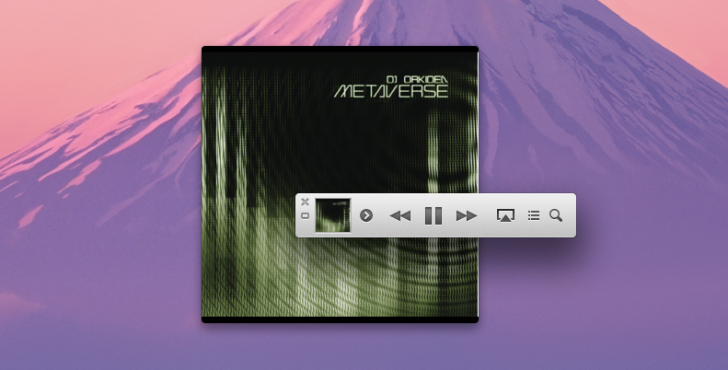
iTunes 11 MiniPlayer screenshot Enlarge picture - iTunes 11 MiniPlayer screenshot
Apple has squeezed a truckload of features into a diminutive MiniPlayer inside iTunes 11 which enables users to see which songs are playing next, album art, a search field, new store options, and more.

Cupertino says with the new MiniPlayer in iTunes 11 “you can now do a whole lot more with a lot less space.”

The concise UI shows what's playing, artwork, Up Next, easy search, and a drop-down menu to check out the rest of the songs in the album that’s currently playing.

“If what you see isn’t what you’re in the mood for, you can search your collection and choose a different song — without having to open your library,” says the Mac maker.

A handy button to the far left offers even more options, such as Play Next, Add to Up Next, Add To…, several Go-to commands, and the ability to show the respective album on the iTunes Store for matching.

TELL US WHAT YOU THINK:

1,565 hits · 3 comments · Link to this article · Print article · Send to friend · Subscribe to news

MUST-READ RELATED ARTICLES:


iMac (Late-2012) Unboxing, Teardown – Video, Photos

Apple Releases New iOS ATV Update with iTunes “Up Next” Support

iTunes 11 Features: Redeem Cards with Your Mac’s Camera

Apple Launches Unlocked iPhone 5

iPad mini – Apple’s Best iPad Yet

READER COMMENTS:


Comment #1 by: Clipper on 30 Nov 2012, 15:57 UTC reply to this comment

Apple omitted one of the most important features that I need - a means of assigning a RATING value in the mini-player. Not to mention that iTunes has become a bloated pig - the significant shortcomings of iTunes was one of the primary reasons I abandoned Apple hardware and sold my iMac, because I spent more time staring at a spinning circle and hearing nothing versus enjoying my music.

Comment #1.1 by: Filip Truta on 30 Nov 2012, 16:14 GMT

Yes there is a rating counter in the Mini Player. Just click the arrow button on the left (to the right of the album art) and the drop down menu will display the star symbols at the top of its window. Hover with your mouse over it to summon the stars.


Comment #2 by: Lady-M on 30 Nov 2012, 16:51 UTC reply to this comment

Is there any way to enlarge the mini-player? I liked the former feature of having the album/artwork fill my screen. The mini-player in this version, well, I simply cannot see it- especially if I need to see the time, battery power remaining, etc. Quite frankly, with their latest updates (to apps, games, etc.) Apple should leave well enough alone. Thank you.

Copyright © 2001-2013 Softpedia. Contact/Tip us at

WindowsGamesDriversMacLinuxScriptsMobileHandheldNews

SUBMIT PROGRAM   |   ADVERTISE   |   GET HELP   |   SEND US FEEDBACK   |   RSS FEEDS   |   UPDATE YOUR SOFTWARE   |   ROMANIAN FORUM