
Softpedia
 

NEWS CATEGORIES:


NEWS ARCHIVE >>
SOFTPEDIA REVIEWS >>
MEET THE EDITORS >>
Home > News > Apple > Iworld > iPod

November 13th, 2008, 09:07 GMT · By

iPod nano 4G Software Update 1.0.3 Available

SHARE:

Adjust text size:


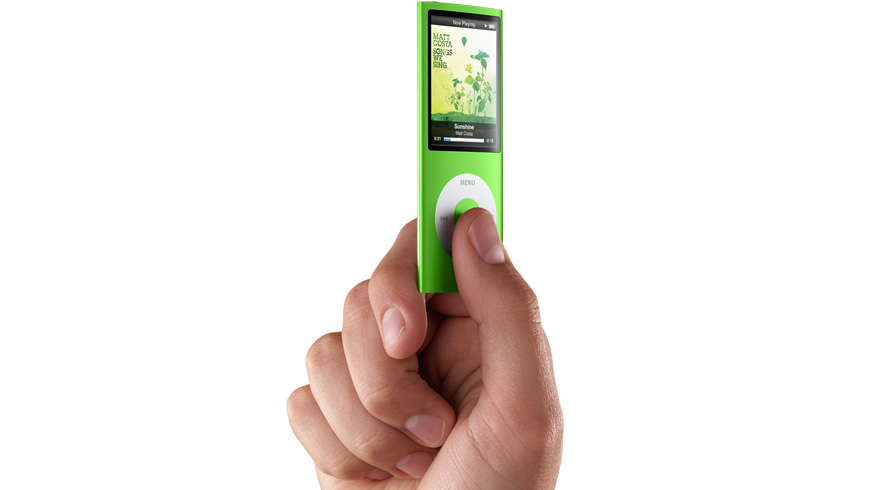
The fourth generation iPod nano
Enlarge picture
Apple has released a new software version for its latest-released iPod, the fourth-gen nano. According to iPod owners, the release notes just say "Bug Fixes," mentioning no details about the update. However, Apple Discussions users promptly posted their findings, revealing that the iPod nano 4G Software Update 1.0.3 included a truckload of changes.

“I am completely thrilled about the calendar word wrap issue being resolved,” Valentia said. “As for photos, I was showing thumbnails, but no full-size pix. I'm a manual sync-er and don't resync photos unless I want other than my usual 4 pix I keep on there. I did manually resync, and then the full-size pix were fine again. (If you sync automatically, you may not even realize there was a prob.)”

Changi1113 could confirm that the new software fixed a syncing issue with equalizer presets. “I updated my nano 3rd gen to 1.0.3, and then set an eq preset on some songs. I was able to sync afterwards, which I could not do with 1.0.2, so that problem seems to be fixed,” Changi1113 wrote.

Discussions poster Heather was able to confirm “a few things that are NOT fixed.” As she puts it, “The Nano still ignores the Start Time setting on podcasts in the Options tab, and starts a podcast at the beginning, even if the Start Time is set to a value greater than 0.” The fact that her 4G nano still wouldn't play “converted audiobooks (m4b files) at the faster or slower rate” was also noted as a minus by the user.

Andrew White4 chimed in providing an extensive list of noticeable changes. According to the user, these comprise

"a) Restart includes a progress bar

b) Disconnecting includes a progress bar

c) Contacts now include full notes !! (this is a big plus: they were completely absent before)

d) Photos were re-optimized and re-loaded/synced

e) The quirky behavior of Calendar sometimes displayed and often not displayed, and same for Notes (sometimes list of Notes is displayed, often list is a blank screen) continues with no change."

Other forum posters revealed that Apple included the "speakers" option, when one connected the iPod to speakers. “...you can now adjust the tone for playing through a speaker- and have the backlight remain on while it is playing so you can see what you are listening to!” said Adamgorn. “The world clock has also been amended to take into account daylight savings ending in the northern hemisphere,” according to the author of the post.

How about you? Have you found any other changes after updating your nano's firmware?

TELL US WHAT YOU THINK:

14,150 hits · 5 comments · Link to this article · Print article · Send to friend · Subscribe to news

MUST-READ RELATED ARTICLES:


Indonesia Apple Store Up and Running

Freeware App Extracts iPhone Backups for Viewing on Your Mac

Thai, Vietnam and Philippines Apple Stores Online

Papermaster Erased from Apple's Bio Site

Malaysia Online Apple Store Debuts

READER COMMENTS:


Comment #1 by: Dan on 13 Nov 2008, 14:34 UTC reply to this comment

This update has made my day as they have finally added an option to disable the coverflow feature. This was a horrible addition in the 4th generation as it drained your battery about 5 times faster and made it almost impossible to change volume while it was in your pocket.


Comment #2 by: Brinkman on 22 Nov 2008, 16:38 UTC reply to this comment

You can also now turn off the "tilt for cover flow" feature.


Comment #3 by: Tito on 30 Nov 2008, 02:24 UTC reply to this comment

YES!!!! The COVER FLOW OPTION CAN NOW BE DISABLED!!! YESSSSSSSSSSSSSSSSSSSSSS!!! BEST UPDATE EVER!


Comment #4 by: CHow CHow on 09 May 2009, 10:44 UTC reply to this comment

how to sync notes? respond asap...


Comment #5 by: Susan Edwards on 10 Jul 2009, 02:09 UTC reply to this comment

I just purchased an Ipod Nano (4th Generation). I uploaded the new versionof ITunes. The version of software I have for my Ipod is 1.0.2 for Windows. I have tried multiple times to get the update for 1.0.3 but with no luck. I am using dial up (still ...) and AOL cuts out typically before the download is complete.

I want to try to download the 1.0.3 update elsewhere (somewhere with a non-dial up connection) and save the file and then load it on my computer later.

The trouble is I have had no luck locating the actual update. I did check out the Apple updates and the Ipod updates. Perhaps I am simply missing it.

If somone oould please let me know where the update actually is from either the Apple or Ipod prompts I would appreciate it.

I recognize that ITunes provides two options - i.e., download and download and install. I have tried both and both were unsuccessful due to AOL timing out. I tried the download only option to see if I could figure out where the file would be saved - i.e., a sort of test run for when I tried to locate the file at another computer - but the download started without asking me where I wanted the file to be saved. I'm concerned if that happens when i'm using another computer I won't be able to retrieve the file.

Constructive suggestions would be appreciated.

Kind regards,

Susan

Copyright © 2001-2012 Softpedia. Contact/Tip us at

WindowsGamesDriversMacLinuxScriptsMobileHandheldNews

SUBMIT PROGRAM   |   ADVERTISE   |   GET HELP   |   SEND US FEEDBACK   |   RSS FEEDS   |   UPDATE YOUR SOFTWARE   |   ROMANIAN FORUM