 14 DAY TRIAL //
 Developer Vais Salikhov acknowledges that Apple's "less is more" philosophy often leaves gaps in the company’s products that are intended to be filled by third-party applications. This is how his Find In Page bookmarklet for iPhone came about.
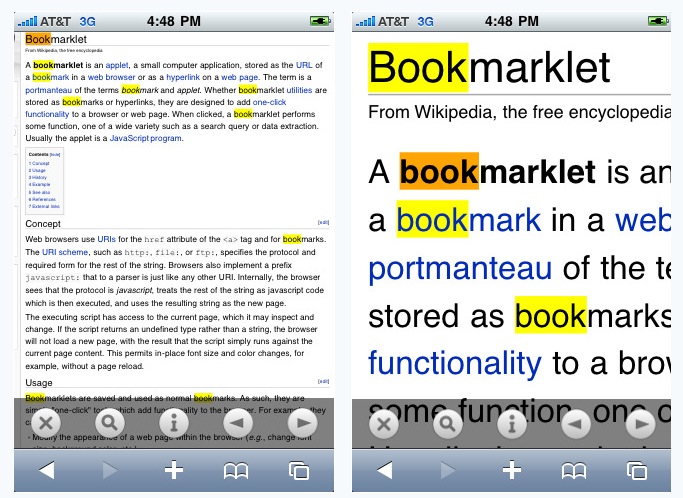
Salikhov says, “Very few people know that even Apple's own Safari browser that comes pre-installed on the iPhone can be augmented with new, unexpected features and functionality. My new plugin for the iPhone and iPod Safari browser is designed to compensate for the missing in-page search feature in mobile Safari by docking a slick semi-transparent toolbar at the bottom of the Safari window with buttons to find text in page and step through search results (just like you can on your regular OS X Safari).”
Appropriately called “Find In Page,” Salikhov’s app has been approved by Apple and can now be downloaded from the App Store for just $0.99. Vais plans on offering a free / lite version next week (February 15th).
Making sure everyone understands what Find In Page does and how it works, Salikhov explains that, “Find In Page is a bookmarklet that adds the missing page search feature to the Web browser on your device. Page search is one of the most important productivity tools for doing research on the Web.”
“For example, it significantly reduces the amount of time required to review search engine results – instead of scanning and reading each page for relevance, you can use Find In Page to look for relevant keywords, saving time and frustration. Ability to search for text in long Web pages and text files online is simply awesome,” Salikhov believes. “I cannot do without it, so I created Find In Page because I got tired of waiting for this feature to be added to the browser,” he pledges. Videos on how to install and use Find in Page can be found here.