 14 DAY TRIAL //
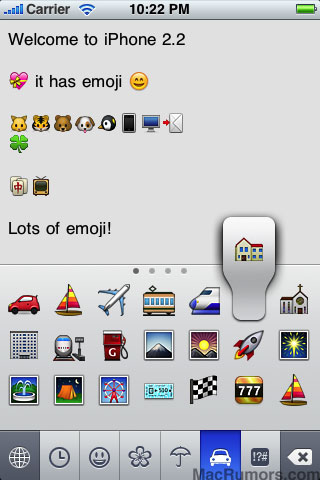
 Last month, it was confirmed that an iPhone 2.2 beta build had been handed to a select number of iPhone developers for testing. Two weeks into the release of Apple's first pre-release build of the new iPhone OS, some hidden features have emerged, Japanese emoji icons (461 emoji characters), Google Street View, and the ability to disable the iPhone's auto-correction.
The iPhone OS 2.2 beta build was accompanied by a new SDK version as well. While the builds were labeled “compatibility testing,” they provided no indication as to what they included. However, MacRumors was recently able to confirm that new features have made their way into the latest iPhone OS version. However, bear in mind that these are just the latest findings and that more features are likely to be disclosed, as testers acknowledge them.
Support for Japanese emoji icons. This is said to be a very popular feature for Japanese phones. In fact, part of the reason Apple's iPhone saw very little adoption in Japan was the lack of emoji support, analysts say.
"The iPhone is a difficult phone to use for the Japanese market because there are so many features it doesn't have," says Eimei Yokota, an analyst with MM Research. He added that a lacking feature as small as this can be quite a deficiency in the iPhone. Emoji clip art that can be inserted in sentences to let a person express more using less characters is a “must-have” for the iPhone in Japan.
Next up, support for Google Street View. Naturally, we're talking about the Google Maps application. Street View is a hefty feature that allows one to view panoramic street level photographs within the Google Maps application. However, as of now, it is available only for select cities on the globe. Recently showcased on Google's Android, the new addition promises to deliver a breathtaking experience.
The third “hidden” feature found in Apple's latest iPhone software is the ability to disable the iPhone's auto correction. Users have long complained about having their hands tied when the iPhone constantly offered suggestions while typing, something you don't necessarily need when, say, you like playing around with words.
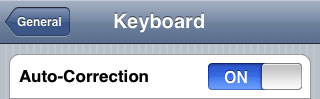 iPhone's auto-correction - disable option
Credits: MacRumors
iPhone's auto-correction - disable option
Credits: MacRumors