
Softpedia
 

NEWS CATEGORIES:


NEWS ARCHIVE >>
SOFTPEDIA REVIEWS >>
MEET THE EDITORS >>
TRENDING TODAY
Home > News > Security > Security Fixes and Improvements

December 18th, 2007, 10:40 GMT · By

ZoneAlarm Now Deploys Browser Toolbar

SHARE:

Adjust text size:

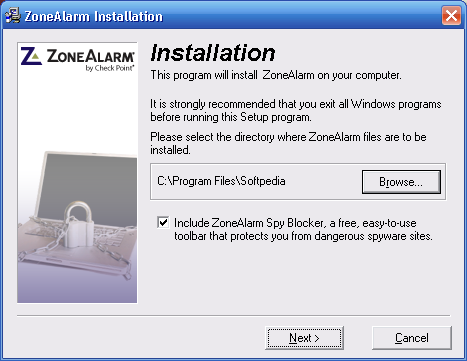
The prechecked option included in the setup file
Enlarge picture
In case you're not one of those tech-savvy users, you probably leave most options included in the programs' installation files unchanged, because
the 'developer often knows what's better for you'. But, what if you're asked to install additional programs such as browser toolbars that come with many other functions than the ones mentioned in the setup?

This is what seems to happen with ZoneAlarm, the famous security solution which now comes with a prechecked toolbar, called ZoneAlarm Spy Blocker. Although you may be tempted to believe this is only a security add-on for your browser, it isn't. It is actually the Ask search toolbar that allows you to search the web using the well-known search engine. Sure, it also includes the Spy Blocker, but do you think it's fair to install such toolbars on users' computers? And keep in mind that the option is prechecked, so many consumers will avoid changing it...

The new Spy Blocker toolbar caused difficulties for some ZoneAlarm users, who were shocked to see the Ask.com toolbar installed on their computer. For example, a post on the ZA forum published by 'NeedingHelp' reads: "I updated my ZoneAlarm Free to the current version 7.0.462.000 today. For the first time, I noticed it gave me the option to download the free Spy Blocker which I opted to do. Upon opening my browser I see that the Spy Blocker is there, but it also now lists 'search web' next to it, which is actually Ask.com. I didn't ask for this. Did I ok that in the licensing agreement (or whatever I agreed to)??. I trust ZoneAlarm not to do anything malicious so honestly, I didn't read it."

The answer came pretty fast from GeorgeV, a Guru member of the ZA forums. "Sorry, No! You get both the spysite blocker and search toolbar wrapped into one. You can't pick and choose its one install only. But it is optional and can be uninstalled if you don't want another toolbar in your browser and you can use ZAFree 7.0.462.000 without the Spy Blocker/Ask.com feature", he wrote.

It seems like the browser toolbar is included only in version 7.0.462.000, so in case you're using one of the previous releases, there's no Spy Blocker for you...


12,938 hits · 7 comments
Link to this article · Print article · Send to friend

MUST-READ RELATED ARTICLES:


ZoneAlarm Anti-Spyware FREE for Download! Today ONLY!

ZoneAlarm Must Be Updated Now!

Zone Alarm Programs Insecure

Kaspersky Scores Big

How to Remain Secure on Cyber Monday

READER COMMENTS:


Comment #1 by: Richard on 03 Jul 2010, 06:28 UTC reply to this comment

In July 2010 ZoneAlarm offered a free update, version 9.2.057.000 - this does not give you any visible option during installation. It installs a ZoneAlarm browser toolbar related to Conduit.com without asking.

Conduit.com seems to be a way of letting anyone develop an App browser button, with tracking.

In the browser you can turn the ZoneAlarm toolbar off. It's very annoying that it installs it without prior warning.


Comment #2 by: sgiff on 21 Aug 2011, 11:23 UTC reply to this comment

Listen ZA guys this is malware any way you cut it because when I tried to set my search pref back to the real google search it maliciously set it back to Ask.com i had no idea what was causing it and it caused me a lot of headache until I found out it was the freakin ZA toolbar which doesn't mention anything about it controlling my searches or collecting data so it is very malicious and shame on ZA for installing spyware and creating a headache for anyone who uses it. You should be ashamed of yourselves.

Comment #2.1 by: Lee Lee on 10 Aug 2012, 03:45 GMT

ZA claims that if you do a custom install you can uncheck the Search Bar option but it is not true. I unchecked it, Search appeared although it wasn't listed in Add Remove. Reinstalled same thing. ZA was a great firewall, but they seemed to have fallen in with the others and are forcing their search bar. Too bad. Twice tried to download their paid version AnitSpyware even with their Tech Support (all Antivirus Programs had previously been uninstalled on computer) still --- no dice----even with Tech Supp. it wouldn't install. They credited my acct. Kinda sorry I wrote a nice review, they requested, when they were trying to get CNET to try it and rate it. Oh, well another bites the dust.


Comment #3 by: Bassoneman on 20 Nov 2011, 16:38 UTC reply to this comment

I just installed the same freaking thing.. They are some companies you should be able to trust. A firewall company should be one of them.. Here is to them going by the way on Netflix


Comment #4 by: Steve on 27 Mar 2012, 14:43 UTC reply to this comment

A good rule of thumb is to never install a toolbar. I haven't seen one yet that's designed to help me instead of the developer.

Comment #4.1 by: Lee Lee on 10 Aug 2012, 03:47 GMT

This toolbar is not installed by choice. The boxes are UNCHECKED. If forces the install. It doesn't show the Tool Bar on Add & Remove. it is a sneaky way to get their ZA toolbar on your system. Nice touch, huh?


Comment #5 by: JonC on 19 Sep 2012, 23:08 UTC reply to this comment

Sept. 17, 2012 I downloaded the ZoneAlarm firewall in advanced mode and unchecked the boxes for toolbar. It downloaded their toolbar wchich is ask.com. I uninstalled it ZoneAlarm and I STILL have toolbar. It behaves like a virus. What sneaks they are.

Copyright © 2001-2013 Softpedia. Contact/Tip us at

WindowsGamesDriversMacLinuxScriptsMobileHandheldNews

SUBMIT PROGRAM   |   ADVERTISE   |   GET HELP   |   SEND US FEEDBACK   |   RSS FEEDS   |   UPDATE YOUR SOFTWARE   |   ROMANIAN FORUM