 14 DAY TRIAL //
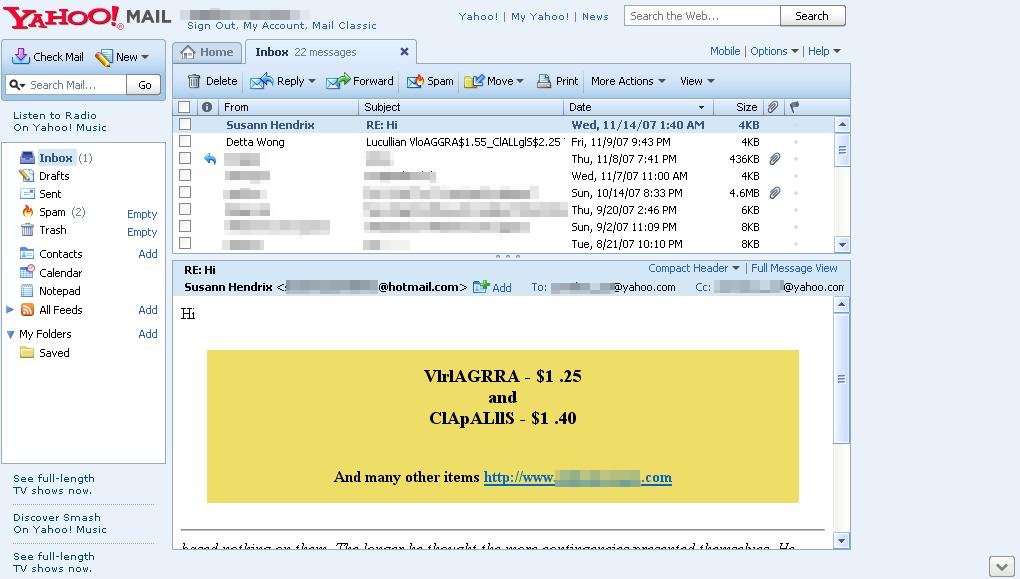
 It was said that the new Yahoo Mail comes with improved security features, better anti-spam filters and several other utilities which are supposed to make the email communication safer than any time before. I even believed that... until today, when several spam messages invaded my inbox, trying to convince me to buy some? Viagra! I don't have a clue how they managed to reach my inbox because all the unsolicited traffic was redirected until now to the special Spam folder included in the new Yahoo Mail.
As you can see in the adjacent picture, both spam messages which reached the inbox come from Hotmail accounts, the emails being sent to numerous recipients at the same time. It looks like the spammer used a list of email addresses, but I wonder why is my email included in it since I avoid publishing it on public websites or other services.
A similar spam attack affected Gmail some time ago when numerous unsolicited messages sent straight from other Gmail accounts reached my inbox without being redirected to the special Spam folder. Recently, I was assaulted by an avalanche of messages promoting credit cards and special bank offerings which came straight into the inbox, my only weapon being the Gmail Report Spam button. However, it looks like the Googleplex engineers managed to stop the attack as my account is currently cleaned and there's no malicious message in the inbox.
On the other side, Yahoo Mail seems to be at the beginning of the attack since only a few messages invade my account. Or who knows, maybe the Sunnyvale company already blocked the attack and the unsolicited messages fail to infiltrate into the inbox.
Anyway, it's obvious we have no chance to get rid of spam messages unless we join forces and use the Report Spam/Spam buttons included in Gmail or Yahoo Mail to keep the unwanted emails outside our accounts.