 14 DAY TRIAL //
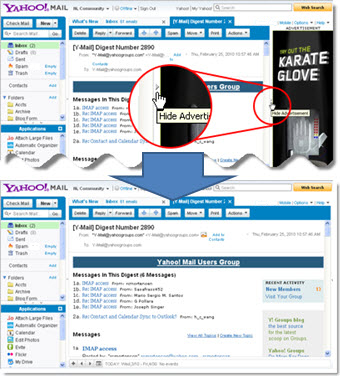
 Yahoo has been in an all-out restructuring and reshaping for about a year now. There have been plenty of changes, some cosmetic, some more drastic and plenty of services have been shut down altogether. But the cash-strapped company also made an interesting decision last year, and a bold one at that, by announcing that it would start decreasing the amount of advertising on its homepage and other properties in an effort to focus on quality rather than quantity. Now, one side-effect of that decision is a brand-new option in Yahoo Mail that enables you to temporarily disable ads on the site.
"As you know, we are always listening to your feedback. Many of you that have small computer screens have told us that you would like more space to read your emails. You spoke and we listened," Andrew Molyneux, program manager at Yahoo Mail, wrote.
"To give you more real estate to read your emails, we are adding a button just to the left of the advertisement in the All-New Yahoo! Mail. Clicking that button will hide the ad temporarily, while you read your email," he explained.
It is certainly a very bold move for any company but especially for Yahoo, which has always had a higher-than-average number of ads on its properties, though, in its defense, a lot less than MySpace, for example. The right-hand-side ads now have a small toggle button that enables you to tuck them away until you move to another part of the site.
Yahoo says that the move will benefit visitors coming from small-screen devices, like netbooks, which need all the space they can get on the cramped, 10-inch or smaller screens. The ads will show up again and the only option to remove them permanently is to sign up for Yahoo's paid service, Mail Plus, but it is certainly a welcomed move.