
|
|
|
|
December 22nd, 2011, 10:32 GMT · By Andrei Dobra
BLOG
Xbox Live Error Codes 801540B7 and 80070571 Will be Fixed by Microsoft |
|
|
|
|
SHARE:
Adjust text size: 
|
|
- The new dashboard is causing some serious errors |
|
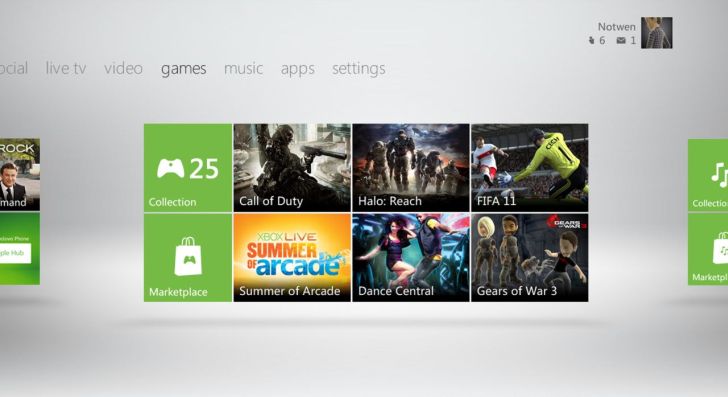
Microsoft has confirmed that it’s working on solutions for errors that have been plaguing the Xbox 360 users, specifically those that result in error codes 801540B7 and 80070571, which are encountered by gamers when they try to log into their profile and then prevents their access to things like profile management, online gaming or any purchased content.
Ever since Microsoft deployed the brand new dashboard update for the Xbox 360 earlier this month, owners of the console have encountered a variety of issues, errors and problems, too few of which were actually acknowledged by the company. Now, after Joystiq received multiple complains from readers about these two errors, 801540B7 and 80070571, Microsoft actually released a statement about them and how it’s working on solutions that will solve these two specific issues. "We have recently identified an Xbox Live profile data error that results in Error Code 801540B7 for a small number of Xbox Live members. The error instructs users to attempt to re-download their Xbox Live profile and directs them to customer service support for further assistance. We apologize for the inconvenience this has caused to our loyal Xbox Live members and are working to resolve the issue as soon as possible." Have you encountered these two errors after installing the new dashboard or was your experience, trouble-free?
|
|
|
|
|
TELL US WHAT YOU THINK:
|
3,607 hits
· 37 comments
· Link to this article
· Print article
· Send to friend
· Subscribe to news
|
MUST-READ RELATED ARTICLES:
READER COMMENTS: |
| Comment #1 by: ANGELOFDAFALLEN on 23 Dec 2011, 19:44 UTC | reply to this comment | I didn't have an of these problems but after the update when ever I try to create a party with my brother and some other friends I get disconnected from xbox live. I don't know this has something to do with the update or not but it worked perfectly fine before this update so I'm only guessing its the problem. |
| Comment #2 by: Gamertag:solarten on 27 Dec 2011, 23:25 UTC | reply to this comment | I encountered the 80070571 error code after downloading the new dashboard, when my xbox started to freeze very frequently and then deleted my profile the error occurs when i try to recover my 5 year old live account. I WANT TO DIE!!! |
| Comment #2.1 by: sasnutter on 10 Feb 2012, 17:02 GMT | sorted well done ma man |
| Comment #3 by: tim on 28 Dec 2011, 12:44 UTC | reply to this comment | I have found a solution to this when it happened to me, all you need to do is go system on settings - memory - hard drive - profiles - and then look for your profile and it should say corrupted. delete profile only and then try re downloading it and it should allow you. |
| Comment #3.1 by: Ken on 29 Dec 2011, 21:35 GMT | Definitely worked! Thanks a million! |
| Comment #3.2 by: XBOX ADDICT on 30 Dec 2011, 01:51 GMT | DUDE THIS WAY WORKS!!! You are my hero hahaha I just was given Skyrim for Xmas and this was ruining my world. You're awesome. This will not screw up your profile, just delete it and not the "items" aka saved data when it asks you. |
| Comment #3.3 by: enoguy on 30 Dec 2011, 14:06 GMT | thanks man now i know what to do about 80070571 |
| Comment #3.4 by: Xbox Live Newbie on 02 Jan 2012, 20:30 GMT | Excellent advice. It worked after we had waited for eternity to speak with an Xbox Live agent and found the solution right here!!!! You're our hero!!!! |
| Comment #3.5 by: FlyinRoc on 15 Jan 2012, 01:42 GMT | YOU ARE MY HERO!!!!!!
almost spazzed out....
thanks a million!! |
| Comment #3.6 by: tacosaregood on 30 Jan 2012, 15:07 GMT | I woke up this morning and found my profile to be corrupted. Followed the advice about deleting the profile only and everything is peachy keen :) |
| Comment #3.7 by: zSynQ on 05 Feb 2012, 06:06 GMT | THank You So much |
| Comment #3.8 by: bb on 05 Feb 2012, 21:19 GMT | thanks a bunch this worked on the first try |
| Comment #3.9 by: Pierre on 08 Feb 2012, 13:07 GMT | A lot of thanks from France, it works ! |
| Comment #3.10 by: ananym0use on 18 Feb 2012, 03:15 GMT | Australia extends its thanks to you my friend! good on ya! :) |
| Comment #3.11 by: Favoriteoscar on 18 Mar 2012, 22:03 GMT | thanks so much dude! Worked on first try |
| Comment #3.12 by: massnoeffectbug on 20 Mar 2012, 23:53 GMT | Tim, thank you. This has probably saved me hours of frustration. |
| Comment #3.13 by: Girlygirl on 02 Apr 2012, 17:45 GMT | thank you so much! This helped. I almost cried when i couldnt get onto my profile. You're a hero! |
| Comment #3.14 by: Breezymedusa 469 on 03 Apr 2012, 10:28 GMT | Dude whoever u r u rock !! Nd u saved me!! Thnks to u i can agn play.... :D :D |
| Comment #3.15 by: Lassuarium on 27 Apr 2012, 19:26 GMT | THANK YOU THANK YOU THANK YOU!!!! You are the BEST!!!!! |
| Comment #3.16 by: joe on 11 May 2012, 20:11 GMT | thanks man that advise saved me |
| Comment #4 by: Tomcat on 01 Jan 2012, 02:31 UTC | reply to this comment | @ Tim, do you know if that is a permant fix or just temporary?? |
| Comment #6 by: Artemis on 17 Jan 2012, 15:20 UTC | reply to this comment | My profile deleted itself from my XBox 360, and if I try to recover it, I can get to the point where it starts downloading it, but stops after a second and I get the error 80070571 |
| Comment #7 by: TheOG on 02 Feb 2012, 17:32 UTC | reply to this comment | I don't use live much, but recently tried to log in to get some DLC for a game I purchased. I could not load my profile from my memory card nor could I move or download the profile to my HD. I have recieved both of those error codes and web searches regarding them point to "page not found" on the xbox site. My PS3 has been snikering in the corner the whole time. Looking forward to the fix. Thanks softpedia for ACTUALLY telling me what was happening. |
| Comment #7.1 by: jools224 on 03 Feb 2012, 20:37 GMT | Go into settings/storage/profiles it should see currupt profile delete profile only not profile and content then try to download profile should work now. |
| Comment #8 by: gymgeek on 02 Feb 2012, 21:36 UTC | reply to this comment | I have got this error code 80070571 all the time. I can bi longer use my Xbox profile.
-sent via mobile |
| Comment #9 by: billy bob on 04 Feb 2012, 21:31 UTC | reply to this comment | goto your system storage highlight over your hard drive and or memory unit and press the yellow y button and then you wanna clear your system cache. your issue is fixed for 80070571 |
| Comment #9.1 by: Who cares about the name on 24 Feb 2012, 22:58 GMT | Will this delete everything that I did on my gamertag or will that be brought back when I download my profile back because I don't want to loose everything that I did. |
| Comment #10 by: bb on 05 Feb 2012, 21:12 UTC | reply to this comment | when will it be fixed? I can't access anything |
| Comment #11 by: mark on 23 Feb 2012, 18:08 UTC | reply to this comment | mine not working either not happy you fork out loads of money for games and subscriptions eg xbox live and elite an then cant use them |
| Comment #12 by: burt reynolds on 10 Mar 2012, 08:52 UTC | reply to this comment | yeah ive got the error 80070571 and cant log onto profile.i hope they give us a refund for the days we lose on xbox live... the service we pay for. |
| Comment #13 by: ElectAsh9 on 13 Mar 2012, 00:07 UTC | reply to this comment | Error on mine as well. I don't need xbox live, but since all of my games were saved on my now corrupted profile and I cannot access or move my files. Tip: back-up thefiles on hardrive |
| Comment #14 by: Help on 01 Apr 2012, 07:09 UTC | reply to this comment | It wont let me download my x box live account it says error 80070571 |
| Comment #15 by: HUSTLING30141 on 24 Apr 2012, 03:23 UTC | reply to this comment | I have this problem with the error code. Only my situation is different. My account actually disappeared off of my xbox. I read that if you delete your profile then redownload it this process will work. The problem is I can't delete my profile hs disappeared therfore i can't delete it. Any advice would be greatly appreciated. |
| Comment #16 by: jim on 10 May 2012, 19:55 UTC | reply to this comment | thanks to Comment #3 by: tim thanks a million really worked!!! |
| Comment #17 by: nat on 12 May 2012, 12:16 UTC | reply to this comment | This is exactly what i am experiencing, i can't redownload my account however as it comes up with the error code and that i should try again later... I have contacted the xbox live helplines many times but with no solutions to this irritating problem. |
| Comment #18 by: Recon on 26 May 2012, 09:13 UTC | reply to this comment | my profiled deleted itself an when i try to redownload it freezes then pops up sorry xbox live profiles cant be downloaded right now try again later with a code 8007045D but it allows me to delete an re download my girlfriends 3 times no problem any help would be great!? | |
Copyright © 2001-2012 Softpedia. Contact/Tip us at 
|
|