NEWS CATEGORIES:


NEWS ARCHIVE >>
SOFTPEDIA REVIEWS >>
MEET THE EDITORS >>
Home / News / Editorials

Editorials


Windows versus Windows or 32-bit versus 64bit

How much does the transition from 32-bit to 64-bit matter?

By

20th of April 2005, 07:45 GMT

Adjust text size:


Recently, Windows XP 64-bit Edition has turned Gold and by the end of the month it will be retailed. What are the advantages of the 64 bit technology, how does it work and what was the history of its introduction on the consumer market, all these topics wiere debated in this article.

It’s clear that Windows XP Professional x64 Edition will provide the necessary support for the 64 bit applications, but it will take another year for their appearance. Until then, those who’ll chose to install this version of Windows will have to run 32-bit applications.

So the next question arises: Is it worth it to install the 64-bit Windows and give up your old Windows XP? To answer this question, we have put together a test, whose main objective was to identify if the performances of the Windows x64 are better than the ones of Windows x32.

Test configuration and benchmarks

The systems used for testing on which we have successively installed Windows XP SP 2 and Windows XP x64 Professional Edition was provided by Senorg Romania www.senorg.ro.

The configuration of the test system:

- ABIT AN8 Socket 939 with nForce 4 chipset motherboard
- AMD Athlon 64 bit 3000+ boxed processor, cooler included
- 512 MB RAM Kingston Dual Channel 400 MHz
- SATA Western Digital 120 GB hard disk
- ATI Radeon X700 PCI Express cu 256 MB RAM GDDR3 ABIT video card
- DVD-RW Lite-ON optical device
- 350 W power source
- Eizo 1280x1024@85 Hz monitor


For the motherboard, the following drivers were used: nForce 6.53 for Windows x32 and nForce 6.39 for Windows x64, being the last available versions from Nvidia when this test was done.

The driver for the ATI Radeon X700 video card was Catalyst Center 4.5, available on the ATI site both for Windows XP Professional Edition and Windows XP x64 Professional Edition.

The operating systems were Windows XP Professional Edition SP2 and Windows XP x64 Professional Edition SP1 build 1433.

The following benchmarks were used:

SiSoftware Sandra 2005 Professional Edition, both 32-bit and 64-bit
3D Mark 2005 1.20
ScienceMark 2005, both 32-bit and 64-bit bit
Chronicles of Riddick : Escape from Butcher’s Bay, both 32-bit and 64-bit bit


Preliminary observations

For both operating systems the size of the partition was 120 GB and it was created with Windows’s installing routine, the hard disk was completely formatted before the installing of Windows XP x64.

For both systems, the size of the swap file was set double than the installed RAM, and the graphical interface was set to minimum, by choosing the Adjust for best performance from Performance Options, Visual Effects.

The resolution of the monitor was set to 1024x768@100Hz, except for the game which was tested at: 800x600, 1024x768 and 1280x1024, at a refresh rate of 85 Hz.

For both operating systems, DirectX 9.0c was installed and the Windows Firewall was activated.


Windows XP x64

The installation routine of the Windows XP Professional
is known by all users and the one for Windows x64 is not much different, the steps taken being similar. The only noticeable difference is represented by Microsoft’s messages which outline the importance of the new operating system and the advantages of the 64-bit technology.

Installing the S-ATA hard disk didn’t require the floppy with drivers as for the 32 bit Windows XP. The setup program had the driver necessary for the S-ATA controller and the procedure was greatly simplified.

The graphical interface is almost identical to the one of the Windows XP and the only difference noticed by the user will be the presence of the 64-bit Internet Explorer in the Start menu.

If the installation procedure for motherboard and video card drivers were not a problem, installing older equipment could be a problem, the 32 bit drivers being incompatible with the new operating system. So before installing the new operating system, make sure you find drivers on the producers’ sites, even beta versions, because otherwise you will be forced to give up on some components.

Briefly, the migration from Windows x32 to x64 doesn’t require you to accommodate with the new graphical interface, but the fact that a series of programs don’t have 64 bit versions could cause serious problems.

For example, you might have to give up your favorite antivirus and to choose between Avast Antivirus 4.5 and McAfee Enterprise 8.0i, the only programs with 64 bit versions. It is expected that once the Windows XP x64 is officially released, the majority of producers will start releasing 64 bit versions for their programs, so you don’t have a lot to wait.

Installing Daemon Tools or any other program for mounting CD or DVD images proved to be a total failure.


TESTS AND RESULTS

SiSoftware Sandra 2005 Professional Edition

The first test program installed and run was SiSoftware Sandra 2005 Professional Edition. The installation procedure allowed choosing between the 32-bit and 64-bit versions, so there were no problems at the installation.

Among the modules offered by SiSoftware Sandra 2005 Professional Edition, the following tests have been made:

CPU Arithmetic Benchmark
CPU Multi-Media Benchmark
File System Benchmark
Memory Bandwith Benchmark

For each system, the following results were obtained:


OS

CPU Arithmetic Benchmark


CPU Multi-Media Benchmark


File System Benchmark

Memory Bandwith Benchmark

Windows x32

Dhrystone ALU - 8385 MIPS
Whetstone FPU/iSSE2 - 2841/3707 MFLOPS

Integer x16 iSSE2 - 17290 it/s
Floating Point x8 iSSE 2 - 18603 it/s

Drive Index - 35 MB/s

RAM Bandwidth Int Buff'd iSSE2 - 5286 MB/s
RAM Bandwidth Float Buff'd iSSE2 - 5222 MB/s

Windows x64

Dhrystone ALU - 8875 MIPS
Whetstone FPU/iSSE2 - 3233/3763 MFLOPS

Integer x16 iSSE2 - 13471 it/s
Floating Point x8 iSSE 2 - 20826 it/s

Drive Index - 34 MB/s

RAM Bandwidth Int Buff'd iSSE2 - 5319 MB/s
RAM Bandwidth Float Buff'd iSSE2 - 5257 MB/s


INTERPRETATION OF RESULTS:

Sandra 2005 SR1 was installed on the Windows XP 64 bit in the optimized version for AMD64. It seems the optimization led to a significant increase, especially in the non accelerated arithmetic tests. The differences between the SSE2 accelerated tests, the hard disk test or the memory bandwidth test (also SSE2 accelerated) are insignificant.


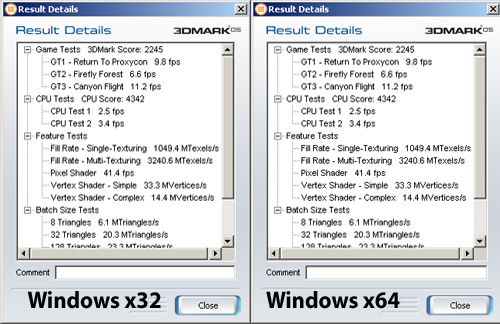
3D Mark 2005 1.20

Even though 3D Mark doesn’t have a 64-bit version, its installing went along without problems. On Windows x32 it ran without any problems, but on Windows x64, until we deleted the pcibus.sys file, installed in the driver section, it refused to start.

For testing, 3D Mark 2005 was configured in two ways for both operating systems.
The first time it was run without the Anti Aliasing option and with Texture Filtering set to Optimal – the default settings of the program.
The second time, the Anti Aliasing option was set to 6 sample AA, and for Texture Filtering it was chosen the Anisotropic setting.
The initial resolution – 1024x768@85Hz was unchanged for both tests.

RESULTS

THE FIRST CONFIGURATION


THE SECOND CONFIGURATION


INTERPRETATION OF RESULTS

As you can see, in both tests (with the initial settings, respectively with AA 6X) the system behaved similarly, the differences being insignificant. Although Windows XP 64 bit is at the beta version and the drivers for 64 bits are new, the system was stable and it performed well.
It should be mentioned that 3DMark05 doesn’t have an executable optimized for AMD64. The fact that the score is not different from the one obtained by Windows 32 is worth taking into consideration.

Science Mark 2005

Science Mark 2005, one of the most precise benchmark programs, stretches the hardware resources to the maximum in order to obtain accurate results. It is based on the correct identification of the CPU and the efficient usage of its extensions during the test.
It’s worth mentioning that the 64 bit version of the Science Mark was in the Beta stage, but is dated the same as the final 32 bit version: March 21, 2005.
The operating frequency of the processor was identified as 1808 MHz, the 32 bit version adding 0.34 MHz compared to the 64 bit one.


THE RESULTS
32 bit

L1 BW: 20728.01 MB/s
L2 BW: 6573.76 MB/s
Mem BW: 4958.26 MB/s

Cipher Benchmark: 15.13797 seconds.

AES Encryption (Rijndael): 100.80 MB/s

64 bit

27278.16 MB/s
8409.88 MB/s
4842.18 MB/s

0.01040 seconds

146719.10 MB/s


INTERPRETATION OF RESULTS:

The majority of tests for the cache memory didn’t run on 32 bit – 6 out 13 tests were performed. The results for those that did run, for L1 or L2, were clearly smaller than the ones performed for 64 bit. For the memory test, 4 tests didn’t run on 64 bits. The results are again favorable to Windows 64.

The result of the AES computation is almost unreal, but we repeated the tests 5 times and the result was always the same.

UPDATE from Softpedia User lllaaa: according to http://www.sciencemark.org/changelog.html
:CipherBench is not supported in 64-bit mode. Running AES returns an incorrect result, that is impossibly too fast. This will be remedied in a future version

Chronicles of Riddick: Escape from Butcher's Bay

Chronicles of Riddick: Escape from Butcher’s Bay is a new game, with an engine that sucks the life out of your system and is comfortable only on medium to high-end configurations. It also one of the few games that has an executable optimized for AMD64, and that is why we chose this game for our test.

To use the game as a benchmark, we had to record a demo (the game doesn’t have its own demo for included benchmark) which was run afterwards from the console with the time demo command.


THE RESULTS

32bit

1024x768 Average: 18.66, Min: 7.39, Max: 97.66
1280x1024 Average: 12.00, Min: 4.68, Max: 96.42

64 bit

1024x768 Average: 16.56, Min: 8.23, Max: 28.22
1280x1024 Average: 11.23, Min: 6.42, Max: 20.54


INTERPRETATION OF RESULTS

The average values were close, with the 64 bit Windows XP being behind XP 32. At higher resolutions, the difference was smaller. Very interesting is the huge difference between maximum values. One could conclude that the variations between minimum and maximum of the 64 bit version are very close, which would mean a high number of frames even in complex scenes; or, the number of frames is reported incorrectly.


CONCLUSIONS

The code optimized for 64 bits is executed much faster, but the SSE 2 optimized one is constant. 3D applications don’t benefit from the migration from 32 bit to 64 bit, probably because of the GPU. The 64 bit video drivers didn’t improve significantly the performance, but didn’t decrease it either.

In this moment, Windows XP 64 bits is not an option for AMD 64 owners. The incompatibility with 32 bit programs is one of the problems of Windows XP 64 bits. For programmers things are different, the compiling of the programs being done much faster.

The optimization for 64 bits is clearly a step forward, but momentarily, the only benefit you can obtain by installing this operating system is the possibility of administering more than 4 GB of RAM.

The test pointed out that as long as there isn’t a wide range of 64 bit applications, migrating from Windows x32 to Windows x64 is not yet justified, the complications regarding drivers and incompatibility being major disadvantages.
Read by 759,883 user(s) | Add comment | Link to this article TWEET THIS


Article rating:
Fair (2.9/5) 415 vote(s)    

Subscribe to news | Print article | Send to friend

© Copyright 2001-2009 Softpedia
Contact:


SEARCH THE NEWS ARCHIVE :


Today's News
| Yesterday's News | News Archive


MORE RELATED ARTICLES:

User opinions:


Comment #1 by: lllaaa on 21 Apr 2005, 11:36 GMT reply to this comment

why don't you take a look at "http://www.sciencemark.org/changelog.html"

: CipherBench is not supported in 64-bit mode. Running AES returns an incorrect result, that is impossibly too fast.
This will be remedied in a future version.


Comment #2 by: bernie73 on 02 Mar 2007, 07:16 GMT reply to this comment

Hi, I'm fairly new at this, how do I tel if I have 32 bit or 64 bit?
I have a AMD Athlon(tm)64 Processor 3800
Thanks in advance

Comment #2.1 by: Chris on 07 Jun 2009, 04:58 GMT

you have an AMD Athlon(tm)64 Processor 3800 then you have a 64 bit processor. Since the 64 bit ones are better, companies like to show it off by putting 64 in the name. Happy Computing!


Comment #3 by: todhend on 03 May 2007, 20:32 GMT reply to this comment

I have been studying the differences from a standard user’s perspective and have concluded that the only real differences I can notice in xp 64 after adjusting the MenuSho Delay is the increase in speed of opening and closing programs, browsing the internet has slowed slightly using explore 6 but nothing to complain about. I have all of the updates available as of may 2007 and I do have installation problems with several programs including printer drivers and antivirus programs but ms office and adobe programs installed without a hitch, Peachtree and my favorite program Radmin did not have such luck . I’ve tracked it down to the Program Files (x86) where it puts 32 bit programs but some programs just don’t want to operate from there, so if it installs just copy it over to Program Files and in some cases; not all that worked.

Comment #3.1 by: Joe Conway on 12 Apr 2009, 23:41 GMT

The only difference between 64 and 32 bit is 64 bit in 2009 is hardly supported for daily use of using the internet as the Adobe Flash player does not support 64 bit versions of internet browsers, yea granted 64 bit browser is amazing but the rest of the world has not even come close to catching up to 64 bit technology

Until they catch up I reverted back to 32 bit Vista


Comment #4 by: Jeffrey Murray on 18 Jan 2008, 14:49 GMT reply to this comment

A little late to the 64-bit party ... looking for some feedback/direction, if possible. I've installed a program on a XP 64-bit system. Didn't know files would get written to Program Files (x86) directory. The software, upon 1st launch requires a registration of the MAC address before running - this is usually quite simple. Unfortunately, I'm unable to register the software on this system...the registration prompt does not occur as normal. I tried copying the files from Program Files (x86) to Program Files, but still wlll not work. Any input? THANKS!


Comment #5 by: Michael Smith on 01 Mar 2008, 04:15 GMT reply to this comment

I am considering a 64-bit Vista ultimate system. So, I am curious if you were able to solve your problem. Any comments?


Comment #6 by: mervin338 on 02 Jun 2008, 22:37 GMT reply to this comment

I've just recently started using windows xp pro 64-bit because I was excited to see what the 64 bit edition had over previous 32 bit versions. In short, I'm not terribly pleased with my decision to go with the 64 bit operating system. First, a significant portion of my programs simply aren't compatible with xp pro 64 because there just aren't any drivers. My favorite internet security program Zone Alarm 7.0 does not function in a 64 bit environment, neither do programs like Ace Utilities. Sound Blaster drivers are very buggy and I still haven't gotten them to work with xp pro 64. I a'm currently using BitDefender 2008 Internet Security for my malware/firewall needs (which I really like) and while it runs fine, it seems to conflict with the soundblaster drivers that I've tried repeatedly to install. The other annoying thing I hate about xp pro 64 is that it makes 2 program files directories: 1 for 32 bit apps and another one for 64 bit apps. While this particular issue is more of a personal gripe than a deal breaker, it just adds more confusion to an already confusing situation.

I plan on switching back to the 32 bit version as a result of the problems I've been having.


Comment #7 by: WaKo on 21 Jul 2008, 02:10 GMT reply to this comment

I think everyone should try VISTA 64 or SERVER 2008 before make any opinion about 64bit computing, because XP 64 was just the first step. Besides you'll see VISTA 64 running fast and beautiful as it should, unlike 32 bits versions. I'm sure that games designed to work only in DirectX 10 such as Halo and Crysis will benefit the most from this.

Yes, maybe there are some problems with drivers and old software, but 64 bit computing has been here since 2004-2005, don't you think that developers should start thinking on 64 platforms?


Comment #8 by: chris on 19 Aug 2008, 23:46 GMT reply to this comment

Microsoft hasn't put out a good OS since Windows 2000 (though xp was alright, but nothing special over Windows 2000 and certainly not the step forward that Windows 2000 was). Windows Vista is hands down the worst OS ever relased, being bested by any decent Linux distro, Mac OS X and Windows 2000 or XP. The 64 bit version refusing to install non Microsoft signed drivers is the equivalent of a Microsoft tax on all hardware. I can't think of 1 compelling reason to "upgrade" from Windows 2000 on my desktop (I got stuck with Vista on my laptop). Save your money, but if you really want 64 bit, go with linux.

Comment #8.1 by: Dimitrios Loghis on 10 Oct 2009, 08:21 GMT

I don't know about any WIN 64 bit version but for the Linux mint 64 bit that i am using all is smooth and fast! Plus that i have 8GB RAM and i am running XP32 bit in a virtual box. plus that i have never face a problem with drivers plus that Linux mint (actually ubuntu 9) has "add remove programs" because windows has only remove !
In Linux mint you have the option to add programs from "package manager" this means that if you have 64 bit version all the programs that you can see in there is for your 64 bit system!
The catch is that if you run Linux you have all the utilities (there are plenty of them and always you can find something to shout with your needs) BUT you don't have anything from Adobe, except the Acrobat reader.


Comment #9 by: Carl on 14 Sep 2008, 18:16 GMT reply to this comment

I was wondering if there was anybody out there who can help me with a problem I am having? I have just purchased a Pentium D 945 processor which is 64-bit, I bought to replace my Pentium 4 which is a 32-bit processor but I am having problems installing a 64-bit OS. Is there anything I need to change to fix this problem your help would be appreciated. Thank you.


Comment #10 by: Christopher Drake on 19 Sep 2008, 14:23 GMT reply to this comment

plz write me if you disagree with anything here I say. Been up countless days fighting with xp 64 and vista 64 to get any drivers to work meaning creative xtreme music drivers and winfast pvr drivers. No sound and no tv means no computer for me. The problems with not only finding drivers is one thing but to find drivers that are suppose to work and they dont is another. AND BTW I love vista so much and bought it the 32 bit version and so mad that I can not install not even my sound card on it or my tv card too. Yet they are supported and when you do any Vista 32 bit or 64 Bit install and it has sp1 you are screwed and even to the point that your pci cards begin to even stop being detected. I know it is not my motherboard or my process AMD X2 4200. Because Everything works great in x86 XP but was upset to see that since i have a 64bit processor wanted to run a X64 bit OS and I see do to the problems it is not possible. Vista is a very nice Look do not touch OS and runs Great on a laptop I have vista x64 on my laptop. But if you are a gamer and enjoy TV and music videos Stay with xp x86 for now. Save your self the headaches that I have been suffering with for weeks. Installing XP x86 right now as I write this. If you have a comment or disagree or want to ask me a question feel free to do so wtchm0n@wtchm0n.net. But life is too short to do all these installs and setting up your programs everyday. However If you have a Junk Box or want to do a dual boot feel free to try the x64 system The x64 appz work great but for your system that you do everything with enjoy less headaches and stay with xp x86 :)

Comment #10.1 by: Heke on 17 May 2009, 05:46 GMT

Hi, I have installed windows 64 bit 7 (7100) and surfing with firefox/ mindfield 3. Opening ALL programs is MUCH faster that with XP pro 32-bit. All drivers, except Logitech webcam, work very well. even audio with M-audio and logitech gordless xmouse. Only some programs which I like to use do not work or have not drivers: Topfield connection program is not installing, skype is not installing and not working (but what use without webcam). Skype-install was terrible, I could not get rid of every crap it installed, I dideven try restore point, it did not help.

I have: ASUS P5K, Intel coreduo 2,6 Ghz, 2 Gb ddr2 ram, M-audio audiophile 2496, ASUS/ Nvidia 8800 gts 342 MB. Samsung syncmaster 225BW.


Comment #11 by: furrydug on 19 Sep 2008, 20:46 GMT reply to this comment

my question is i want to put 64 bit in my comp is it worth it if not why


Comment #12 by: tabish on 11 Oct 2008, 03:33 GMT reply to this comment

Getting problem in installing Sql express on windows vista..


Comment #13 by: Fred on 12 Nov 2008, 16:03 GMT reply to this comment

Stay away from 64-bit XP or Vista


Comment #14 by: Ray on 23 Nov 2008, 23:41 GMT reply to this comment

A Lot of information but for me I'm still very unsure about 64 bit. I use a lot of older software, that I like very much, and am very afraid it will not work properly under 64 bit.

Is there a simple way for a novice, such as my self, to test too see if my software will operate under 64 bit?

I realize you are unlikely to give answers but maybe somebody out there may contact me with some help. I really have far mor questions than answers.

l.patterson/at/centurytel.net


Comment #15 by: jeremy on 14 Dec 2008, 03:52 GMT reply to this comment

Im about to switch over to 64 windows, i hope it works out well.


Comment #16 by: david on 24 Dec 2008, 01:17 GMT reply to this comment

64 bit system can actually run slower than a 32 bit o/s if you are mainly running 32 bit apps.


Comment #17 by: jeromimo vasauez on 04 Jan 2009, 21:53 GMT reply to this comment

i recently upgraded my pc from a windows 32-bit sytem ( XP) to a 64-bit system windows (VISTA ULTIMATE). BUT the sound doesn't work at all now. vista is not supported it says, but my sound card (creative soundblaster X-Fi) according to the device manager is up to date and loaded. there is a code error 10 message with an explanation point next to it in the device manager as well. all the cables to the speakers are hooked properly as well. please help a computer without any sound at all is like an expensive useless paperweight. thank you.


Comment #18 by: Dave on 18 Jan 2009, 02:59 GMT reply to this comment

I am so glad I visited this site - I was about to "upgrade" to 64 bit but after reading these posts I have definitely changed my mind!


Comment #19 by: Brad on 19 Jan 2009, 16:15 GMT reply to this comment

This article was written in 2005, and I would agree at that time. Now in 2009, my experience has been completely different and I believe the compatibility and performance information has aged somewhat. The first time attempted to upgrade to XP x64 was Jan 2007; however, I found not all my hardware had 64-bit drivers. Next, in Jan 2008 I attempted to upgrade, ran for 3 weeks trying to find some remaining drivers and software solutions (like a 64-bit of NAV), and then downgraded back to XP 32-bit; however, after running XP 32-bit for 2 days, it was so noticeably slower, I went and bought what I needed (like NOD32, a Gamepad, & printer) and upgraded back to XP 64-bit. To date, I have been totally please and will not go back. My 32-bit software has not slowed the system either. Though I don't play many games, Madden 08 and World in Conflict have no problems. It will not run 16-bit Windows software though, such as Civilization 2, though I don't use 16-bit software any longer (I upgraded to Civ 4 on that one and glad I did!). The only incompatibility I've found was installing Pinnacle Studio 10.5 hardware driver for the video capture card. The 32-bit driver caused problems and bogged my system down majorly, though it actually worked. Even after uninstalling and manually removing the fragments it leaves in the registry and harddrive, I still had problems and ended up reinstalling XP x64. In summary, I would recommend going to 64-bit, because the install and interface is the same as XP 32-bit and I've had minimum compatibility issues and it gives you a noticeable boost in performance that you do not need performance testing software to confirm (although I ran tests before & after on clean installs). Just make sure you have all the 64-bit drivers for your hardware and that you don’t need your 16-bit software, AND don't "try" any 32-bit hardware drivers like those with Pinnacle's video capture card, just to see if it works...32-bit Application software is generally fine to "try", just play is safe with drivers and go 64-bit only.


Comment #20 by: RHAUL on 21 Jan 2009, 13:47 GMT reply to this comment

I've recently purchase a hp dv5 pavilian with amd 64 -bits operating system. i have been trying to install some programs for school on it and it will not allow it. Can some one tell me whats the problem.... or even instruct me how to reduce this 64- bits to 32 - bits. I am unaware of procedure and really need some help.

Comment #20.1 by: mother on 21 Jan 2009, 21:13 GMT

Rhaul, you simply have to install a 32-bit version of your operating system. Installation of 32-bit programs will not work on a 64-bit configuration.


Comment #21 by: joshg81 on 27 Jan 2009, 02:57 GMT reply to this comment

i believe the answer to all of the problems with running a 64bit o/s is to dual boot. the best scenario would probably be 32bit xp, and 64bit vista. try to reap the benefits of both worlds while we wait for windows 7. based on the beta, i believe that we're in for a treat.


Comment #22 by: T-Zero on 01 Feb 2009, 17:34 GMT reply to this comment

I have been running Win 7 x86 (beta) for 2 months now and am impressed how well it works.
Seen the fact that the x86 (32 bit) version recognised all my hardware w/o problems and actually runs faster than Win XP, I decided to download and install Win 7 x64 (64 bits).
Smoothless installation, executes everything very fast. However, it didn't recognize part of my hardware, and after installing the respective drivers, my hardware was still unrecognized.
My mission today is to remove Win 7 x64 and get back to Win 7 x86 (32 bit).
I've come to the conclusion that x64 is indeed worth using, but not right now until software and hardware companies shower us with adequate 64-bit goodies.


Comment #23 by: JP on 07 Feb 2009, 18:26 GMT reply to this comment

I currently have windows 7 x32 and windows xp x32. dual booted onto my PC. Dual booting is the way to go. There is alot of x64 programs out right now for xp and vista. im gonna upgrade my windows 7 to x64 but i cant decide if im going to use xp or server 2008.


Comment #24 by: Bluefishfoot on 17 Feb 2009, 13:12 GMT reply to this comment

If you look at the specifications of the computer that they used for the tests, it had 512 MBs RAM. If You have less than 4GBs ram, 64-bit doesnt show alot of difference. if you have 4GBs or more of RAM, it's very different. (I have 6GBs) I've tryed XP64 and Vista 64, and I've found XP64 to be ALOT faster than Vista 64. I had some trouble finding drivers at first, but I found them eventually, just had to look for a while. Many drivers were found on Europen sites, but they work fine, and have english installers. I still get automatic updates for my XP64 all the time from Microsoft. Some of the drivers made for vista64 work for xp64. I do have problems with some programs, installing them, but there are alot of other programs that do the same thing that work fine.
Also, I've found that my games run alot faster and with highest detail with xp64 than they do with xp, and I can run 5 or 6 different programs at once with xp64 without them slowing down. I think the key is to have 4GBs or more of RAM, because 64bit can access the extra RAM, while 32bit cant.
I like xp64 very much from what I've experienced with it. I have a copy of Windows 7-64bit that I might try out, but if it's slow like vista64, I'll stick with xp64. This is all only my opinion from what I've had experience with.


Comment #25 by: MickD on 23 Feb 2009, 02:33 GMT reply to this comment

My advice to all of you is use Vista 64bit as your host OS and install VMware workstation (google it) on it... within Vmware you can then install a virtual OS (can be absolutely anything Linux, Mac, XP 32 and 64 or Vista 32 and 64bit) . The virtual OS will act as a normal computer and can be used to run all 32bit apps, additionally you can run multiple OS's at the same time on the same machine even share files throught the virtual computers 'network port'. It definately beats a dual boot option, cause I absolutely hate having to restart the computer everytime i need to use the other OS.. try virtualisation let me know how you go.. cheers!


Comment #26 by: ama on 04 Mar 2009, 23:41 GMT reply to this comment

this artical was written in 2005
things are much diffrent now.


Comment #27 by: bvbv on 19 Mar 2009, 12:10 GMT reply to this comment

Im about to switch over to 64 windows, i hope it works out well.


Comment #28 by: sam on 22 Mar 2009, 20:02 GMT reply to this comment

install a second harddrive and run xp 32bit on the first ,64 bit on the other
you can test 64bit it is faster with dual channel 4gb or more. the programs that don't run under 64bit leave on the xp 32bit.


Comment #29 by: dan on 23 Mar 2009, 08:31 GMT reply to this comment

i have used windows xp 64bit, vista 64bit and now windows 7 64bit beta. everything works well.

im just using amd 64 3000+, 4gb of ddr rams, ati 4830 PCI-E card as well. just my own inputs. cheers!


Comment #30 by: jun on 27 Mar 2009, 06:11 GMT reply to this comment

I migrated to 64 bit for 2 months now, and i have no problems with it. My coputer runs fast as before, all the applications i used runs smoothly like KAV (Kapersky Anti Virus).


Comment #31 by: Reza on 27 Mar 2009, 17:22 GMT reply to this comment

I recently bought an AMD quad core, with 8GB or RAM, and tought I needed vista ultimate 64 to use all that memory but I quickly realised that I could not install any of my 2 year old equipment, specially usb camera and scanner, even if 64 bit drivers existed, they would not install properly. Vista was also very annoying with all the validation popup that it ask the user to click everytime he tries to run something. Microsoft ! do your job properly and don't try to protect your O/S by turning the users into cheap antivirus program.

I think I will skip vista and wait for Windows 7, but only if Microsoft add the option to install older 32 drivers, and make a tool to fine tune the O/S for power users.

In the mean time, I installed XP Pro 64 bit edition. I still had to look around to find all the drivers, but it was a bit easier since it has been out for much longer than vista. Some programs still did'nt work, specialy cisco vpn, but I found I could run them in a Windows XP 32 partition running under Vmware. Running a VM also has the advantage that if you want to connect on your home PC from work while your girlfriend in on your machine, you can do a remote desktop on the VM instead. You can also test any driver and software inside a VM partition before installing them on you real machine. That could add a few years to your installation before you will need to reinstall it from scratch.


Comment #32 by: Anthony S Keller MD on 06 Apr 2009, 15:58 GMT reply to this comment

32 bit Explorer always reverts to the 64 bit version when choosing a site in your favorites window. So, Adobe Flash player will not play videos on that site. Adobe claims they are working on a 64 bit version of their Flash Player but they have been claiming this for the past year. They also claim that the Flash Player operates on the 32 bit version of Explorer included on all 64 bit versions of VISTA. That, I'm afraid is not the case. Even if you replace the site you wish to go to in the HTTP://WWW window in explorer 32 bit edition, it will open in a new explorer window YES THE 64 bit Explorer. AMAZING!!


Comment #33 by: Caesar on 12 Apr 2009, 02:54 GMT reply to this comment

Which should I use for gaming... 32bit or 64bit... I'm running 32 bit vista home premium... gaming consist of online gaming mostly... and if I should use Vista or XP...
ty


Comment #34 by: Rusty on 26 Jul 2009, 22:32 GMT reply to this comment

Adobe have a pre-release version of 64-bit Flash Player released for Linux only at the moment, but it is in development for all operating systems.

This isn't a major issue, as Windows 7 64-bit has both 64-bit and 32-bit Internet Explorer so I just switch over to the 32-bit version when I need to use Flash.


Comment #35 by: Steven Thomas on 27 Oct 2009, 00:42 GMT reply to this comment

Reply to: Comment #7 by: WaKo on 21 Jul 2008, 02:10 GMT:

Right on WaKo. WAKE UP CALL! IS ANYONE LISTENING OUT THERE?

So, it is what it is. what can I do? I have a SERIOUS error and can't use the fix tool because I'm running 64-bit" Vista Home Premium". If Microsoft can't help me NOW sombody is asleep at MS and MS has screwed up. Pretty lame if you ask me.


Comment #36 by: Static Rev on 30 Oct 2009, 19:26 GMT reply to this comment

Hi im wondering the same thing as Comment #33, does 64 bit work better with gaming?

Share your opinion:

Your Name:
Your Email Address:
(will not be used for commercial purposes)
Solve this to prove you're not a bot: =
Your review/opinion:


Windows tabGames tabDrivers tabMac tabLinux tabScripts tabMobile tabHandheld tabGadgets tabNews tab

SUBMIT PROGRAM   |   ADVERTISE   |   GET HELP   |   SEND US FEEDBACK   |   RSS FEEDS   |   ENTER NEWS SITE   |   ENGLISH BOARD   |   ROMANIAN FORUM