
Search Perform an advanced search query SOFTPEDIA
 
SOFTPEDIA
Updated one minute ago
HomeSubmit a program for being reviewedAdvertise on our websiteGet help on surfing our websitesSend us your feedbackGet information about our XML/RSS backend and how to use itBrowse the news archiveVisit our discussion forumVizitati forumul in limba romana


KLIP
  1. HOME
  2. SCIENCE
  3. TECHNOLOGY
  4. WEBMASTER
  5. SECURITY
  6. MICROSOFT
  7. LINUX
  8. APPLE
  9. GAMES
  10. TELECOMS
  11. REVIEWS
  12. LIFE & STYLE
  13. EDITORIALS
  14. INTERVIEWS
  15. RSS
Welcome!
Hello, Guest

Login if you have a Softpedia.com account.

Otherwise, register for one.

MICROSOFT

Windows Vista to Windows Vista - Upgrade Paths

- From one edition to another

By: Marius Oiaga, Technology News Editor

This is not the first time that I approach the subject of Windows Vista upgrades. However, I have never detailed the upgrade options that users have if they wish to switch one edition
of the operating system for another. With Windows Vista Microsoft has streamlined the upgrade process. Swapping an inferior edition for a more feature-rich alternative can be done via an upgrade disc or through the Windows Anytime upgrade disc. Inferior in this context should be read according to the features and capabilities each version of Vista delivers to users.

The main editions of Windows Vista can be cataloged according to the following hierarchy: Home Basic, Home Premium, Business and Ultimate. This is the main upgrade path for Windows Vista, from Basic to Premium to Business and to Ultimate. However, there are a few issues that you have to consider. First off, there is the small matter of 32-bit and 64-bit editions of the operating system. Microsoft treats each of them separately.

With 64-bit editions of Windows Vista, things are as clear as possible. You can upgrade:
- Home Basic to Home Premium and Ultimate;
- Home Premium to Ultimate;
- Business to Ultimate.

All of these have to be x64 Vista editions. Why? Due to the simple reason that you will not be able to upgrade from the 32-bit to the 64-bit versions of Windows Vista. What this means is that while you may own a 32-bit Vista you will also have to purchase a full license of a 64-bit edition. If you only acquire an upgrade edition, you will not be able to upgrade the 32-bit operating system to the 64-bit variant.

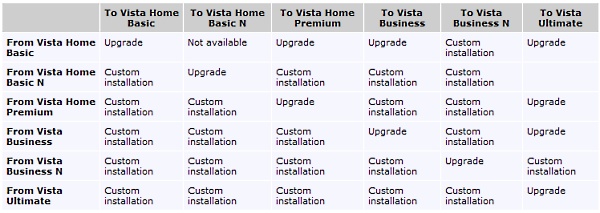
With 32-bit Windows Vista things are a tad more tricky. Here are the upgrade paths, be sure to check out the image included at the bottom for clarification on the 32-bit Vista upgrade options:

- from Vista Home Basic to Home Premium, Business and Ultimate;
- from Vista Home Basic N users will not be able to upgrade to any other edition of Vista with the exception of Vista Home Basic N;
- from Vista Home Premium to Ultimate;
- from Vista Business to Ultimate;
- from Vista Business N users also have no upgrade options available.

Windows Vista Home Basic N and Business N are available only in Europe.

MORE RELATED ARTICLES: Windows Vista Express Upgrades Live Next Week Windows Vista Express-Less Upgrades Windows Vista Upgrades Should You Wait for the Service Pack 1 in Order to Upgrade to Vista? Windows Vista Upgrade Editions Not on Hacker Radars Windows Vista Lives in Full Only with 4 GB RAM Installation Resources for 32-bit and 64-bit Windows Vista Windows Vista Power User Guide AMD Makes Windows Vista Part of Its DNA Zero Reasons to Upgrade to Windows Vista? Here's 30 of Them!
 
Comments | Link here | Subscribe
Print | Send to friend
Today's News | Yesterday's News

Search:


14th March 2007, 14:14 GMT | Copyright (c) 2007 Softpedia | Contact:
Read by 3,174 user(s) | Rating: | 7 vote(s) so far | Cast your vote:
Windows Vista to Windows Vista - Upgrade Paths - USER OPINIONS


We are sorry, there are no opinions available for this article.


SHARE YOUR OPINION ABOUT Windows Vista to Windows Vista - Upgrade Paths

Since you are not logged on, your comments will have to be approved before being displayed.
Click here to login, or register.
Your Name:
Your Email:
Type in the result:
Your Opinion:


DO YOU WANT TO CONTACT US?  

If you have some comments or you want to send us some information you can send us an email directly to .
You can use the form below for the same purpose.
Your full name: (at least 3 characters)
Your email address: (at least 5 characters)
Message subject: (at least 5 characters)
Message text:
(at least 10 characters)
Type in the result:


© 2001 - 2008 Softpedia. All rights reserved.
Softpedia™ and Softpedia™ logo are registered trademarks of SoftNews NET SRL.
Copyright Information | Privacy Policy | Terms of Use | Contact Softpedia | Update your software | Archive