 14 DAY TRIAL //
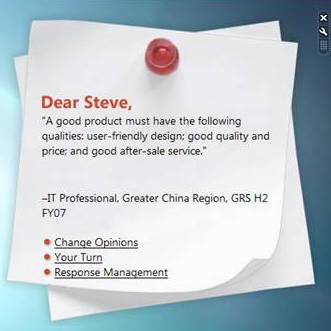
 Dear Steve... This is how an email addressed to Microsoft's Chief Executive Office Stave Ballmer begins. Ballmer's actual account as well as the password are unnecessary to read the CEO's email. All you need to access it is a gadget designed to integrate seamlessly with the Windows Sidebar in Windows Vista. Of course that there's a trick involved. You also have to be working for Microsoft. In a blog post focusing on advertising the Windows Sidebar and the adjacent gadgets, Microsoft Product Manager Nick White mentioned a product reserved for company employees created to permit access to customer input emails sent directly to Ballmer.
"We have a gadget we use internally to train employees in fielding and responding to customer feedback; it's called the "Dear Steve" gadget, and it displays anonymized contents of emails our customers have sent directly to Steve Ballmer with their personal product feedback," White described illustrating the example with the image included at the top, sent by an IT professional from the Greater China region. Now, as a side note, an email sent by Gianfranco Lanci, President of Acer, would probably offer a disappointing perspective over Windows Vista, but for the sake of applauding the Sidebar and the gadgets, the content was trimmed.
White added that if you decided to turn off Windows Sideber "you're missing out, as there's a Windows Sidebar gadget for almost anything you might want: PC utilities, music, messaging, traffic reporting, searching or just a quick game can be yours with a click of the mouse. If you haven't taken the time to explore gadgets beyond those loaded by default, take a minute to right-click the Sidebar and select 'Add Gadgets.' From there, click 'Get More Gadgets Online' -- you'll find over 1000 different gadgets available for download."
And of course that you can always access Microsoft Gadgets Gallery, Windows Live Gallery and Code Project for additional applications. But if you were wondering why Microsoft's gadgets offerings are not delivering top content or great volume of items, White articulated the company's strategy focused on providing third-party, rather than proprietary solutions.
"We see Windows Sidebar as a tool wherein the real innovation (and value) will come from third-party vendors creating their own apps based users' needs, as opposed to the market relying solely on MS to develop further on the platform. We'll create more gadgets, to be sure, but most of the creations will come from the external", White added.