
NEWS CATEGORIES:


NEWS ARCHIVE >>
SOFTPEDIA REVIEWS >>
MEET THE EDITORS >>
Home / News / Microsoft

Microsoft


Windows Vista Maximum Supported RAM

128 GB RAM

By Marius Oiaga, Technology News Editor

15th of January 2007, 15:29 GMT

Adjust text size:


Windows Vista is a resource hog. At least as far as the memory usage goes, Vista seems to never get enough. Is this the case? How much RAM can you feed into Windows Vista? Is there
a limit to the amount of RAM you add to a system, or will the operating system simply swallow resources?

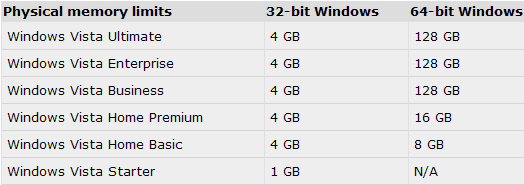
Well, Vista can indeed get enough. There is in fact a maximum amount of physical memory in concordance with the editions of Windows Vista. In this context, Windows Vista Starter edition is the least demanding of the operating system's versions, and the 32-bit variant delivers support for a maximum of 1 GB RAM.

The 32-bit editions of Windows Vista Home Basic, Home Premium, Business, Enterprise and Ultimate, all support a maximum of 4 GB of RAM. The real variations come when we start looking at the 64-vit versions. On a system running x64 Vista Home Basic, you can add as much as 8 GB of RAM. x64 Vista Home Premium supports as far as 16 GB of RAM.

But it will take no less than 128 GB of RAM in order to satiate x64 Vista Business, Enterprise and Ultimate. 128 GB of RAM is the maximum supported physical limit in the case of these three operating systems.

However, with Windows Vista, there is a clear distinction between the maximum supported physical memory and the virtual addresses that the operating system will use. The x86 editions of Vista will not deliver full support for all the RAM installed in the case that this amounts to 4GB. And there are also some limitations involving x64 platforms, but that subject will be addressed in a different article. Keep your eyeballs on Softpedia and be sure not to miss it!
Read by 79,810 user(s) | Add comment | Link to this article TWEET THIS


Article rating:
Good (3.5/5) 28 vote(s)    

Subscribe to news | Print article | Send to friend

© Copyright 2001-2009 Softpedia
Contact:


SEARCH THE NEWS ARCHIVE :


Today's News
| Yesterday's News | News Archive


MORE RELATED ARTICLES:


Is Your PC Ready for Windows Vista?

Windows Vista Phone Activation Crack

Windows Vista's Details

Symantec Explains the Vista CSRSS Vulnerability

A Windows Vista Zero-Day Exploit Costs $50,000

Windows Vista Activation Crack

Force Windows Vista Into Reduced Functionality Mode

Build Your Own Windows Vista KMS Activation Server

User opinions:


Comment #1 by: tyrlisc on 11 Jul 2008, 11:11 GMT reply to this comment

Very interesting and important article. Now that DDR memory is cheap it is good to know how much RAM is supported by Vista for upgrading purposes or when buying a new configuration !


Comment #2 by: OZON on 19 Aug 2008, 13:22 GMT reply to this comment

Hi,

It is said that the maximum RAM for 64 bit Vista is 128 gigabytes. There should not be true limits to 128 gigas in 64 bit operating system.

If this 128 is correct answer it is possible to put 10000 gigas RAM to Vista 64 bit or even more. If I remember correctly the maximum should be 16 million gigas in 64 bit operating system.

128 gigas is not a lot. In few years this starts to be serious limit. When 20 years has passed people will wonder how it was possible to use computer with poor 128 gigas RAM.

I have 3 gigas and it must be said that it is far too little for me, I do CAD work. I have need for 16 cores and 32 gigas currently when I have XP. WIth VIsta 64 bit there should be more RAM, more speed, naturally.

Microsoft makes its best that no processor is good enough or no amount of RAM is enough...this is sad.


Comment #3 by: real on 23 Jan 2009, 19:43 GMT reply to this comment

You have the need for 16 cores and 32 gigas of ram???? And you use Xp???? To bad XP ONLY SUPPORTS 4 GIGS OF RAM, AND NO SUCH THING AS A 16 CORE PROCESSOR, UNLESS YOU SOME HOW FOUND A MOTHER BOARD THAT WOULD TAKE 4 QUAD CORE PROCESSORS. IDIOT!

Comment #3.1 by: Pigmaster on 28 Jan 2009, 22:21 GMT

Hey now lighten up he didnt say he had 16 cores, or 32 gigas. He only said that the need was there for it. I think he was trying to project the need for more on a OS that wasnt even as weighty. We can all agree that XP doesnt tax your system as much, in comparison. But it looks like he has other issues if he needs that much and hes only running cad. Maybe check if other apps, or running procs are hogging. I run about 2 Gigas and can run almost idle with CAD. So either the statement is exagerated or hes neglectfull. I personally wont mess with Vista since Microsoft doesnt even want to anymore. Its still verry beta in how it acts and isnt getting better.

Comment #3.2 by: Dave on 29 Jan 2009, 02:42 GMT

There is always windows XP 64bit out there. I don't know if you may be comfortable with that version but I like Vista Ultimate so far. My question is how do I "physically" add 128 gigs of ram to my pc when it only has 4 slots? I use DDR2 PC5400 667mhz and was wondering if I could add 4x4gigs memory cards? does anybody know?

Comment #3.3 by: Jason on 31 Jan 2009, 12:36 GMT

Also I beleive some motherboards have been taking 4 quad core Xeons for a long time - giving 16 cores. It's also rumoured that Intel are about to announce 8 core Xeons in Feb 2009, with hyperthreading - so two of those on a board would give you the chance of having 32 threads - that's around 1GB each which for some modelling tasks isn't that much. So yes 'lighten up' is one way of putting it. I think an apology is in order.

Comment #3.4 by: Michael on 04 Mar 2009, 19:51 GMT

Tyan has a board that uses a daughter board... each of them can hold 4 processors... 8 processors! They support AMD Quad core processors... XP and Vista only support 2 processors so the cap is 8.

Comment #3.5 by: sataiuto on 09 Mar 2009, 12:52 GMT

Well actually there is a computer capable of having 32 GB of RAM and 16-cores.... take a look at the Mac Pro by Apple... 2 processores with 8 cores each ;) and you can run Windows XP 64 bit edition throught Boot Camp =D


PS: it costs up to 20,000 dollars =]
Apple rocks =)


Comment #4 by: w00t on 16 Feb 2009, 17:20 GMT reply to this comment

That is false. All editions of 32-bit operating systems will only support a maximum of 3 GB. A 64-bit, however, will support more than the 32-bit limitations.


Comment #5 by: Chemich on 25 Feb 2009, 03:14 GMT reply to this comment

w00t, you're wrong.

The max for XP is 4 GB of RAM, if you don't believe that then you seriously need to research a bit more, my friend is running 4 GB of RAM on his computer, and it reads it as such.

But damn, 128 GB? Imagine a computer starting up an operating system just on RAM. (Not like puppy linux, but Imagine Windows Vista xD.)

Would only take a second to startup really, I wonder if a processor is even made that fast enough to compliment that much RAM power correctly?

Doubt it, but if that's truly the max then I'm worried on how much a standard computer will cost in 50 years. :(

Comment #5.1 by: Alex on 01 Mar 2009, 19:16 GMT

notice on how pentium 4 pc's used to be expensive li9ke there no tomoro when they came out. well same thing is gonna happen to quads later in time. a 128gig pc will be expensive but not as much as you expect.


Comment #6 by: Shawn on 12 Apr 2009, 04:08 GMT reply to this comment

A modern byte-addressable 64-bit computer—with proper OS support can address 264 bytes (or 16 exbibytes) which as of 2008 is considered practically unlimited, being far more than the total amount of memory ever made.

- From Wikipedia, the free encyclopedia


Comment #7 by: Peter on 01 Jun 2009, 03:36 GMT reply to this comment

I wouldn't agree with that article! My 64bit vista ultimate doesn't use all installed RAM altougt it's just 5 GB. There is a lot of problems with ram recognition for vista. Setting up Physical Adress Extention doesn't change anything. My 64bit OS works the same as 32 bit. SO GUYS!!! Dont buy too many RAM at once. First check if you'll be able to use more than 4GB with your OS.


Comment #8 by: Rik on 10 Jun 2009, 06:10 GMT reply to this comment

Memory maximums for current Microsoft® Windows OSs include:
Windows Vista (32 bit)
Ultimate: 4 GB
Enterprise: 4 GB
Business: 4 GB
Home Premium: 4 GB
Home Basic: 4 GB
Starter: 1 GB
Windows XP (32 bit)
Professional: 4 GB
Home: 4 GB
Starter Edition: 512 MB
Windows Server 2003 (32 bit)
Datacenter SP2: 128 GB
Enterprise SP2: 64 GB
Standard SP1: 4 GB*
Datacenter R2: 128 GB
Enterprise R2: 64 GB
Standard R2: 4 GB*
Web Edition: 4 GB*
Small Business Edition: 4 GB*
* Certain Microsoft server operating systems can support over 4GB of memory via Physical Address Extension (PAE). Please refer to Microsoft knowledgebase article located here for more information.
Windows Server 2008 (32 bit)
Datacenter: 64 GB
Enterprise: 64 GB
Standard: 4 GB
Web Server: 4 GB
Windows Vista (64 bit)
Ultimate: 128 GB
Enterprise: 128 GB
Business: 128 GB
Home Premium: 16 GB
Home Basic: 8 GB
Windows XP (64 bit)
Professional: 128 GB
Windows Server 2003 (64 bit)
Datacenter SP2: 2 TB
Enterprise SP2: 2 TB
Standard SP1: 32 GB
Datacenter R2: 1 TB
Enterprise R2: 1 TB
Standard R2: 32 GB
Small Business Edition: 128 GB
Windows Server 2008 (64 bit)
Datacenter: 2 TB
Enterprise: 2 TB
Standard: 32 GB
Web Server: 32 GB


Comment #9 by: Paul Miller on 27 Jul 2009, 15:24 GMT reply to this comment

The next major version of Mac ( Snow Leopard ) supports upto 16 TB of RAM. Now what do you say to that?

Comment #9.1 by: Diesil on 21 Sep 2009, 19:01 GMT

I say mac sucks and has been making false claims for FAR too long.


Comment #10 by: john on 22 Sep 2009, 06:54 GMT reply to this comment

Quite. a 32 bit version of vista (not windows server) will support up to 3.2-3.5 gb of RAM. if you have more than that, though 4GB for example it will still show that you have 4GB of ram but will only use that 3.2 to 3.5 of it. 64-bit versions of vista can support more. vista Home basic 64 bit-8GB 64 bit Home Premium-16GB. But of course, with windows server you can support these crazy 2tb of ram and stuff.

Share your opinion:

Your Name:
Your Email Address:
(will not be used for commercial purposes)
Solve this to prove you're not a bot: =
Your review/opinion:


Windows tabGames tabDrivers tabMac tabLinux tabScripts tabMobile tabHandheld tabGadgets tabNews tab

SUBMIT PROGRAM   |   ADVERTISE   |   GET HELP   |   SEND US FEEDBACK   |   RSS FEEDS   |   ENTER NEWS SITE   |   ENGLISH BOARD   |   ROMANIAN FORUM