
|
|
|
|
|
Windows Live Messenger 9.0 (2009) Beta Build 14.0.5027.908Download available here |
|
| |
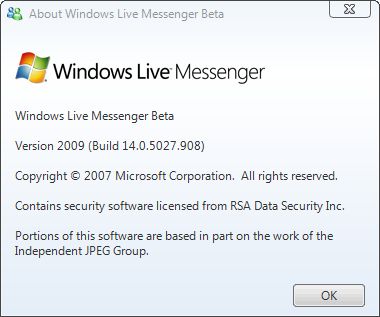
Windows Live Messenger 9.0 (2009) Beta Build 14.0.5027.908 was made available for download on September 17, 2008 as an integral piece of the Windows Live Wave 3 puzzle. Windows Live Messenger 9.0 is designed as the successor of version 8.5, which was finalized as a component of Windows Live Wave 2 and offered both leaked and officially starting with November 2007. By the end of November 2007, the first private Beta build of Windows Live Messenger 9.0 labeled as 9.0.1407.1107 was also leaked and up for grabs from various third party sources. Now with Build 14.0.5027.908, Windows Live Messenger 9.0 (2009) has reached the public beta stage.
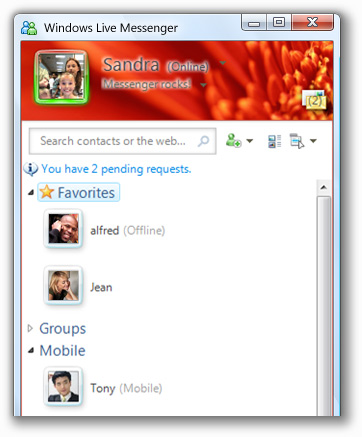
“After months and months of hard work (and a lot of fun!) the Windows Live Messenger team is proud to release our latest beta,” revealed a member of the Windows Live Messenger team offering a few details on the new features available to end users starting with Favorites. “If you are like me, you have a few IM buddies you chat with a little more frequently than others. People like your family, best friends, or significant other hold a special place in your heart, and now they hold a special place in your favorite IM client.” But at the same time, there are additional features delivered with this Beta, including Groups, What’s New Feed, Personalization, Photo sharing etc. The graphical style and user interface of Windows Live Messenger 9.0 (2009) has evolved consistently compared to version 2.0. Users will be able to notice that the implementation of the new GUI spans from the main window of the new iteration of Microsoft's instant messaging client all the way to the conversation window.
“Messenger has had groups for some time now, but they were nothing like the new Groups! You can create a group of friends that has its own conversation window, among many other benefits. It’s a whole new way to stay in touch with your sports team, community group, or just a bunch of friends,” the Windows Live Messenger team representative added. Build 14.0.5027.908 of the IM client is designed to be aware of what a user's friends are up to. In this regard, version 9.0 Beta offers notifications via the What’s New Feed feature every time a buddy makes modifications to their Windows Live Space, the display picture or their status. “Messenger has always had great ways to express yourself, but in the latest version we take it to a whole new level. Dynamic display photos, animated display photos, and hyperlinked personal status message URLs,… but the most dramatic feature has to be Scenes. Wait until you see it,” promised the member of the Windows Live Messenger team. In addition, Windows Live Messenger 9.0 (2009) Beta Build 14.0.5027.908 also permits end users to sign in from a variety of locations and from different devices simultaneously. To complete the experience, Microsoft has also improved the photo-sharing capabilities of the instant messaging client delivering two-way synchronization functionality. Windows Live Messenger 9.0 (2009) Beta Build 14.0.5027.908 is available for download via the installer for Windows Live Wave 3 Beta via this link.
|
|
| Article rating: |
|
Very Good (4.0/5) |
71 vote(s) |
|

|
|
|
User opinions: |
| Comment #1 by: Rahat on 18 Sep 2008, 11:12 GMT | reply to this comment | awesome...this is so handy...i love it.......... |
| Comment #2 by: stranger on 18 Sep 2008, 15:45 GMT | reply to this comment | well, i got error that WINDOWS LIVE MESSENGER can only be installed on windows xp or windows vista
isn't strange?
becz i am already using XP operating system SP2 |
| Comment #3 by: Ken on 25 Sep 2008, 20:47 GMT | reply to this comment | why window live messenger beta 9 build 14.0.5027.908 unable show emotion when i writing? actually those emotion icon i save already,and each emotion save by different key shortcut,when i write out that key words they didn't automatic change to emotion icon.that previous version i used before still can,but this newer version got this trouble. |
| Comment #4 by: Ken on 25 Sep 2008, 20:49 GMT | reply to this comment | if you have a patch that able repair those problem,please sent it to me,i'll very much appreciate. |
| Comment #5 by: zaid on 28 Sep 2008, 12:08 GMT | reply to this comment | please help me : i installed Windows Live Messenger 9.0 (2009) Beta Build 14.0.5027.908 and i lost my contacts list.noone on my contacts list? |
| Comment #5.1 by: Shane on 14 Jun 2009, 05:00 GMT | I too have lost all of my contacts with this latest update - 14!!!! Previous updates I lost all my winks and emoticons. Why do I put up with this crap - coz my family uses MSN. Im not impressed at all. All atempts at putting my contacts back on have failed. I'll try o download it again before I give up.
Grrrrr.... |
| Comment #5.2 by: gumby. on 16 Sep 2009, 16:29 GMT | I downloaded the latest Windows Live Messenger (2009) yesterday and lost my contacts list as well. You're given the option to import contacts from other services but that's about it. Am I missing something? Is there an obvious solution to this problem? |
| Comment #6 by: hana on 02 Oct 2008, 02:51 GMT | reply to this comment | yeh! i got the same problem! "The Windows Live programs you've chosen can only be installed on Windows Vista or Windows XP operating systems"
but i have windows XP and SP2?
wth?
ne ideas? |
| Comment #7 by: Stefan on 02 Oct 2008, 07:54 GMT | reply to this comment | Yup I've got the same problem, "The Windows Live programs you've chosen can only be installed on Windows Vista or Windows XP operating systems" I have WinXP Pro with SP2. |
| Comment #8 by: Collin on 11 Oct 2008, 02:40 GMT | reply to this comment | I have the same problem as Ken, unable to show the emotions. Any idea why? |
| Comment #9 by: martina on 11 Oct 2008, 12:05 GMT | reply to this comment | Yes, why is that, that I can't instal it although I'm already using Win XP?!?!?! |
| Comment #10 by: Kathy on 11 Oct 2008, 14:21 GMT | reply to this comment | Where in the world did all my contact list go??? I have no one in my list.. that's so bad. can anyone help me? or tell me why did this happen?? and when I try to add people, an error appears and say that it is not compatible with the version I am using. what's up with this new version of msn. I'm hating it!!! |
| Comment #11 by: Dominatro on 12 Oct 2008, 01:25 GMT | reply to this comment | the new changes to windows live messenger 9 seem to be pretty solid...but i strongly believe that u should have the ability to delete certain groups that have been added...such as the "favorites" and the "groups" tabs...i long ago set up a series of groups that fit my needs...and i maintain it...but these two added groups come to the top of the list and push everything down (i have a kind of idiosyncrasy that all my tabs have to be visible without scrolling when they are closed)...not only that but the font size of the names of the groups are way bigger than that of the older versions. i think there should be more options as to wat size and amount of tabs and everything...to appeal as best as possible there should always be the option...we should not have to deal with something like unwanted group tabs(i used to want to delete the other contacts tab til i started using it) this also goes for conversation window resizing...i noted a max length of about 700 pixels...and considering the size increase of the contact's picture in the conversation(this should be an option where we have multiple choices to re-size the picture, not just small, medium or large) i feel that the max length should be far longer...especially for those who have higher resolution screens
now the sole technical glitch i have found so far is that when i set a default color for my conversation windows it does not end up applying to whatever window i open unless i do it for each one. another piece to this glitch is that if i set, black as an example, as my default background color and in a new window that hasn't been changed yet i click "default color" in the color tab and the screen stays the original default sky blue. thus i'm forced to go into "more colors" pick black specifically even tho it is already set as my default and make it the default for that window...i don't know if that is a glitch or the way this version is programmed but it's a hassle
on a good note....after all this bad aha...i LOVE the layout and the vista-esque shape of the windows and pop-up boxes. All the visuals look spectacular...i also liked the customizability of the messenger main window with a scene in the background...i now have a perfect shot of a picture i made of earth in photoshop :)
if the glitches are fixed and my suggestions taken into consideration in a later version of windows live messenger 9 then i can't see why not windows live messenger isn't the BEST messenger available on the net |
| Comment #12 by: Miriah on 12 Oct 2008, 04:14 GMT | reply to this comment | I lost my contact list and it says hotmail addresses are not compatible as well. |
| Comment #13 by: arkan on 12 Oct 2008, 11:52 GMT | reply to this comment | YAP, I have same problem "The Windows Live programs you've chosen can only be installed on Windows Vista or Windows XP operating systems"
I'm using WIN XP + SP2 (I hope so)
This error is realy PAIN IN THE A.S |
| Comment #14 by: dre on 12 Oct 2008, 17:44 GMT | reply to this comment | hi there! i had the same problem that i couldn't install messenger 9...the solution for me was to install windows installer version 3.1...that's all folks:) i hope its help for you:) |
| Comment #15 by: Ahmed on 13 Oct 2008, 06:30 GMT | reply to this comment | I lost All of my Contacts .. How Can I get them back ? |
| Comment #16 by: Nemanja on 13 Oct 2008, 12:57 GMT | reply to this comment | "The Windows Live programs you've chosen can only be installed on Windows Vista or Windows XP operating systems" If you have a skin (I had Vista Inspirative Pack), uninstall it, and it will work. |
| Comment #17 by: jeff on 13 Oct 2008, 18:43 GMT | reply to this comment | Yup I've got the same problem, "The Windows Live programs you've chosen can only be installed on Windows Vista or Windows XP operating systems" I have WinXP Pro with SP2. ???? |
| Comment #18 by: Natty on 15 Oct 2008, 17:10 GMT | reply to this comment | Lost All Of My Contacts How Do You Get Them Back?? Please Help Me Thanks. |
| Comment #19 by: Nicole Paul on 16 Oct 2008, 09:44 GMT | reply to this comment | I was amazed upon seeing the new shape but has few points:
1/ I can't use plus which is a real loss.
2/ No winks on the cha windows.
3/ Slower in connecting to the server.
4/ Downloading featured emoticons became very easy.
5/ I loved the (whats new) tab.
6/ Unlike other viewers, I had my previous modified emoticons, winks, display pictures and wallpapers. (I was using WLM9 not 8).
Waiting for Plus Support Team. |
| Comment #20 by: mulina on 19 Oct 2008, 10:54 GMT | reply to this comment | problem:
"The Windows Live programs you've chosen can only be installed on Windows Vista or Windows XP operating systems"
solution:
"Install windows installer version 3.1...that's all folks:) i hope its help for you:)"
that solved my problem too!! thanks dre ! :)) |
| Comment #21 by: toni on 19 Oct 2008, 10:59 GMT | reply to this comment | IT is good , but in mi PC. in mi tab. down doesnt work the IM.,call phone., messenger., he does not work there nothing just TODAY. Whay ?
And what is the favorites group ? What thay help? |
| Comment #22 by: Luke on 20 Oct 2008, 02:22 GMT | reply to this comment | I have Windows XP operating system, but contrary to what I've read here, the new upgrade Windows 9 will not install on my system. Also my contact list has disappeared completely. How do I get my list back? |
| Comment #23 by: mahlan on 21 Oct 2008, 03:03 GMT | reply to this comment | i have the same problem as zaid.. it does not show any of my contacts.. say i need to add.. i hav to resort bac to the old msngr 8.5.. cud som1 tell be how to solve this as i wud really like to use the new msngr |
| Comment #24 by: Kuba on 22 Oct 2008, 22:12 GMT | reply to this comment | it happend to me to...but ..
I found it out. :))
1. Fully update u're windows from Microsoft Windows
U have to have this update in Add or remore programs after u ve finished the update .
--- Windows Instaler 3.1----
restart pc
instal wlsetup-web (windows live instaler betta )
Good luck. |
| Comment #25 by: bob on 25 Oct 2008, 23:47 GMT | reply to this comment | To all those xp sp2 people who get the "can only be installed on xp or vista" messege, you have to upgrade to sp3 |
| Comment #26 by: mahmoud on 26 Oct 2008, 17:26 GMT | reply to this comment | no u dnt have to upgrade to sp3..just download "Windows Installer 3.1" from microsoft site or any site and install it,,and the problem with be solved..i tried it,,and it was solved ...i mean the problem "can only be installed on xp or vista" |
| Comment #27 by: Josephine on 01 Nov 2008, 13:16 GMT | reply to this comment | I also got the same problem with my contact list. All gone. :( Is there any way to get them back? Because if I add my contacts, nothing happens. And the weirdest thing is that my sister also downloaded the beta and my contact list worked fine on her computer.. =/
Please help me! |
| Comment #28 by: help! on 01 Nov 2008, 17:05 GMT | reply to this comment | I also got the same problem with my contact list. All gone.
me too. |
| Comment #28.1 by: mahli on 25 Nov 2008, 06:25 GMT | http://download.microsoft.com/download/0/6/1/061F001C-8752-4600-A198-53214C69B51F/dotnetfx35setup.exe.
download that and see if it works... its an update for .net framework.. it worked for me |
| Comment #29 by: Renegore on 02 Nov 2008, 11:00 GMT | reply to this comment | To all of those people who cannot see your contacts, there is a separate "Contacts.msi" file which you will have to download and install in order for you to see your contacts again. The download link is: http://cid-a4dd1fa4d01105e6.skydrive.live.com/self.aspx/Windows-Live-Wave-3/Contacts.msi
Copy and paste that into your web brower, download and enjoy WLM 2009! |
| Comment #30 by: Toni on 08 Nov 2008, 18:04 GMT | reply to this comment | It is good, but he doesnt work very well. I cant qange contact e-mail with name or e-mail EDIT. Do you understand me. |
| Comment #31 by: Stuart on 09 Nov 2008, 09:48 GMT | reply to this comment | i had the problem with the msn plus not working with the new beta but the msn plus have released a new compatible with the beta
http://www.msgplus.net/news/2008/10/31/compatibility-with-messenger-2009-beta/ |
| Comment #32 by: Sarah on 09 Nov 2008, 21:35 GMT | reply to this comment | How come when I send custom emoticons, my recipiants can see them but I can't? |
| Comment #33 by: Ray on 10 Nov 2008, 23:11 GMT | reply to this comment | I have also lost my contacts. I have XP with SP3 but it simply will not load my contacts from Outlook, a CSV file or Hotmail.
There must be a solution.
Anyone with the answer?? |
| Comment #34 by: Marcus on 11 Nov 2008, 07:16 GMT | reply to this comment | i were close my display picture previously while chating.
but then i cant enable the display picture back.
do anyone know how to solve it? |
| Comment #35 by: usman on 14 Nov 2008, 01:43 GMT | reply to this comment | Where in the world did all my contact list go??? I have no one in my list.. that's so bad. can anyone help me? or tell me why did this happen? |
| Comment #35.1 by: mahli on 25 Nov 2008, 06:27 GMT | http://download.microsoft.com/download/0/6/1/061F001C-8752-4600-A198-53214C69B51F/dotnetfx35setup.exe.
download that and see if it works... its an update for .net framework.. it worked for me |
| Comment #36 by: Arnold on 14 Nov 2008, 17:05 GMT | reply to this comment | i'm getting this error message all the time
(Windows Live Communications Platform has encountered a problem and needs to close. We are sorry for the inconvenience.)
why? |
| Comment #37 by: Christian on 14 Nov 2008, 21:01 GMT | reply to this comment | when i add a contact it say congradulations you added a contact or something like that and then it wont show up on my contact list plese help me |
| Comment #38 by: roguester on 18 Nov 2008, 15:02 GMT | reply to this comment | i cant use my emoticons!!! any update on how to make this work? |
| Comment #39 by: King Moeha on 20 Nov 2008, 17:44 GMT | reply to this comment | everything works just fine, but I can't see my emoticons! my contact persons can see them but can't... If someone has a solution for my problem, let me know :) |
| Comment #40 by: Soffieeh on 20 Nov 2008, 23:22 GMT | reply to this comment | Why can't you install the plus? I have this new msn version and the plus and it works perfectly :S
you just have to click on a link that says something about the Windows Live Messenger BETA where you donwload it, look for it, it's there (:
I also had the 8, but one question, when you're writing, do your emoticons show? I still have them and everything, but I can't see them =/ |
| Comment #41 by: starkilla69 on 05 Dec 2008, 20:16 GMT | reply to this comment | CANNNNN SOMEONE HELP ??
i downloaded the new msn,
but on my contact list only certain emoticons show in my msn name..
but i really dont like how that looks
does anyone know a way to change it so that every emoticon shows?
and so it doesnt show up like this.. (L) ?????????????
help :( |
| Comment #42 by: Moe on 15 Dec 2008, 08:31 GMT | reply to this comment | Everytime i Sign into messenger, The moment I click on the window it Signs Out!! Wtf?! I cant start a convo with anyone!! It signs out then starts reconnecting!! :S |
| Comment #43 by: juliana on 21 Dec 2008, 23:55 GMT | reply to this comment | well i like the new version its really really stylish and good but why is there no messenger plus and scripts and when will it get them?
thats the only thing missing and i hope it gets it soon. |
| Comment #44 by: po on 23 Dec 2008, 00:38 GMT | reply to this comment | New WLM looks great, but I'd like to know, how I can add those icons (formelly called "tabs") to my contact list (e.g. Office icon, Xbox icon on the screenshots).
Thx a lot. |
| Comment #45 by: randy on 27 Dec 2008, 15:45 GMT | reply to this comment | hey everyone i got a lot of problems too, not as extreme as your problems with WLM, but they are a pain, but everyone has got to remember that THIS IS A BETA, its obviously not completely done, but ready enough to work at optimal performance to showcase to the consumers |
| Comment #46 by: Mia on 16 Jan 2009, 23:31 GMT | reply to this comment | i can't seem to find a msn live plus! version that matches this version of msn, HELP!! |
| Comment #47 by: samya on 20 Jan 2009, 13:56 GMT | reply to this comment | heeey everyone !
i wanna ask how can i download msn plus on the last version of the msn =S ??!! |
| Comment #48 by: matt on 12 Feb 2009, 21:33 GMT | reply to this comment | I hate this why has the layout changed the display pictures were fine on the right side. & now everything u type gets a bullet point at the side of it why is this? i cud cope with the pictures on the left but having every sentence bullet pointed is annoying I cant even get rid of them. |
| Comment #49 by: Elie on 17 Feb 2009, 14:25 GMT | reply to this comment | I'm using windows live messenger 9.0 but i cannot call a contact neither start a video call.
Can someone help?
Thank you |
| Comment #50 by: Ricardo on 20 Feb 2009, 02:17 GMT | reply to this comment | man, im so mad, i have windows xp and i downloaded it, and i clicked sign in and then my contactlist wont show, and i cant do anything, i cant change teh scene, or anything, it doesnt work right and my sister has vista and it works perfectly in her computer, is this messenger not compatible with xp or what? |
| Comment #51 by: Xpletiver on 20 Feb 2009, 16:31 GMT | reply to this comment | Microsoft should be ashamed of releasing WLM 2009 with these contact list issues. Further that they have not jumped to provide a solution is absolutely disgraceful. |
| Comment #52 by: Chloe. on 11 Mar 2009, 15:37 GMT | reply to this comment | on my messenger , the one i had before showed all the colours on the names and things but now the colours wont show up its all these codes :S , someone please help ? |
| Comment #53 by: flackb on 21 Mar 2009, 12:42 GMT | reply to this comment | Spent ages trying to find out how to recover my contacts. Finally gave up and re-installed WLM 2008. Works fine. |
| Comment #54 by: telma alves on 06 Apr 2009, 16:53 GMT | reply to this comment | I'm having problems. The version 2009 is install, it happens that I'm having problems in signing in. No error message, just 'Welcome back!' The Windows Live M. icon says 'Not signed in'. I uninstall and install a lot of times, I've no idea what's the problem. |
| Comment #55 by: Sharon on 13 Apr 2009, 10:00 GMT | reply to this comment | Can someone tell me why some contact display pictures do not appear in version 9, when they do appear in the profile page, and were always there in previous version of messenger ? I find this really annoying ! |
| Comment #56 by: Paul on 16 Apr 2009, 22:12 GMT | reply to this comment | Can Someone Help Me..
I Sign In To Wlm 9.0 And Open A Convo And At The Top Where There Name It.. It Doesnt Actually Show It It Shows For Example K... And Thats It Instead Of The Whole Name
Help Anyone?? |
| Comment #57 by: simon on 21 Apr 2009, 19:34 GMT | reply to this comment | i can't even decide from where to start complaining.
for the first thing i liked beeing online, now i'm suddenly "available".
everything is on the other side of everything.
every time you move your arrow over a contact you see in front of everything an annoying little blue window pops out blocking the viev to what i wanted to read.
also same problems as the other people here the colors in diffrent windows.
i've got to ask what was wrong with the layout of live messenger 8?
MY personal oppinion is, stick to WLM 8 as long as you can.
why throw away something that works better than the uprgrade for it. |
| Comment #58 by: Magnus on 21 Apr 2009, 21:33 GMT | reply to this comment | I don't like the new Messenger. It has a major fault. Almost every minute, I get logged out for no adequate reason. I can't have a conversation without being interrupted by that stupid glitch. |
| Comment #59 by: justabloke on 10 Aug 2009, 02:45 GMT | reply to this comment | Absolute rubbish! After installing "live" I can no longer receive text in messenger from any of my contacts, they can see my text and I can see the "ann is writing" above the text input box but nothing comes thru to me. No text or nudges.
Ive spent over 3 weeks trying to find the issues until I'm blue in the face.
I am deff not going to pay my hard earned money on anything microsoft again!
I am now investigating ubuntu as replacement! |
| Comment #60 by: Missy Storm on 01 Sep 2009, 00:45 GMT | reply to this comment | ABSOLOUTLEY HOPELESS.
Firstly, just 'cause I'm online doesn't mean I'm ''available''.
Second, I've lost all my contacts and cannot add them, Obviously, I'm not alone here. I'm wasting hours trying to repair it and am currently trying to get back my old WLM. DO NOT upgrade to this. |
| Comment #61 by: ReeRee on 01 Sep 2009, 16:10 GMT | reply to this comment | I Need Help!
I Installed This MSN, And Now I Cant Sign In Due 2:
Firewalls (Turned Them Off Still Nothing)
Internt Connection - Im Using Internet Now - OBVIOUSLYY WORKING
DNS & Keyports - ? What Are They
Anyone Had The same Problems? |
| Comment #62 by: Thanasis on 18 Sep 2009, 13:23 GMT | reply to this comment | How many contacts is the limit of the current version of windows live messenger. I think that is surely greater than 1000 that was in the past, as I
have more than 1000.. I have almost 1150 I guess.. Do you know someone this limitation number? |
| Comment #63 by: Lorahh on 21 Sep 2009, 08:55 GMT | reply to this comment | Iv'e Downloaded msn messenger 9.0 & msn plus live..
&+ on the messenger i can see every1's name in colours but when i start to chat to people.. i can't see the colours on the acual chat page.. HELP !! i really want my colours in the chat :/ |
| Comment #64 by: James Deakin on 21 Sep 2009, 21:10 GMT | reply to this comment | I've got a problem and it seems strange...
I had the previous version to the version that i've got now with msn plus aswell, but i installed the update for the plus on the old one. When I did that, the msn plus didn't work...
I then installed the newest version of msn (14.0.8089.726) and the plus seems to be showing colour and working. However, on the convo windows that I have with my friends, my name (and theirs) doesn't come up in colour... it just shows all the coding to get the colours yet I have got plus installed :(
Anyone know why it doesn't show the colour on my conversation windows? |
|
|
|