

Softpedia
 

NEWS CATEGORIES:


NEWS ARCHIVE >>
SOFTPEDIA REVIEWS >>
MEET THE EDITORS >>
Home > News > Microsoft > Windows Live

February 17th, 2009, 10:11 GMT · By

Windows Live Hotmail Wave 3 Inaccessible - Login Problems

SHARE:

Adjust text size:


Windows Live
Enlarge picture
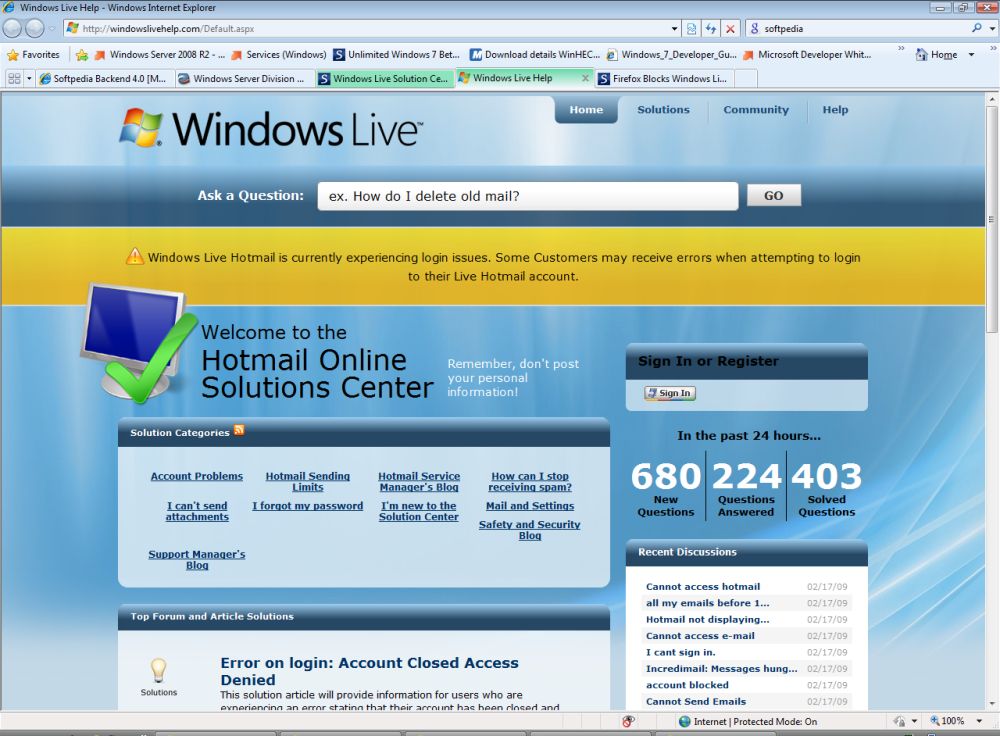
Microsoft has confirmed issues with Windows Live Hotmail, revealing that the service cannot be accessed by a range of users who are confronted with various login problems. At the end of the past week, Softpedia started receiving reports from Firefox users that the open source browser was blocking Windows Live Hotmail Wave 3. However, in the notification provided by Microsoft there is no mention of Firefox whatsoever, and only an indication that Windows Live Hotmail itself is the source of the problems.

Firefox users are reporting not being able to access Windows Live Hotmail or to use the email service under normal parameters with the open source browser following the implementation of the latest update for Wave 3. This is of course not the first time that Firefox fails to play nice with Windows Live Hotmail, however, it is the first time that the latest version of Windows Live Hotmail, namely Wave 3, has problems working properly in Firefox.

I played around with the default installation of Firefox 3.1 Beta 2 and found absolutely no issues accessing Windows Live Hotmail. In this context, neither Firefox nor a bug in Firefox is responsible for access to Windows Live Hotmail being lost, or the service running as it normally should. As was the case in the past, Firefox users have identified various add-ons for the browser as the source of the issues.

“After I updated I started having problems opening my mail. I was using firefox. and I also had the paypal plugin installed. Through trial and error I found out that the paypal plugin was causing the problems with the new update. Don't know if this helps any, just thought I would throw it out there,” writes a user identified as StarTrekker.

“WOT KILLING HOTMAIL. I'm also facing same issues. I don't have adblock addon installed and i can't find it in addon's list. I have WOT installed so let Microsoft know WOT is also killing it...” added Kausar; with Jacek saying that “Ok, I did check Hotmail on several PC running XP, 7, Ubuntu, SimplyMepis and old iMac with Safari and IE. Various browsers, various versions. I had problems with FF on XP only. I managed to solve the problem. Go to AdBlock Preferences (ctrl+shift+e) then Filters then Remove all custom filters. Restart browser. After that hotmail should be ok. I have it as before no stupid messages etc. Please note - disabling AdBlock did not help, reinstaling either. Uninstalling did but who wants to uninstall AdBlock?”

“Through my own trial and error fixing I have found it was not ad block plus at all, it was the firefox addon "No Script". Make sure to allow "MSN.com" "Hotmail.com" and "live.com". I have had no problems after allowing these in No Script,” explained Michael.

Windows Live Solution Center
Enlarge picture
Fact is that Windows Live Hotmail has had problems with the Adblock add-on, and we verified that the default installation of NoScript indeed handicaps the email service to the point of making it unusable. Users running Firefox are advised to disable all add-ons and to see whether they can access and use Windows Live Hotmail, or to use another browser to determine if Firefox is indeed the problem. If the service functions on Firefox with add-ons disabled or in an alternative browser, re-enable the add-ons one by one trying to access Windows Live Hotmail after each step in order to identify the specific item that is causing the problems. Solutions for making Firefox no longer block Windows Live Hotmail by tweaking Adblock and NoScript are presented above.

Still, Microsoft's acknowledgment of login problems for the email service, suggest that Firefox, or its add-ons might not be the cause. “Windows Live Hotmail is currently experiencing login issues. Some Customers may receive errors when attempting to login to their Live Hotmail account,” Microsoft revealed.
TELL US WHAT YOU THINK:

16,004 hits · 7 comments · Link to this article · Print article · Send to friend · Subscribe to news

MUST-READ RELATED ARTICLES:


Microsoft Pushes Mobile Phones in the Cloud

Microsoft Keeps a Close Eye on Windows Live Servers

Patched Google Chrome Now Works with Windows Live Hotmail

Microsoft Hits the Break on Construction of New Data Centers

Microsoft Rolling Out POP3 for Windows Live Hotmail

READER COMMENTS:


Comment #1 by: Chuck on 17 Feb 2009, 18:13 UTC reply to this comment

This morning I could not login to live.com with firefox (it kept refusing my username and/or password), but could use firefox from a different pc. Before the problem occurred, I had installed the paypal addin. So I uninstalled paypal, but that didn't fix it. Then I went into the cookies (tools/options/privacy/show cookies) and deleted the folders "login.live.com" and "mail.live.com". Problem resolved.


Comment #2 by: grant on 21 Feb 2009, 15:55 UTC reply to this comment

This is a Hotmail issue, not a Firefox issue. I am an avid FF user, but I can't even log in using Internet Explorer. Back to Firefox, I am also not using ANY of the aforementioned add-ons.

Microsoft, seriously... get with the program.


Comment #3 by: Stuart on 07 Mar 2009, 09:05 UTC reply to this comment

I've cracked this problem (for me at least) by looking at the Add-ons as suggested in this article. I only experienced the problem in Firefox, not Internet Explorer or Opera Mobile. In Firefox I went to Tools/Add-ons/Extensions, and disabled Microsoft .NET framework assistant, and that worked first time. Didn't need to touch any Plug-Ins or Themes.


Comment #4 by: Hector Bericochea on 23 Apr 2009, 23:44 UTC reply to this comment

It has become gradually more difficult to read my mail. Somehow, in a roundabout manner I have succeeded. But, what happened?


Comment #5 by: Elixir on 06 May 2009, 02:35 UTC reply to this comment

I have had the same problem with Firefox remembering my login information in Vista. The XP operating system is fine the problem is only with Microsoft's Vista operating system. It probably has something to do with Vista's security setup, either that or Microsoft is just kicking the competition around? Actually it's probably a little bit of both those reasons.

The only way I have been able to correct the problem is to download the IE Tab add-on. It allows you to set up a tab to open with the IE engine embedded. If you have a site that is giving you login problems, when it is open select the tools button. In the dropdown box select the IE Tab Options. The problem web site should be highlighted in the pop-up display box. Select the add button to the right and it will transfer the web site to the list of sites that you want to open with the IE operating engine.

Now that web site will always open under the IE operating engine when you start up Firefox. After you login to that web site if you go back to the tools button and select options again, you can save all opened tabs as your home page. Now when you start up Firefox you will still have all the advantages of Firefox and those hard to login web sites will automatically load and sign you in the same as they did before.

Someday Microsoft will probably stop teasing Firefox and let them in on what they have to do to get around this obstacle, but then again maybe not.


Comment #6 by: ric91stang on 07 Sep 2011, 00:57 UTC reply to this comment

I can not login to hotmail.com, or live.com using IE 8.0 today at all (9/6/2011). I have WinXP SP3.


Comment #7 by: BJ on 19 Oct 2011, 17:58 UTC reply to this comment

My live.com account was "jacked" . My daughter called this morning and said she received an email from me asking for money, stating a relative in the UK was ill and needed an operation. Will these crooks ever give up? She knew it was not from me What can I do now? Can I recover anything on this account?

Copyright © 2001-2012 Softpedia. Contact/Tip us at

WindowsGamesDriversMacLinuxScriptsMobileHandheldNews

SUBMIT PROGRAM   |   ADVERTISE   |   GET HELP   |   SEND US FEEDBACK   |   RSS FEEDS   |   UPDATE YOUR SOFTWARE   |   ROMANIAN FORUM