 14 DAY TRIAL //
 Microsoft introduced a range of optimizations designed to minimize OS memory use in Windows 8, hundreds of modifications, making it possible for the platform to run on just 64MB of RAM.
As a result of the work put in by the Windows fundamentals team, the next iteration of Windows already does a better job at leveraging system memory compared to its predecessor.
The software giant launched Windows Developer Preview, a Milestone 3 Build of Windows 8, at BUILD in mid-September 2011, and early adopters can download and test the release themselves and get a taste of the memory usage improvements.
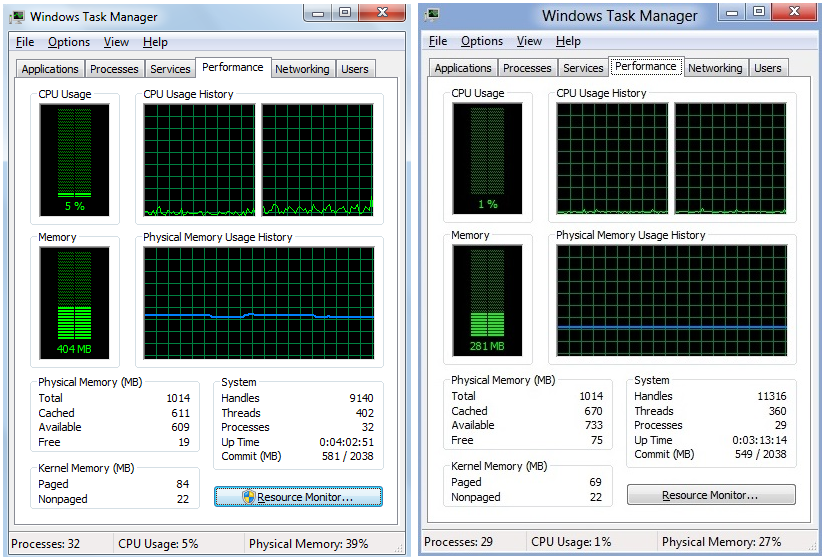
The image at the top of this article contains two screenshots of Task Manager, one in Windows 7 Service Pack 1 (SP1) and the other in Windows 8, installed on the same machine, a Lenovo S10 with 1GB RAM.
Bill Karagounis, the group program manager of the Performance team, notes that both operating systems had been rebooted multiple times, and were left idle for a while before the screenshots were taken.
“The Windows Task Manager contains the main view of system memory through its “In Use” statistic. The (…) graphics compare memory consumption on Steven [Sinofsky]’s 3+ year old netbook that he was using at the //build/ keynote recently, running Windows 7 at idle, and then with the same machine running Windows 8,” Karagounis said.
“The specific hardware making up a machine, memory use of drivers, and even uptime can cause variability, so memory results will be different on different machines (or even the same machine at different times). As you can see though, Windows 8 is doing well relative to Windows 7.”
I played around with Windows 8 Developer Preview Build 8102 M3 recently and found that the platform becomes usable on machines with as little as 128 MB of RAM, and can still run even if the amount of memory is reduced to 64MB.
Karagounis also suggested an interesting test scenario for Windows 8, designed to show how low memory usage can drop.
“For a bit of extra fun on a test machine, go to device manager and disable your display adapter (unload the graphics driver). You’d never run your machine this way but this does give you an even closer approximation of the memory use of Windows itself. With a disabled graphics driver, the machine above gets under 200MB after idling for a while,” Karagounis said.
Windows 8 Developer Preview Build 8102 Milestone 3 (M3) is available for download here.