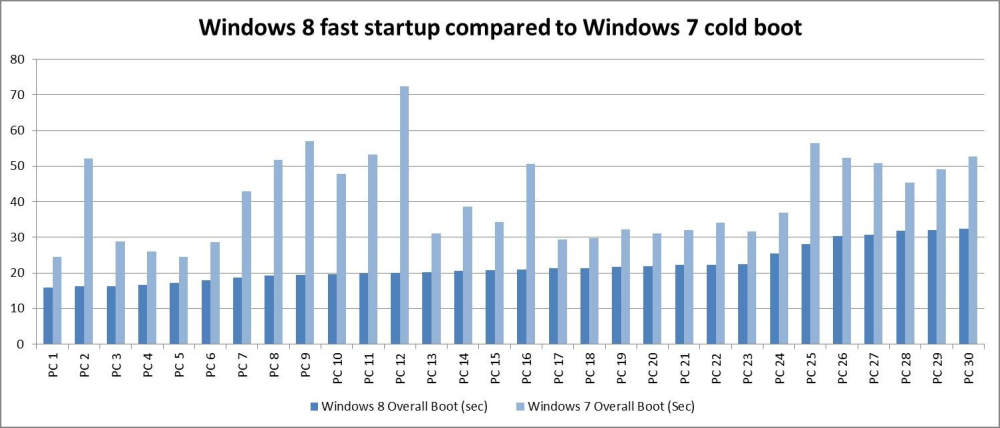

The winner of the first Windows 8 vs. Windows 7 boot performance measuring contest is clear, and I doubt that we’ll ever see a comeback from Windows Vista’s successor in future comparisons.
An important aspect of Windows 8’s evolution is the fine tuning of the start-up process. Technologies such as solid state drive (SSDs) and Unified Extensible Firmware Interface (UEFI) aside, the next iteration of Windows comes with optimizations which will let Windows 7 in its boot dust.
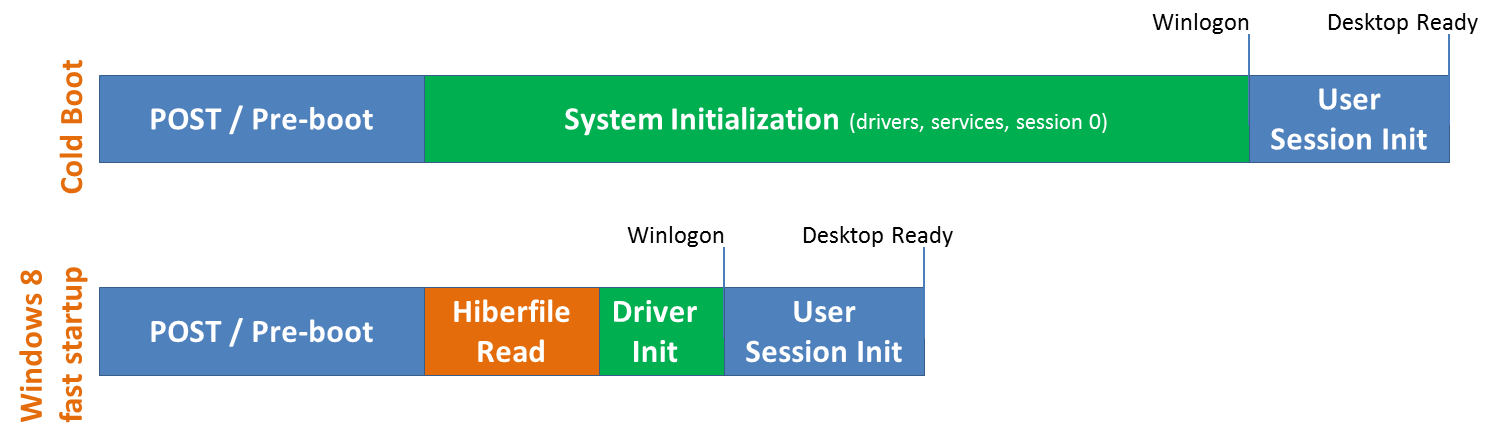
Featuring a new start-up mechanism which combines cold boot with resuming from hibernate, Windows 8 delivers unmatched speed, drastically reducing the time it takes toreach Metro-ready or desktop-ready.
The next version of Windows closes user sessions on shutdown, but makes sure to hibernate the kernel session.
Only a small portion of memory is actually written to disk, it’s what the Redmond company calls, session 0 hibernation, as opposed to full hibernation.
“If you’re not familiar with hibernation, we’re effectively saving the system state and memory contents to a file on disk (hiberfil.sys) and then reading that back in on resume and restoring contents back to memory,” explained Gabe Aul, a director of program management in Windows.
“Using this technique with boot gives us a significant advantage for boot times, since reading the hiberfile in and reinitializing drivers is much faster on most systems (30-70% faster on most systems we’ve tested).”
The two graphics included with this article, courtesy of Microsoft, reveal the comparison between the new Windows 8 start boot and the old Windows 7 cold boot.
It’s rather obvious, that no matter the actual device customers will be running, it will deliver superior boot performance if it’s running Windows 8 as opposed to Windows 7.
“It’s faster because resuming the hibernated system session is comparatively less work than doing a full system initialization, but it’s also faster because we added a new multi-phase resume capability, which is able to use all of the cores in a multi-core system in parallel, to split the work of reading from the hiberfile and decompressing the contents,” Aul added.
Users can watch a video of Windows 8 booting on an EliteBook 8640p (Intel Core i7-2620M, 8GB, 160GB SSD) in just 8 seconds below.
Yah you are right! And I don't understand why microsoft do that. Hibernation is its own disadvantage. But I hope We have a option to fully shutdown our computer or I will stick to my dual boot Windows 7 and Ubuntu 11.04!!!
Comment #2 by: Che@ter_007 on 10 Sep 2011, 05:33 UTC
Thats a really stunning time, 8s @@ but does this mean every single version of windows 8 will have the same boot time? or it depends on other things like cores?
Comment #3 by: SiavashJe on 10 Sep 2011, 10:39 UTC
Nice but that's the whole story? MS wants us to spend money on a new OS just to save a few seconds on Boot time? Even Joe Superneerd has got laugh at that one.
@tharan...like anyone cares about Linux...why don't you actually look at what Windows 8 can do (even at the Developers Preview Stage) and then post a comment.
windows 8 is cool.. u have to try it out before commenting
Comment #9.1 by: Zie25 on 28 Jun 2012, 17:32 GMT
Windows 8 has a very fast start up, but windows has ALWAYS had a start menu to click on. It is now gone and is very inconvenient for previous Windows users. This version of Windows will not be good for PC but it will be amazing for mobile devices and xBox. The start menu tile style is very modern, and looks cool, but it is very hard to find everything right away.
Just my opinion.
Comment #10 by: Windows 8 on 24 Nov 2011, 06:50 UTC
It's great to see that Windows 8 has a considerably faster boot time, as I feel that boot time is one of the areas in which Microsoft Operating Systems have always been sorely lacking in.
My ipod turns on really fast. However if you shut it down and it starts up from a "cold boot" it takes forever for the little "apple" icon to disappear. However I am not cold booting all the time. My windows machine is always completely shut down so it cold boots all the time. I would like to see how windows 8 cold boots, not comes out of a hybernation wake up like my ipod.
Comment #14.1 by: Joel on 05 Dec 2012, 20:42 GMT
Your iPod goes into sleep, not hibernation. Hibernation writes that state of the entire system onto your disk. This new type of shutdown writes only the kernel state to the disk so the system doesn't have to reload drivers and such.
Sleep, on the other hand, just puts the system into a low power state, but it's still on.
Windows 8 has a very fast start up, but windows has ALWAYS had a start menu to click on. It is now gone and is very inconvenient for previous Windows users.
The start menu tile style is very modern, and looks cool, but it is very hard to find everything right away. So difficult for me, that I want to reformate and install Windows 7 in my brand new laptop that I was forced to take with Windows 8. Anyone know whether I can back go down to 7 from 8???????
Share your thoughts on this story...
Comment #16.1 by: Tommy on 05 Mar 2013, 06:05 GMT
you can actually dual boot windows 8/win7...just insert your win7 dvd before on and makes sure in the bios setting it take DVD drive to boot first...:)