
Softpedia
 

NEWS CATEGORIES:


NEWS ARCHIVE >>
SOFTPEDIA REVIEWS >>
MEET THE EDITORS >>
Home > News > Microsoft > Windows

June 10th, 2011, 07:02 GMT · By

Windows 8 to Sport Multi-Screen Taskbar

SHARE:

Adjust text size:


Windows 8
Enlarge picture
In Windows 8, the Taskbar will no longer be limited to a single display when users connect multiple monitors to the same computer.

Customers running older releases of the Windows client, Windows 7 included, and also leveraging multiple monitors have undoubtedly been frustrated by the limited functionality of the operating system’s UI.

Even in Windows 7, the Superbar as the Redmond company called it at some point, proves that there’s really nothing super about it when users add extra monitors.

Anchored on just the main screen, the UI limitations force customers to come back to the Taskbar time and again, and to shift focus from any of the additional monitors they might be working on to the main display. Yes, it does get old after a while, really old.

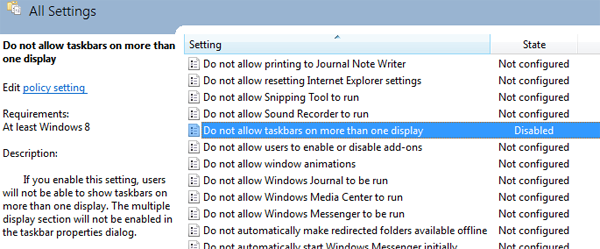
Apparently this will change with Windows 8 according to a find by ITWorld. There’s a Group Policy setting which reveals that as of the next major iteration of Windows, the Taskbar would also be displayed on any extra monitors connected to the same machine.

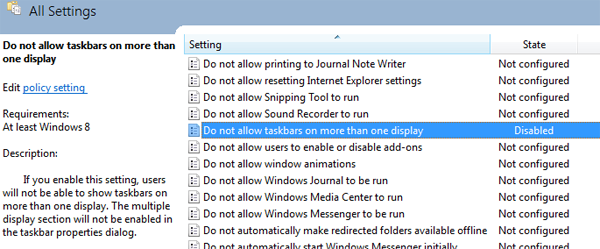
“Do not allow taskbar on more than one display,” reads the Group Policy setting which might be disabled by default.

Windows 8 GP
Enlarge picture
This of course means that Windows 8 will inherently stretch the Taskbar to additional monitors connected to a PC.

“If you enable this setting, users will not be able to show taskbars on more than one display. The multiple display section will not be enabled in the taskbar properties dialog,” the software giant says in the description of this particular Group Policy option.

If you ask me, multi-screen Taskbar is a long overdue feature in Windows, and introducing it in Windows 8 is more a case of “better late than never,” than anything else.

Microsoft has yet to offer official confirmation of the implementation of the multi-monitor Taskbar in Windows 8, or to offer any details as to its functionality and capabilities. Hopefully, some information will be shared with the public at the BUILD conference in September.
TELL US WHAT YOU THINK:

2,845 hits · 3 comments · Link to this article · Print article · Send to friend · Subscribe to news

MUST-READ RELATED ARTICLES:


Windows 8 Availability 2 to 3 Years after Windows 7

Microsoft Dogfooding IE9 RTW on 120,000 Computers

Windows 8 HTML5 and JS First-Class Citizens, but Don’t Rule .NET, XAML, and Silverlight Out

Windows 8 and Kinect NUI, Imagine the Possibilities

Windows 8 Pricing vs. Chrome OS (Free) and Mac OS X (Just $30)

READER COMMENTS:


Comment #1 by: angrysock on 10 Jun 2011, 08:35 UTC reply to this comment

Um, wrong screenshot?

Comment #1.1 by: Marius Oiaga on 10 Jun 2011, 09:20 GMT

Indeed... Fixed now! Thanks!


Comment #2 by: Charles on 10 Jun 2011, 12:49 UTC reply to this comment

This presents several problem or issues to figure out. What would be shown in the extended task bar? An extension of the current or a copy? If I don't have enough icons pinned to fill more than one task bar, then the other will show nothing? If it is a duplicate,then, what's the point? To make it usable the taskbar should hold the icons for the apps that are in that particular screen, so we can switch between them without going back to the main screen. So how about the pinned icons? If I pin an app to a secondary taskbar and disconnect the monitor, will it go to the primary taskbar or will dissappear altogheter? And if it goes to the primary, what if I the pinned apps in the secondary are so many that won't fit in the primary? It is not a 'simple' feature to implement

Copyright © 2001-2012 Softpedia. Contact/Tip us at

WindowsGamesDriversMacLinuxScriptsMobileHandheldNews

SUBMIT PROGRAM   |   ADVERTISE   |   GET HELP   |   SEND US FEEDBACK   |   RSS FEEDS   |   UPDATE YOUR SOFTWARE   |   ROMANIAN FORUM