 14 DAY TRIAL //
 Windows Explorer in Windows 8 will evolve with new file management functionality, not just fresh eye candy (through the adoption of the Ribbon / Fluent UI). Microsoft has confirmed a new experience for “copy jobs” in Windows 8 via the official blog set up to share details of the operating system’s development process with the world.
Alex Simons, a director of program management on the Windows engineering team noted that Windows 8 features improvements to the core file management commands associated with Windows Explorer: copying, moving, renaming, and deleting.
“Our focus is on improving the experience of the person who is doing high-volume copying with Explorer today, who would like more control, more insight into what’s going on while copying, and a cleaner, more streamlined experience,” he stated.
The video embedded at the bottom of this article is a demo of the new Windows Explorer copy jobs enhancements in Windows 8.
According to Simons, the evolution of file management in Windows 8 is an adaptation to the changes in user behavior, since older releases of Windows Explorer are not designed to deal with high-volume jobs or to perform multiple copy jobs concurrently.
“In Windows 8, we have three main goals for our improvements to the copy experience:
• One place to manage all copy jobs: Create one unified experience for managing and monitoring ongoing copy operations.
• Clear and concise: Remove distractions and give people the key information they need.
• User in control: Put people in control of their copy operations,” Simons stated.
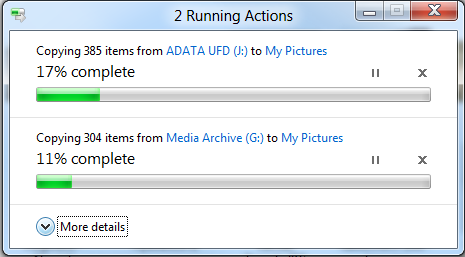
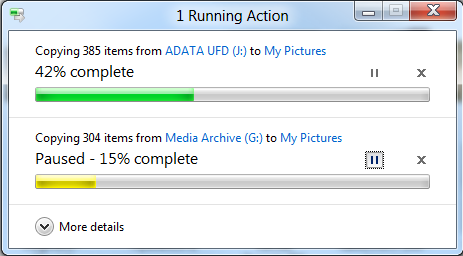
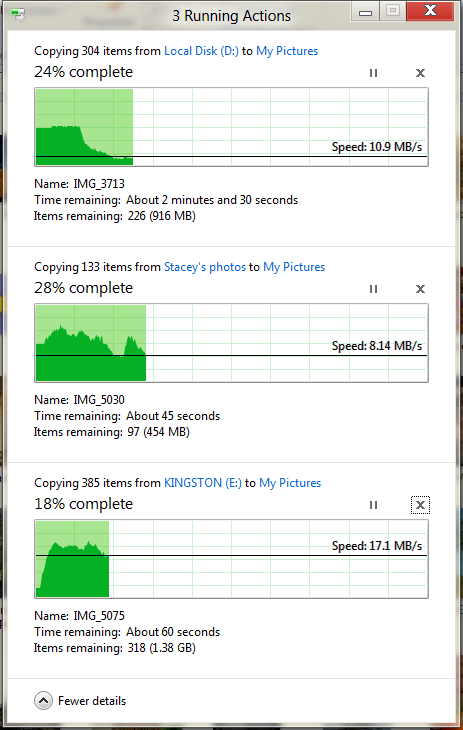
Windows 8 will feature a consolidated UI for all management actions, especially for concurrent Windows Explorer copy jobs. A single dialog will present all pending copy jobs, providing users with a new level of control over the ongoing processes.
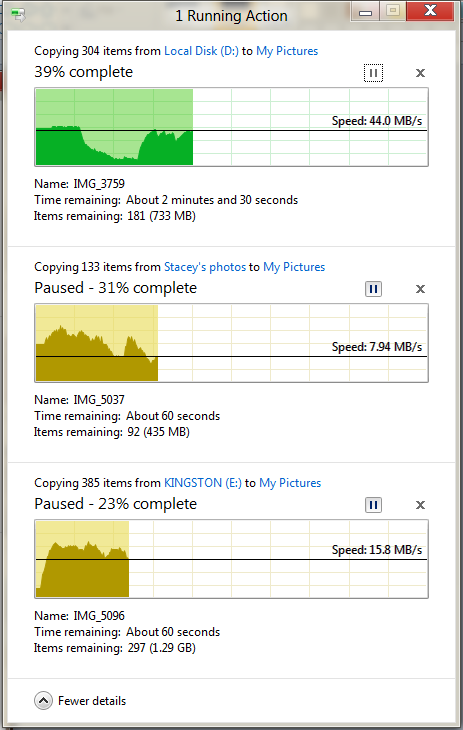
In this regard, Windows Explorer will enable Windows 8 users to pause, resume, and stop each one of multiple simultaneous copy operations.
“To support this new ability to prioritize and decide, we’ve added a detailed view with a real-time throughput graph. Now each copy job shows the speed of data transfer, the transfer rate trend, and how much data in left to transfer. While this is not designed for benchmarking, in many cases it can provide a quick and easy way to assess what is going on for a particular job,” Simons added.
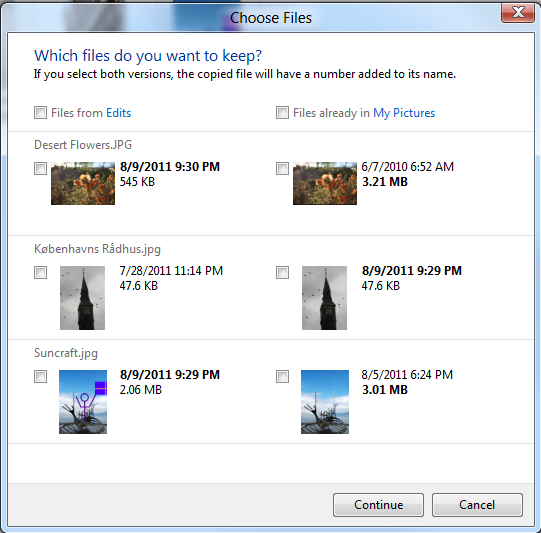
Next gen Windows Explorer comes with enhanced conflict resolution in relation to name collision during file management jobs. Users will be presented with streamlined and intuitive options to resolve issues that come up when dealing with files sharing the same label during copy or moving jobs.
“Our new design is much more clear, concise, and efficient, providing a much more visible and actionable approach to conflict resolution. All the files from the source are on the left," Simons explained.
"All the files in the target location with file name collisions are on the right. The screen layout is easy to understand and shows you the critical information for all the collisions, front and center in one dialog.”