 14 DAY TRIAL //
 The evolution to Windows 8
will make it extremely simple for users to wipe the slate clean and start fresh in case their computer starts acting up for whatever reasons from malware infections to faulty drivers.
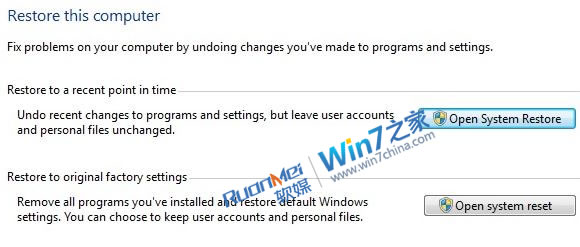
A new leaked screenshot reportedly from Windows 8 Milestone 2 (M2) shows the upcoming System Restore options that the next major iteration of Windows will feature.
The image, courtesy of Chinese website Win7China (via UltraWindows) reveals the new “Restore to original factory settings” feature which will be introduced in the successor of Windows 7.
According to the description of the option, Windows 8 users will be able to “Remove all programs you’ve installed and restore default Windows settings. You can choose to keep user accounts and personal files.”
Essentially, this feature will allow customers running Windows 8 to perform a system reset.
According to sources close to Microsoft, the main advantage of a Windows 8 system reset will be the speed at which it will happen.
The entire process is rumored to take only a few minutes at most, certainly outperforming a reinstall.
In fact, with customers being able to restore their Windows 8 PC to original factory settings in a matter of minutes, they will no longer need to reinstall their copy of the OS in case that something goes terribly wrong.
Windows 8 will also offer the traditional System Restore option designed to “fix problems on your computer by undoing changes you’ve made to programs and settings.”
This will be possible by restoring Windows 8 to a specific point in time. “Undo recent changes to programs and settings, but leave accounts and personal files unchanged.”
A Beta of Windows 8 is expected to be offered to early adopters in the second half of 2011.