
Softpedia
 

NEWS CATEGORIES:


NEWS ARCHIVE >>
SOFTPEDIA REVIEWS >>
MEET THE EDITORS >>
Home > News > Microsoft > Windows

September 23rd, 2011, 12:30 GMT · By

Windows 8 PCs with UEFI Secure Boot Won’t Lock Out Other Platforms

SHARE:

Adjust text size:


Windows 8
Enlarge picture
Users will be in full control of their PCs and will be able to install any operating system they want, Microsoft stressed, ending the controversy over the possibility that Windows 8 machines with UEFI Secure Boot could lock out third-party platforms. Not the case, the software giant says.

Tony Mangefeste, from Microsoft’s Ecosystem team set the record straight in a post on the ‘Building Windows 8’ blog, noting that customers will have the possibility of disabling UEFI secure boot, to install even older operating systems, including Linux, on their PC.

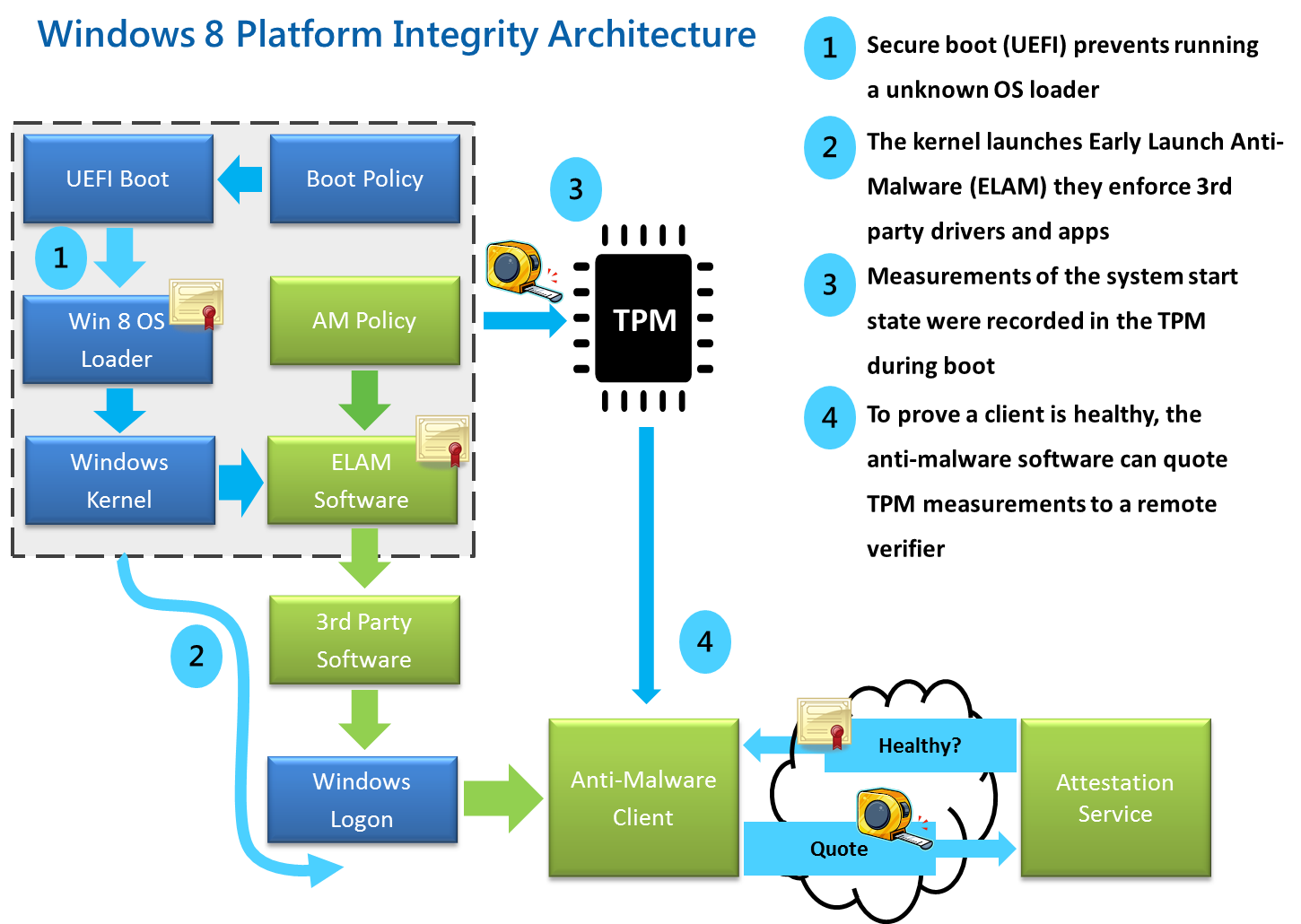
Windows 8, in combination with UEFI 2.3.1 addresses a security hole in the current design of BIOS which lets any loader, including for malicious code such as rootkits, start ahead of the operating system.

In contrast to BIOS, the Unified Extensible Firmware Interface will only allow verified OS loaders to start, as long as UEFI secure boot is enabled. This means that malware can no longer switch the boot loader.

“For Windows customers, Microsoft is using the Windows Certification program to ensure that systems shipping with Windows 8 have secure boot enabled by default, that firmware not allow programmatic control of secure boot (to prevent malware from disabling security policies in firmware), and that OEMs prevent unauthorized attempts at updating firmware that could compromise system integrity,” Mangefeste explained.

What this means is that while a rootkit or any other piece of malware using a boot loader won’t be able to run during startup on a Windows 8 machine with Windows 8 PCs with UEFI Secure Boot, customers would still have the option of disabling the security mitigation and run other legitimate software, including non-Windows operating system loaders.

Mangefeste provided some highlights about what protecting the pre-OS environment with UEFI means for Windows 8 customers:

“• UEFI allows firmware to implement a security policy

• Secure boot is a UEFI protocol not a Windows 8 feature

• UEFI secure boot is part of Windows 8 secured boot architecture

• Windows 8 utilizes secure boot to ensure that the pre-OS environment is secure

• Secure boot doesn’t “lock out” operating system loaders, but is is a policy that allows firmware to validate authenticity of components

• OEMs have the ability to customize their firmware to meet the needs of their customers by customizing the level of certificate and policy management on their platform

• Microsoft does not mandate or control the settings on PC firmware that control or enable secured boot from any operating system other than Windows.”
FILED UNDER:
Windows 8
UEFI
secure boot

TELL US WHAT YOU THINK:

4,356 hits · 5 comments · Link to this article · Print article · Send to friend · Subscribe to news

MUST-READ RELATED ARTICLES:


New Windows 8 Metro Apps for Messaging, Mail, Calendar, Photos and People

New Visual Studio 11 Developer Preview Features and Enhancements

Download Microsoft Security Essentials (MSE) 2.1 with Antimalware Engine 1.1.7702.0

150,000 Windows 8 Testers Used Windows Live IDs for Their User Accounts

Windows 8 PCs with UEFI Secure Boot Could Lock Linux Out

READER COMMENTS:


Comment #1 by: groberts116 on 24 Sep 2011, 14:28 UTC reply to this comment

I think UEFI is a good idea. The only down side is in order to turn it off one will have to open their computers and flip a dip switch. While that would be a problem for non tech savvy users, it is not a problem for tech savvy users, just an inconvenience. From my perspective I prefer UEFI secure boot because of the layer of security it provides. Also, the majority of PC users are either at the novice level or not tech savvy enough to use a 2nd OS and considering that it makes their machines more secure it makes sense.

Comment #1.1 by: Ravi on 26 Sep 2011, 12:45 GMT

But what about others who want a 2nd operating system like me. If windows 8 is going to prevent this I better stick with my Windows 7 and Ubuntu 11.04 dual booted system. I will even stop using windows completely. Hope Microsoft will not do that.

Comment #1.2 by: Ben on 14 Oct 2011, 19:34 GMT

@Ravi, you can still dual boot with Windows 8. You just would need to disable Secure Boot if you wanted to use a different boot loader.

Comment #1.3 by: Xenu on 15 Oct 2011, 02:28 GMT

I'm another dual boot guy, and this is very worrying to me. While I've been content to use both Windows and Linux for different things, I need Linux for my work. I don't really need Windows, its just nice to have as a secondary OS.


Comment #2 by: rijnsma on 22 Oct 2011, 14:53 UTC reply to this comment

Do I have a problem if I (use it for some time now) have a mixed (ext3/ext4 Grub1/Grub2) no Windows multiboot Linux-config on UEFI?

Copyright © 2001-2012 Softpedia. Contact/Tip us at

WindowsGamesDriversMacLinuxScriptsMobileHandheldNews

SUBMIT PROGRAM   |   ADVERTISE   |   GET HELP   |   SEND US FEEDBACK   |   RSS FEEDS   |   UPDATE YOUR SOFTWARE   |   ROMANIAN FORUM