
Softpedia
 

NEWS CATEGORIES:


NEWS ARCHIVE >>
SOFTPEDIA REVIEWS >>
MEET THE EDITORS >>
TRENDING TODAY
Home > News > Microsoft > Windows

September 19th, 2011, 10:10 GMT · By

Windows 8 Developer Preview System Requirements

SHARE:

Adjust text size:

Windows 8
Enlarge picture
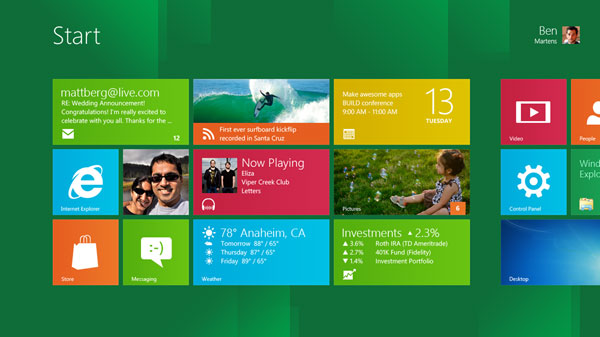
Early adopters can run Windows 8 Developer Preview even on modest, pre-Vista era hardware, and I don’t expect this to change for the RTM Build of the operating system.

Almost a week ago, Microsoft offered the first taste of its next generation Windows client, and started providing testers with Windows 8 Developer Preview Build 8102 Milestone 3 (M3) downloads.

Prior to September 13, the company had stressed on numerous occasions that Windows 8 would sport the same hardware specifications as its predecessor. The software giant delivered on that promise.

“Windows Developer Preview works great on the same hardware that powers Windows Vista and Windows 7,” Microsoft noted as Windows 8 Build 8102M3 downloads went live.

A machine capable of running Windows 8 needs a processor of at least 1 gigahertz (GHz), which is pretty modest by any standards, either 32-bit (x86) or 64-bit (x64). Faster CPUs are also supported, of course, including the latest technologies such as Intel Sandy Bridge and AMD Bulldozer.

Testers opting for an x86 computer will only require 1 gigabyte (GB) RAM. Those with x64 PCs will need to go a bit higher to at least 2 GB RAM (64-bit) to ensure that Windows 8 works under normal parameters.

Additional system requirements are “16 GB available hard disk space (32-bit) or 20 GB (64-bit); DirectX 9 graphics device with WDDM 1.0 or higher driver; taking advantage of touch input requires a screen that supports multi-touch; to run Metro style Apps, you need a screen resolution of 1024 X 768 or greater,” Microsoft said.

The software giant has not shared system requirements for System-on-a-Chip / ARM devices, but I doubt that there are all that many early adopters interested in running Windows 8 on anything else than x86 and x64 computers, at least for the time being.

Also, the ARM flavor of Windows 8 is not available for the public, only the 32-bit and 64-bit versions of the Windows Developer Preview.

Windows 8 Developer Preview Build 8102 Milestone 3 (M3) is available for download here.


13,470 hits · 9 comments
Link to this article · Print article · Send to friend

MUST-READ RELATED ARTICLES:


Preview SkyDrive on Windows 8

Building Windows 8 Makes Steven Sinofsky Top MSDN Blogger

Windows 8 Metro Still Embryonic, Yet to Reach Its Full Potential

Windows 8 Reset and Refresh Make Reinstalling Obsolete

Samsung Windows 8 Developer Preview PC

READER COMMENTS:


Comment #1 by: imkhalid on 19 Sep 2011, 11:04 UTC reply to this comment

i cant make a VM of WIN8 32bit, using VMware Workstation 8 and Oracle VM 4.1.2, i think Virtualization Technology must be required for running this OS as VM.

Comment #1.1 by: tvivert on 20 Sep 2011, 06:29 GMT

Having the same trouble on my host too which has Windows 7.

Microsoft has not said that much of this fact yet that virtualization will be one of the limitations. Without having support for it in the hardware Windows 8 can't run.

That's one of the new strategies they showing in the awake of making bucks and force the development forward as they believe is the right way. We lock them out so users have to buy what we decide even our virtualization doesn't have full support for run other formats than our own vhd's. That's not really userfriendly development.

The most worst - they don't want to admit it and Virtual PC couldn't even run WDP
Have a feeling we'll face Vista one more time before this finished

Comment #1.2 by: Marius Oiaga on 20 Sep 2011, 07:16 GMT

Limitations are only temporary. Remember, Windows 8 is M3. Don't expect it to be compatible to the level of a RTM Build. C'mon! Here's some guidance on virtualization... http://news.softpedia.com/news/The-Best-Way-to-Test-Windows-8-Run-It-on-a-Dedicated-Machine-222421.shtml

Comment #1.3 by: mnguy on 27 Oct 2011, 04:09 GMT

I'm running Windows 8 Developer Preview in Oracle VM VirtualBox (Free) (http://www.virtualbox.org/), there was one other ($) VM product that can also run it, found them on a MS page that confirmed it would not run in MS Virtual PC...
Word of caution: Do not try and start MS VirtualPC on the same system at the same time as VirtualBox - it'll crash VirtualBox. (Tried loading WindowsXPMode VM to scan a page (another FYI: since XP is the last OS to support Twain scanners (if you own an old scanner, you can still use it in W7 via XP in VirtualPC)).
Started messing with W8 - my biggest complaint - cannot close an app. Not so upset since I learned to press the Windows Key - duh... of course... but annoying to like accidentally start an app and find it in popping up every now and then...


Comment #2 by: devbrianLee. on 19 Sep 2011, 11:17 UTC reply to this comment

I really love the full screen apps embedded in it...very cool - devbrianLee.

Comment #2.1 by: pooya on 19 Sep 2011, 17:51 GMT

e.i like full screen apps too!but there is a big problem!u cant close full screen apps directly with any button or shortcut key!the only way is to close theme from task manager!


Comment #3 by: Roger125 on 19 Sep 2011, 17:28 UTC reply to this comment

Windows 8 on 128MB of RAM

http://www.engadget.com/2011/09/16/windows-8-aint-fussy-runs-on-macs-surface-128mb-ram-banana/


Comment #4 by: motae on 20 Sep 2011, 05:28 UTC reply to this comment

I'm currently running W7 on Samsung n148 netbook, butI'unable to install win8.. error "no ACPI support" how can i resolve this?

Comment #4.1 by: Marius Oiaga on 20 Sep 2011, 07:46 GMT

Hmmm... Not the first time that a Windows release has problems with ACPI. The best way around them that I can think is to use an external DVD drive to load Windows 8 after you burn the ISO. It might also work from a USB key. Just make sure you clean install and don't try to upgrade from within an existing version of Windows.

Copyright © 2001-2013 Softpedia. Contact/Tip us at

WindowsGamesDriversMacLinuxScriptsMobileHandheldNews

SUBMIT PROGRAM   |   ADVERTISE   |   GET HELP   |   SEND US FEEDBACK   |   RSS FEEDS   |   UPDATE YOUR SOFTWARE   |   ROMANIAN FORUM