
Softpedia
 

NEWS CATEGORIES:


NEWS ARCHIVE >>
SOFTPEDIA REVIEWS >>
MEET THE EDITORS >>
Home > News > Editor Blogs > Software

January 7th, 2012, 10:05 GMT · By

BLOG

Windows 8 Comes with Hidden Aero Lite Glass Theme

SHARE:

Adjust text size:

Windows 8 Enlarge picture - Windows 8
One of the features that Windows 8 will be able to offer to users that run it on low-end hardware will be an Aero Lite Glass Theme.

The feature is already available in Windows 8 Developer Preview and will make it to Windows 8 Beta too, which means that the final flavor of the platform could sport it as well.

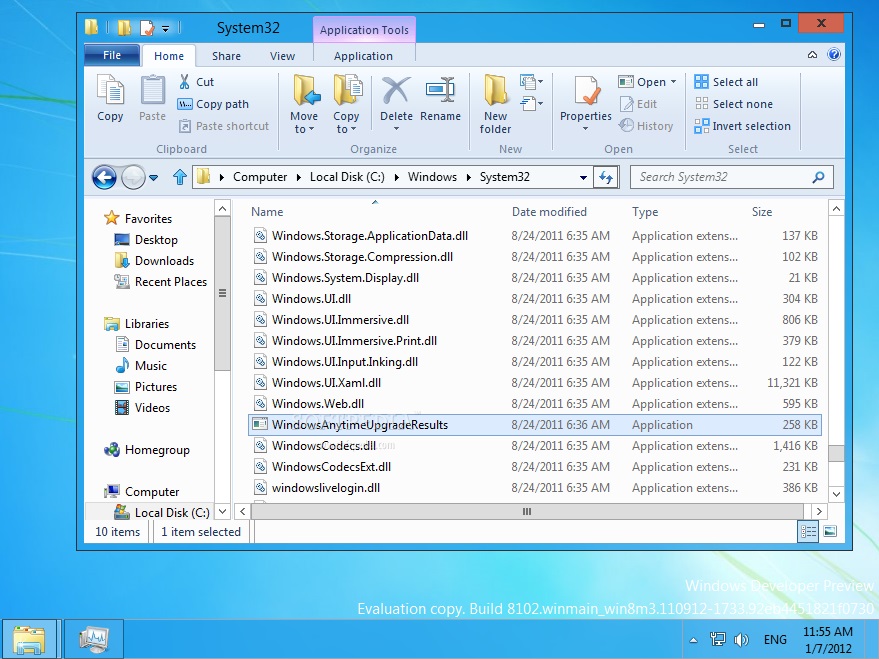
The theme can be easily enabled by going to Windows \ System32 and launching WindowsAnytimeUpgradeResults.exe (as you can see in the shot attached to this article). Before that, however, you should enable the AeroLite theme.

As soon as you launch the application, the Aero Lite Glass Theme will be applied, WinUnleaked notes in a recent post. Those who did not try Windows 8 yet can download the Developer Preview from Softpedia via this link.

WINDOWS 8 AERO LITE GLASS THEME - PHOTO GALLERY:

TELL US WHAT YOU THINK:

3,133 hits · Link to this article · Print article · Send to friend · Subscribe to news

MUST-READ RELATED ARTICLES:


Windows 8 Loaded on AT&T LTE Tablet

Windows 8 Storage Spaces Get Detailed

Windows 8 Reset and Refresh Features Get Detailed

What to Expect from Microsoft in the First Half of 2012

Windows 8 Tablets in Late 2012 Featuring Intel’s Clover Trail

READER COMMENTS:


No user comments yet.
Be the first to express your opinion!
Copyright © 2001-2012 Softpedia. Contact/Tip us at

WindowsGamesDriversMacLinuxScriptsMobileHandheldNews

SUBMIT PROGRAM   |   ADVERTISE   |   GET HELP   |   SEND US FEEDBACK   |   RSS FEEDS   |   UPDATE YOUR SOFTWARE   |   ROMANIAN FORUM