 14 DAY TRIAL //
 In an attempt to ensure that applications built for the Windows 8 platform can deliver a consistent experience regardless of the devices they have been loaded on, Microsoft decided to set the minimum supported resolution on the platform at 1024x768.
The Redmond-based software giant claims that it took this decision so that applications designed for the OS would fit the different screens on which Windows 8 can be loaded now and in the future.
By setting this minimum resolution requirement, the company ensured that developers had a baseline for making navigation, controls, and content fit the screen.
David Washington, a senior program manager on the User Experience team, Microsoft, notes that the minimum resolution was also set higher so that apps designed for the platform would be richer and more tailored.
He also explains that apps designed with this minimum resolution in mind do not compromise quality, so that they would fit on lower resolution screens.
The main reasons for which this specific resolution was selected to be the minimum for Windows 8 include:
It is large enough to support the rich and beautiful layouts that we expect to see with Metro style apps. Lower resolutions, like 800x600 for example, require simpler more basic layouts with less content.
Websites are typically designed for 1024x768 as the minimum (or only) resolution, and web developers are used to targeting this resolution.
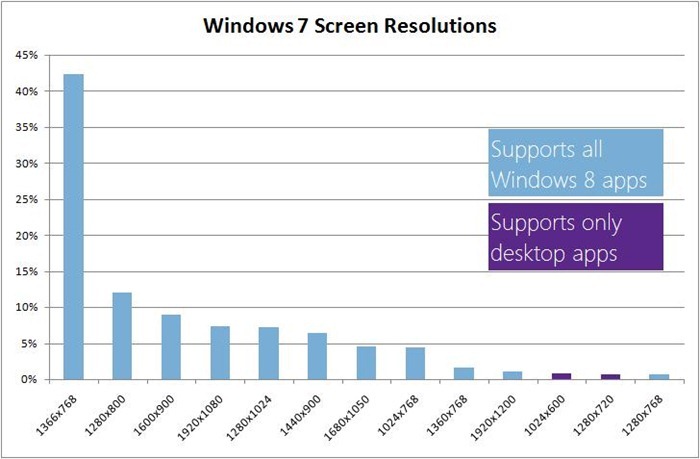
Looking at the data about devices in the marketplace today, we see that only 1.2% of active Windows 7 users have screens with a resolution of less than 1024x768. When designing a new platform that supports the devices of today and tomorrow (with undoubtedly higher resolutions) we optimized for the majority of today’s screens (i.e. 98.8%) without sacrificing the experience and complicating the developer story for legacy screens.
The number of PCs that feature screen sizes of 1024x600 and 1280x720 is now dramatically low, and there are no new mainstream PCs being manufactured with such low resolutions at the moment.
It is also worth noting that the minimum resolution that would offer support for all features in Windows 8, including multitasking with snap, is 1366x768. Thus, the snapped app is 320px wide, the main app is 1024px wide x 768px high.
Since a width of 320px is commonly met in applications destined for mobile phones, it should not be difficult for app builders to implement it and to create a targeted view for this size.
No maximum resolution, but developers beware
While there is the need for putting in place a minimum resolution for these Windows 8 applications, there is no maximum set as of now. David Washington explains why.
“With higher resolutions there is more space, so the layout is really never broken or truncated on higher resolution screens. You can run Metro style apps on a screen as big as 30” with a resolution of 2560x1600,” he says.
“But although apps aren’t broken when they have more space, developers should give some consideration to these larger resolution screens, so that they make use of the space in a way that keeps their apps looking beautiful.”
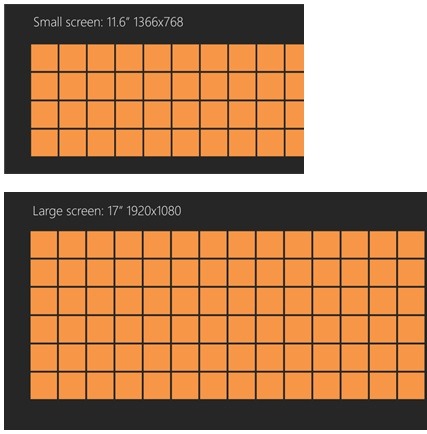
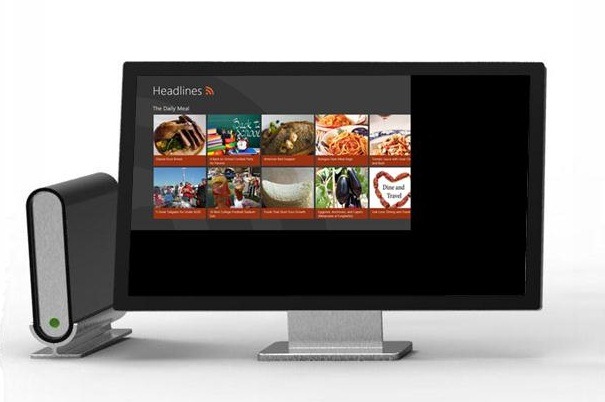
After all, more content can fit on a larger screen, especially on one that sports a higher resolution. Not all apps will make use of this space, which means that there might be empty spaces on extra-large monitors.
“The Windows 8 platform makes building one app that scales to different screen sizes straightforward for the developer by providing built-in layout controls and techniques,” Washington explains.
“Apps in Windows 8 fill the available space by bringing in more content where possible. A developer can easily build the same app to show more content as the screen size changes from a tablet, to a laptop with a bigger screen, all the way up to a desktop monitor.”