 14 DAY TRIAL //
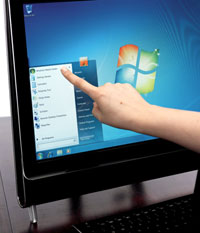
 There is little doubt that, at least as far as human-computer interaction models go, Windows 7 takes UX to a whole-new level. Windows Vista’s successor is the first Windows client that features multi-touch technology out of the box, an indication of the company’s vision to standardize natural user interfaces. Graphics cards manufacturer Nvidia noted that, while Windows 7 indeed changed the way that end users would interact with their machines, the underlying hardware resources available can push the experience even further, making it more engaging, but also smoother, and without taking its toll on computer performance.
“A Windows 7 PC powered by NVIDIA GPUs will deliver faster, more engaging Windows Touch experiences. NVIDIA GPUs are well known for accelerating 3D interfaces. The Windows 7 Aero desktop, now designed using the DirectX 10 API and designed for Windows Touch, is no exception. From the new taskbar previews to Aero Peek, Flip, Snap, and Shake, NVIDIA GPU provides a snappy 3D experience. Windows 7 also uses the GPU to reduce memory consumption by half by eliminating the need to keep a second copy of each window in system memory. This frees up system memory for other applications and keeps your PC responsive,” an Nvidia representative noted.
In the video embedded at the bottom of this article, you will be able to see demonstrations of just what Windows 7 in combination with new Nvidia graphics cards can do. Neither Microsoft nor Nvidia are recommending specific graphics cards to be used with the operating system, but, as long as they feature Windows 7 and DirectX 11 support, users should be good to go.
“Touch is a natural and intuitive way to interact with your PC when you are doing common computing tasks such as: web browsing, interacting with photos, playing games, organizing music and video (creating playlists, sorting media, and organizing content), reading and sorting e-mail, using documents, managing a Windows workspace,” the Nvidia representative added.