 14 DAY TRIAL //
 Users of Windows 7 pre-RTM development milestones will not be able to perform in place upgrades to the gold release of the operating system, according to Microsoft. The Redmond company has made available for download the Windows 7 Upgrade Paths, a resource designed to provide information on the “supported and unsupported upgrade paths for editions of the Windows 7 operating system.” The Windows 7 Upgrade Paths documentation went live on the Microsoft Download Center on July 20, 2009, and is currently up for grabs via this link.
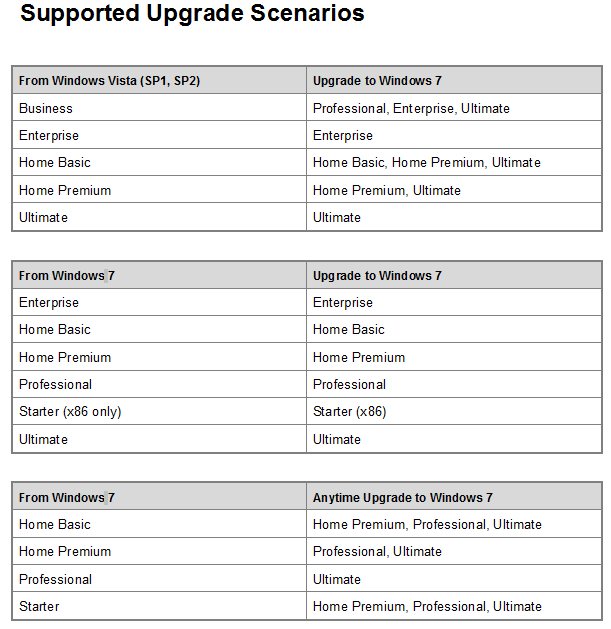
Microsoft does an excellent job at revealing which are the supported upgrade paths to Windows 7 SKUs. Users of Windows Vista (SP1, SP2) will be able to upgrade to Windows 7 only between certain editions, namely: Vista Business to Windows 7 Professional, Enterprise, Ultimate; Vista Enterprise to Windows 7 Enterprise; Vista Home Basic to Windows 7 Home Basic, Home Premium, Ultimate, Vista Home Premium to Windows 7 Home Premium, Ultimate; and Vista Ultimate to Windows 7 Ultimate.
In addition to Vista to Windows 7, Microsoft will also support Windows 7 to Windows 7 upgrades, also between certain SKUs in this manner: Enterprise to Enterprise; Home Basic to Home Basic; Home Premium to Home Premium; Professional to Professional; Starter (x86 only) to Starter (x86) and Ultimate to Ultimate. Not really sure what this means, but it's certainly not that much of an upgrade.
At the same time, there's the Windows 7 to Windows 7 via Anytime Upgrade, with the following supported paths: Home Basic to Home Premium, Professional, Ultimate; Home Premium to Professional, Ultimate; Professional to Ultimate; and Starter to Home Premium, Professional, Ultimate.
Microsoft also revealed that the "upgrades to Windows 7 from the following operating systems are not supported:
- Windows 95, Windows 98, Windows Millennium Edition, Windows XP, Windows Vista RTM, Windows Vista Starter, Windows 7 M3, Windows 7 Beta, Windows 7 RC, or Windows 7 IDS - Windows NT Server 4.0, Windows 2000 Server, Windows Server 2003, Windows Server 2008, or Windows Server 2008 R2 - Cross-architecture in-place upgrades (for example, x86 to x64) are not supported. - Cross-language in-place upgrades (for example, en-us to de-de) are not supported. - Cross-SKU upgrades (for example, Windows 7 N to Windows 7 K) are not supported. - Upgrades from Windows Vista to Windows N, Windows K, Windows KN, or Windows E are not supported. - Cross-build type in-place upgrades (for example, fre to chk) are not supported. - Pre-release in-place upgrades across milestones (for example, Windows 7 RC to Windows 7 RTM) are not supported."