
NEWS CATEGORIES:


NEWS ARCHIVE >>
SOFTPEDIA REVIEWS >>
MEET THE EDITORS >>
Home / News / Microsoft / Windows

Windows


Windows 7 Release Candidate (RC) Turn Windows Features On or Off

The list grows compared to Vista's

By Marius Oiaga, Technology News Editor

6th of March 2009, 20:31 GMT

Adjust text size:


Windows 7
Enlarge picture
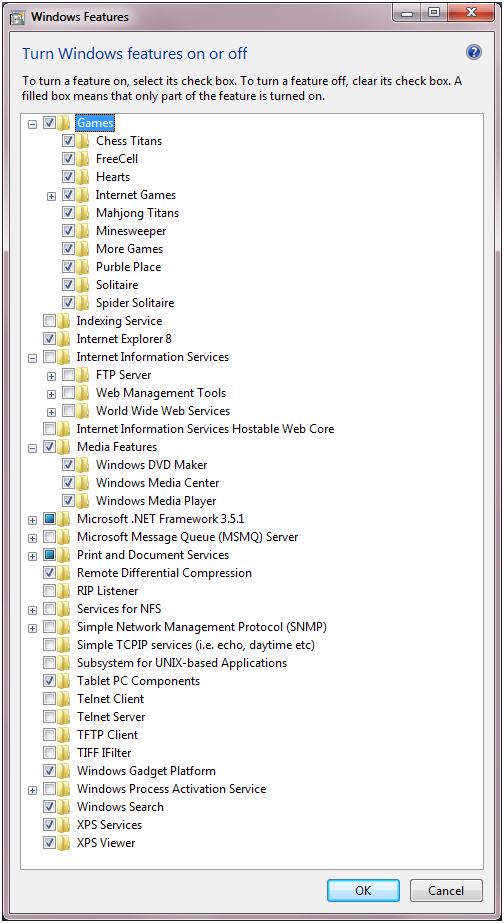
Microsoft is indirectly confirming Windows 7 Build 7048 from the Release Candidate branch by stating that Internet Explorer 8 can indeed be removed from the operating system. The software giant says that it's about giving users choice and control, when it comes down to functionality in Windows 7, designed to permit the switching off or on of default components shipping with the operating system. Moving from Beta Build 7000 to Release Candidate, the Turn Windows Features On or Off has evolved. As of Build 7048, Windows 7 features an extended list with additional components compared to older releases of Windows and to previous development milestones of Windows 7. “Windows Features” can be accessed via “Programs and Features” in Control Panel.

“If a feature is deselected, it is not available for use. This means the files (binaries and data) are not loaded by the operating system (for security-conscious customers) and not available to users on the computer. These same files are staged so that the features can easily be added back to the running OS without additional media,” revealed Jack Mayo, group program manager for the Documents and Printing team.

Windows 7 RC Turn Windows features on or off
Enlarge picture
At the same time, removing a feature is not synonymous with uninstalling it or deleting it from the platform. Fact is that the staging permits users to add the feature back at any time via the same dialog box, rather than having to turn to the installation media. “In Windows 7 we are expanding the number of features you have control over in this regard, giving customers more control, flexibility and choice in managing the features available in this version of Windows,” Mayo added.

As of Windows 7 Build 7048, users will be able to turn off a variety of additional components compared to Vista. The RC of Windows 7 will permit the disabling of the following features: Windows Media Player, Windows Media Center, Windows DVD Maker, Internet Explorer 8, Windows Search, Handwriting Recognition (through the Tablet PC Components option), Windows Gadget Platform, Fax and Scan, and XPS Viewer and Services (including the Virtual Print Driver) in addition to what Vista allowed.

“It is worth describing the details of “remove” since this too is a place where there are engineering and customer decisions to be made. We’ve already seen one decision which is to make sure we keep the features staged for future use so that a DVD is not required. A second decision is that we also continue to support the APIs available for features where these APIs are necessary to the functionality of Windows or where there are APIs that are used by developers that can be viewed as independent of the component. As many of you know these are often referred to as “dependencies” and with Windows the dependencies can run both internal to Windows and external for ISVs,” Mayo added.
TAGS:

Windows 7 | RC | Release Candidate | Build 7048
Read by 7,731 user(s) | Add comment | Link to this article TWEET THIS


Article rating:
Excellent (5.0/5) 9 vote(s)    

Subscribe to news | Print article | Send to friend

© Copyright 2001-2009 Softpedia
Contact:


SEARCH THE NEWS ARCHIVE :


Today's News
| Yesterday's News | News Archive


MORE RELATED ARTICLES:


Windows 7 Beta Default Video and Audio Codecs to Expire

Download Vista SP2 RC via Windows Update

Download Windows 7 Driver Kit Documentation

Internet Explorer 8 (IE8) RTW Available for Download in Just 2 Weeks

Windows 7 Client Software Logo Program Looking to Windows 8

Microsoft Confirms Vista SP2 RC Officially

Windows 7 Plays Nice with Paper

Mozilla Cooking Firefox 3.5, Forget Firefox 3.1

User opinions:


Comment #1 by: AION on 07 Mar 2009, 00:21 GMT reply to this comment

Why use vista when you can wait for windows 7? Why wait for windows se7en when you can wait for window 8. OR whatever the next release with some new candfloss has on its UI. Best option is Linux but still vista is far better than XP if you have a good machine. I hope Asia boycotts windows 7 or at least some of Asia because some dislike that number.

The Asians are right about the number 7, by the way!


Comment #2 by: Matt on 07 Mar 2009, 23:22 GMT reply to this comment

Who is Microsoft trying to fool? They want to claim it's about choice but if that were the case they'd allowed allow you to choose which browser you want during Windows 7 installation, but they won't. They know Internet Explorer won't be most used if given the choice. They know most who use Internet Explorer only use it because it's what comes installed on their pc.

Also you notice they will allow you to remove Internet Explorer (which you can do in XP too) but they won't allow you to completely uninstall it.

They won't allow you to choose during installation and won't allow you to completely uninstall Internet Explorer completely. It's not about choice at all, it's about making people think it's about choice when if it were about choice, Microsoft wouldn't force Internet Explorer on users to begin with and they would allow for complete uninstallation of Internet Explorer too.


Comment #3 by: BesT on 08 Mar 2009, 21:38 GMT reply to this comment

First, what is with asians and win 7 ?! searched google and nothing.
Second, Linux has different versions like any other program/OS out there, so why use linux 2.4 when you can use 2.6 kernels, or why not wait for even a better one, or why linux, lets go to mac os, right ?
PEOPLE CAN CHOOSE, that is why. You wait for windows 8 for what i care, all the other world will try win vista and win 7. But wait, why use win 8? wait untill win 9 comes up, or the hell, why use a computer at all, go back to the stone age redneck


Comment #4 by: TK on 18 Mar 2009, 16:22 GMT reply to this comment

The whole concept of NOT uninstalling the unwanted component and just disabling it is fundimentaly flawed because the uninstalation of a windows component followed by a fresh re-install of it is sometimes the only way to restore a hosed component when system restore fails to help or the problem dates from before the oldest restore point. Only other ways to fix them are hands on registry hacking if you have enough inside information or a full re-install of windows, since it cannot be certain a repair install would correct any hosed component settings. I have that problem with windows movie maker, no way to selectively remove and re-install it. Also I'd love to fully remove windows media center from my vista home premium laptop as it serves no useful purpose, just consumes space and resources with its services running in the background.

Share your opinion:

Your Name:
Your Email Address:
(will not be used for commercial purposes)
Solve this to prove you're not a bot: =
Your review/opinion:


Windows tabGames tabDrivers tabMac tabLinux tabScripts tabMobile tabHandheld tabGadgets tabNews tab

SUBMIT PROGRAM   |   ADVERTISE   |   GET HELP   |   SEND US FEEDBACK   |   RSS FEEDS   |   ENTER NEWS SITE   |   ENGLISH BOARD   |   ROMANIAN FORUM