14 DAY TRIAL //
 Come March 1st, 2010, Microsoft will kick off the full scale roll-out of the “Web browser choice screen” which will end up being served to all Windows/Internet Explorer users in Europe. The Redmond company still continues to test the browser ballot screen internally, but will also start a limited, test roll-out at the start of the coming week. Essentially, the Redmond company is giving green light to an update to all IE users on Windows which is designed to give users in the European Union a choice of additional browsers, among which Opera, Firefox and Google Chrome. The test roll-out will continue for the next few weeks until the update’s general availability this March.
“External testing of the choice screen will begin next week in three countries: the United Kingdom, Belgium and France. Anyone in those countries who wishes to test it can download the browser choice screen software update from Windows Update. We plan to begin a phased roll-out of the update across Europe the week of March 1,” explained Dave Heiner, vice president and deputy general counsel.
The browser ballot screen software update is designed for customers running Windows XP, Windows Vista and Windows 7. Served as an automatic download through Windows Update, the software update will either be installed automatically, or will notify the users to download and deploy it themselves. This is the behavior that users with the Automatic Updates setting enabled.
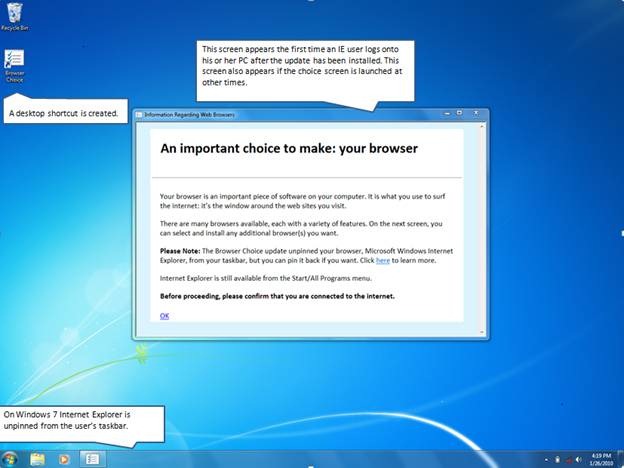
“If you are running Internet Explorer as your default browser, what you will see after the software update is installed [is an] introductory screen. In the screen shot [on the left] we added a few comment bubbles to point out certain features. The introductory screen provides context for the next screen, which shows browser options,” Heiner added.
Immediately after being installed on Windows 7, the “Web browser choice screen” removes the Internet Explorer 8 icon if it is pinned on the Taskbar (Superbar). However, the update does not actually remove IE8 at this point, and provided that end users choose to run IE from the ballot screen presented to them, they will need to pin the icon to the Taskbar again, manually.
“The browser choice screen will present you with a list of leading browsers (…) in random order. (…) The browsers that are listed and the content relating to them will be updated from time to time. The screen provides three options: Click on “Install” to install one of the listed browsers. Click on “Tell me more” to get more information about any of the browsers. These links (and the browser logos and associated text) are provided by each browser vendor. Click on “Select Later” to review the choice screen the next time you log onto your computer. This software update will also add a shortcut to your desktop, from which you can launch the choice screen at any time,” Heiner explained.
The “Web browser choice screen” update will be made available only to IE users in Europe, as a consequence of a deal that the European Commission and Microsoft arrived at in December 2009. The refresh is designed to take care of anti-competitive concerns related to the bundling by default of IE into Windows. “This browser choice screen will present a list of browsers, with links to learn more about them and install them. The design and operation of this choice screen was worked out in the course of extensive discussions with the Commission and is reflected in the commitment that Microsoft made. Users who get the choice screen will be free to choose any browser or stick with the browser they have, as they prefer,” Heiner stated.
Internet Explorer 8 (IE8) RTW is available for download here (for 32-bit and 64-bit flavors of Windows XP, Windows Vista, Windows Server 2003 and Windows Server 2008).
Firefox 3.6 Final for Windows is available for download here.
Google Chrome 4.0 Stable is available for download here.
The latest release of Opera 10 is available for download here.