

|
|
|
|
June 26th, 2009, 07:12 GMT · By Marius Oiaga
Windows 7: Home Premium vs. Professional vs. Ultimate |
|
|
|
|
SHARE:
Adjust text size: 
|
|
It was bound that with Microsoft having made public the pricing details on the next iteration of the Windows client, the company would also introduce initiatives designed to help consumers decide on the Windows 7 edition best suited for them. And what better way than an operating system editions measuring contest? The software giant and partners have already started accepting pre-orders for Windows 7, which is scheduled to launch officially on October 22, 2009.
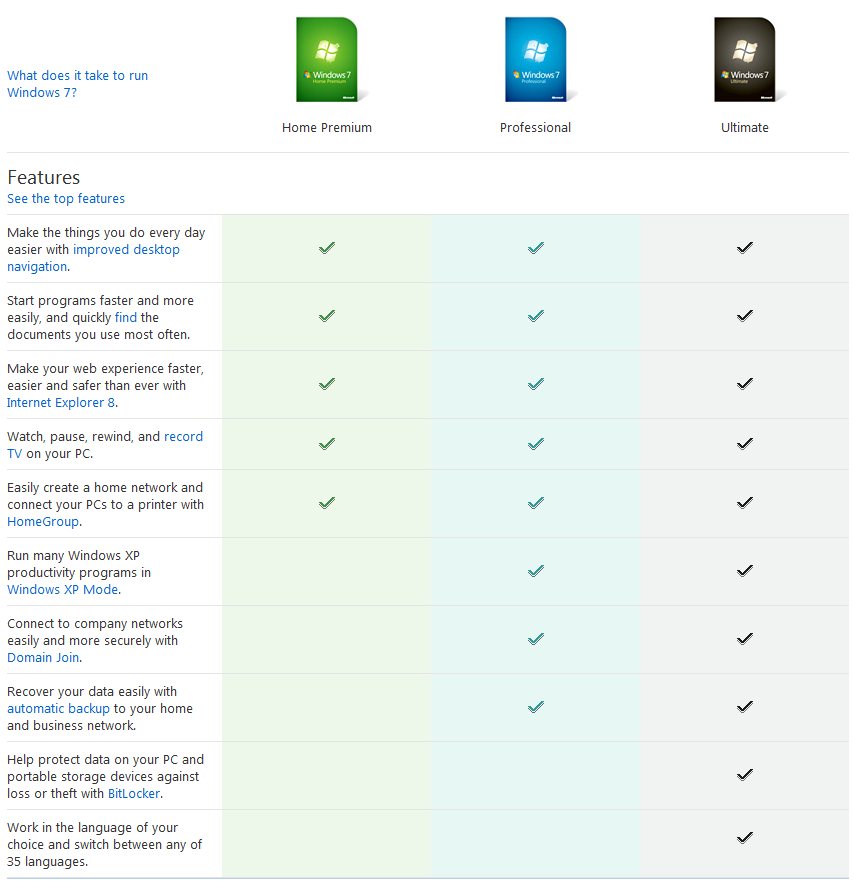
Microsoft is, of course, offering a Compare editions page set up as an overall guide highlighting the differences between Windows 7 Home Premium, Professional, and Ultimate. But don't expect an in-depth, feature by feature, painfully exhaustive comparison. Instead, the software giant is offering a general perspective over what it considers the main two editions of Windows 7 and the high-end SKU of the operating system. Windows 7 “Makes the things you do every day easier with improved desktop navigation. Faster and easier to launch applications and find the documents you use most often. Make your web experience faster, easier, and safer than ever with Internet Explorer 8. Easy to create a home network and connect your PCs to a printer with HomeGroup. Watch many of your favorite TV shows for free when and where you want with Internet TV,” are the tasks enumerated by Microsoft that can be performed by all three editions.
When it comes down to running “many existing Windows XP productivity applications in Windows XP Mode. Connect to company networks easily and more securely with Domain Join. Recover your data easily with automatic backup to your home and business network,” only the Professional and Ultimate editions of Windows 7 will do the trick. Windows 7 Ultimate offers a few extra features on top of all other editions. In this regard, Microsoft has chosen to highlight BitLocker, an encryption technology for the computers running the platform but also for removable and portable storage devices. In addition, Windows 7 Ultimate is the only version of the OS, with the exception of Enterprise, that can easily jump from one Multilingual User Interface (MUI) to another, seamlessly jumping among 35 supported languages.
|
|
|
|
|
 |
672,626 hits
· 40 comments
Link to this article
· Print article
· Send to friend
|
MUST-READ RELATED ARTICLES:
READER COMMENTS: |
| Comment #1 by: Marco on 24 Feb 2010, 20:46 UTC | reply to this comment | This is just a summary of their comparison. No additional details. Might as well look at the ms chart. |
| Comment #1.1 by: hs on 18 Mar 2011, 19:39 GMT | exactly lol |
| Comment #2 by: William on 16 Mar 2010, 00:06 UTC | reply to this comment | Er-Hum!
Hello!
Q: Is Windows 7 Home Premium worth the trouble?
A: I think probably not.
Q: Why?
A:There is a tiny clue in the following two facts.
Fact 1: Windows 7 Home Premium has the recovery drive first met in Windows Vista.
Fact 2: Windows 7 Ultimate does not.
I don't know if Windows 7 Professional has the recovery drive but I am guessing it don't.
Here is the thing.
Based on my experience with a 5 year old Dell Inspiron 8600 laptop.
I recently bought a (new) Dell Inspiron 1545 that came with windows home premium 64-bit preinstalled. My expectations where high.
I must admit I was surprised to find that my old Dell with Windows 7 Ultimate 32-bit installed seemed to be as responsive and in most cases as quick as the new Dell.
My old Dell had a bit of a hardware upgrade when I doubled the RAM to 1gig and a new 160gig hard drive. Apart from that it has a slower than its original 1.7gig CPU at 1.5gig.
The new Dell boasts a 4000 series dual core CPU running at 2gig+ and 3 gig of DDR2 RAM
and a 250gig hard drive which I will assume is a SATA drive and not IDE like the old Dell.
So why is the new Dell not much better than the old?
Unfortunately detailed information on windows 7 versions differences is not available.
So?
Being just a tad suspicious and extremely paranoid.
I can only assume that the main difference between Windows Vista and Windows 7 Home Premium are aesthetic and that Windows 7 Home Premium is as much the old RAM and resource hungry Windows Vista dog, just prettier.
My old Dell with minimum spec graphics card for Windows 7 runs with the Aero Glass Theme just fine.
Now I could well be wrong about Windows 7 Home Premium and have bought a brand new but iffy Dell laptop.
Since it is still under garuntee for some time and I don't wish to void it I can't experiment by installing Windows 7 Ultimate on me new Dell so if any of you guys out there have any more input on this little problem which really isn't a problem.
I am all ears?
Toodle pip! |
| Comment #2.1 by: EpicWin on 04 Mar 2011, 03:17 GMT | i'm guessin your older laptop has more updates for win7. have you checked for service pack 1? |
| Comment #2.2 by: Sky Lab Industries on 22 May 2011, 17:37 GMT | "Er-Hum"??? What heck is that!?!? What do you write in some alien foreign language or something!?!? |
| Comment #2.3 by: karojes on 09 Jul 2012, 08:22 GMT | thats cool er-hum |
| Comment #3 by: Bhaskar on 30 Mar 2010, 09:11 UTC | reply to this comment | Windows 7 Ultimate is definitely better then the Home Premium version. I upgraded from XP prof. to Win 7 Home Premium first in my 32bit core 2 duo (2.7 Ghz) with 2G DDR2 RAM. For unknown reason the GUI became extremely slow. I was having problems with software installations as well. After a week's frustration, I moved to Win 7 Ultimate and all the problems gaot resolved immediately. Its way faster and extremely responsive and acts as if its the best friend of my hardware config :)
You may try Win 7 Ultimate 32 bit. I cannot comment on the 64 bit version, yesterday my friend said he's unhappy with the 64 bit Win 7 Ultimate, no idea why that is. |
| Comment #3.1 by: HP Corporation on 15 Jun 2011, 00:22 GMT | the 64 bit version isn't fully compatible with the world wide yet that is why the 64 bit still lacks in usage.
But 64 bit will soon be compatible with all computer functions |
| Comment #3.2 by: randan on 25 Sep 2011, 13:43 GMT | sure you can put another hard drive in it to try....leaving the other hard drive untouched |
| Comment #3.3 by: rocket7777 on 06 Oct 2011, 16:52 GMT | Your experience has NOTHING to do with difference between premium and ultimate.
My guess would be that your premium got something corrupt installed or critical parts were on marginally working harddrive sector (such as virtual memory).
Or perhaps something like spyware or virus that got over written when ultimate got installed. |
| Comment #4 by: Gramfel on 31 May 2010, 01:26 UTC | reply to this comment | I have Windows 7 Premium and like its speed (with 4gb Ram), but I want to see my C drive with all its files and folders on one page as I could with XP. Then I could move files, delete them or open as I chose. Does anyone have an idea how to do this with Windows 7? I used to have
windows exlorer (I think) on my desktop, and when I opened it, I saw a tree diagram of the C drive with all my files and folders.
Thanks! Gramfel |
| Comment #4.1 by: Helper on 12 Jun 2010, 17:53 GMT | Windows key + E key at same time will bring up Windows Explorer in any version. |
| Comment #5 by: don on 23 Jun 2010, 06:11 UTC | reply to this comment | This is stupid. You did no writing.
Here is the original page:
http://windows.microsoft.com/en-us/windows7/products/compare |
| Comment #6 by: @rBis™ on 14 Oct 2010, 19:18 UTC | reply to this comment | Finally I got Windows 7 Professional 64-bit is the BEST after using all the OSs |
| Comment #6.1 by: Dude... on 03 Dec 2010, 00:11 GMT | Why?. |
| Comment #7 by: bhupesh on 15 Nov 2010, 09:59 UTC | reply to this comment | is window 7 HOME PRIMIUM SUPPORTS VISUAL STUDIO 2008 WITH SQL SERVER 2008 |
| Comment #8 by: Jodie on 19 Dec 2010, 18:01 UTC | reply to this comment | Windows 7 is ultimate is ok but the windows 7 ultimate X64 bit alienware edition is awesome!!!!!! |
| Comment #9 by: ghannon49 on 26 Dec 2010, 04:38 UTC | reply to this comment | My son has Windows Premium on his laptop but something happened that he needs to reinstall it. We cannot find the disc. Can we install the one on our home computer - which is Windows Professional? If not - any options for us to try and save us the cost for a new disc? Thanks! |
| Comment #9.1 by: UnKnown One on 26 Dec 2010, 20:06 GMT | You can install the Windows from your computer to his laptop. But it will probably void the laptops warranty, so you won't be able to get future updates or fixes under that warranty. Also you have to be sure that the laptop is capable of running that version of Windows 7. You would want to install it and then the laptop slows to a crawl. I'm pretty sure everything will work fine after install it's just I think the warranty will be void if you put another OS on there besides the one that came with the laptop. Good Luck! |
| Comment #10 by: PFB on 24 Jan 2011, 16:03 UTC | reply to this comment | Can one install a older 32 software program on a windows7 PROFESSIONAL 64 OS. |
| Comment #12 by: JJDC on 10 Apr 2011, 10:31 UTC | reply to this comment | The Uk One Is Here: http://windows.microsoft.com/en-us/windows7/products/compare Scroll Down And Click Compare |
| Comment #13 by: katie lee park on 19 Jun 2011, 15:55 UTC | reply to this comment | you did NOT answer any questions
Why should I buy Windows 7 professional or why should I buy Windows 7 home premium. What is the major differences and why one over the other
Please don't lie to me just tell me differences |
| Comment #14 by: Vern on 05 Jul 2011, 15:40 UTC | reply to this comment | Typical Microsoft releasing all new computers with home premium so as not to keep XP alive. Think I'll just keep XP and forget 7 |
| Comment #14.1 by: Marv on 28 Sep 2011, 15:03 GMT | If you have the hardware to run Win 7 you should consider upgrading from XP. Better speed, better functionality, regardless of the Win 7 version when compared to XP. |
| Comment #14.2 by: rocket7777 on 06 Oct 2011, 17:08 GMT | Vista is worst, but there's very minor difference between xp and 7. It is really really stupid to waste money on buying win7. Main thing to do is dump norton and get avg or other free and better antivirus etc.
Of course if someone want more than 4gb ram or use readyburst, w7 would be slightly faster but if they going to spend $100-200 on w7 plus various upgrade, minds well get new computer. |
| Comment #14.3 by: PatRM2 on 13 Jun 2012, 13:36 GMT | Totally agree with you. Can't see any advantage for a competent user who does their own system work to go to 7. |
| Comment #15 by: Josh on 06 Jul 2011, 12:22 UTC | reply to this comment | They dont make sense. It's like they're speaking a different language. |
| Comment #16 by: Jas on 16 Sep 2011, 11:02 UTC | reply to this comment | I didn't understand much of your writing... |
| Comment #17 by: Rakesh on 01 Dec 2011, 16:58 UTC | reply to this comment | Is windows Home premium support visual studio .net 2010 framework |
| Comment #17.1 by: vb Guy on 05 Dec 2011, 16:20 GMT | I installed VS 2008 and VS 2010 on my new Dell laptop over the weekend. It has Windows Home Premium and all seems to work fine. |
| Comment #18 by: AdamFlores on 13 Jan 2012, 19:53 UTC | reply to this comment | im planning to purchase, which one is better? home premium or professional? anyone knows? |
| Comment #19 by: ab on 18 Feb 2012, 21:48 UTC | reply to this comment | windows 7 ultimate might offer a few extra features but it SUCKS!!!!I am disappointed in microsoft for it....it might have a some "cool features" bt overally Home Edition is better... |
| Comment #20 by: jillian on 29 Apr 2012, 17:48 UTC | reply to this comment | i ad vista now with my new tower i have windows 7 premium ultimate
i play games from big fish since i had my new tower some games come up out of range why is this when on my old tower they all plated |
| Comment #21 by: PatRM2 on 13 Jun 2012, 13:33 UTC | reply to this comment | Been running XP Pro and Windows 7 Home Premium on two identical machines. The first thing I did was ask a number of people who do not get into computers much what they thought of 7, or XP, and their remarks were the same, more or less. They found both of them demanding, and had to have friends change the simplest of things of their machines. They did not find 7 intuitive (nor XP for that matter. Asking friends who do their own maintenance, clean up etc., their comments were about the same, and that was "where the heck is this or that on 7"? I have to agree. If you are half way competent on your machine, and know where the defrag, etc. is, or if you need it, then you probably know where to find most of those things you need. To change just the desktop background in 7, you have to type "desktop background" and then wade through a pile of this and that in options. Point is, if you do not know where these things are, and you won't if you just go from screen to screen, you will spend months just trying to find out. Life is too short. I've used all of the Windows versions from the time Windows came out. XP is about the best they will ever do, unless you just have a lot of friends you can bug every day to come fix your machine. |
| Comment #22 by: Sam on 30 Jul 2012, 15:49 UTC | reply to this comment | Perhaps you wanted to ask about the OS itself and its associated utilities, management consoles, updates, cpl applets that you can find in ultimate but not in home premium , this question seem more a school homework for an mcse student. instead of getting bits and pieces, or the work of others, here is the way you can get these answers all by yourself, go to the microsoft website and compare the OSs as they market it ...THEN work on finding what makes those differences tick .... get both oss, get yourself a virtualization solution ( vmware , virtual box ) to install the OSs on then take screenshots of the registry using a registry comparison tool ( regshot ... ) , compare the folders using a file and folder comparison tool ( win merge ... ) have fun learning ... and by the way ... even though i know windows ... MAC OSX is simply much better than both. |
| Comment #23 by: A proud member of Microsoft Corporation on 07 Aug 2012, 18:57 UTC | reply to this comment | Windows 7 Home Premium is said to start and shut down a lot quicker than Ultimate and Professional. Windows 7 Professional is mainly meant to be a worker's computer, as it's features meet a lot of a buisness worker's requirments. Windows Ultimate is an overall very decent operating system.
Windows 7 Home Premium, Ultimaate, and Professional all have a few features that the other types do not.
NONE IS FASTER THAN THE OTHER THEY ALL RUN AT THE SAME, FAST, SPEED. THE ONLY WAY YOU COULD FIND ONE FASTER THAN THE OTHER IS IF ONE IS 64 BIT AND THE OTHER IS 32 BIT(32 is also known as 84)
The 64 bit is more powerful and therefore faster than 32 bit. |
| Comment #23.1 by: dogbite on 13 Aug 2012, 14:50 GMT | the professional model is only 20 dollars better. However it cost me 89 dollars to install professional on my Windows 7 prem. |
| Comment #25 by: ugyen thai on 29 Sep 2012, 05:45 UTC | reply to this comment | i m using windows 7 ultimate sp 1 but ther is problum with wall,
so would u please help me out,,,it well be a very thankfull you my clint | |
Copyright © 2001-2013 Softpedia. Contact/Tip us at 
|
|