
Softpedia
 

NEWS CATEGORIES:


NEWS ARCHIVE >>
SOFTPEDIA REVIEWS >>
MEET THE EDITORS >>
Home > News > Microsoft

March 21st, 2007, 15:19 GMT · By

Why Does Windows Vista Consume All My RAM?

SHARE:

Adjust text size:


Enlarge picture
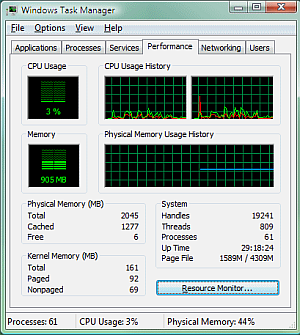
If you have been using Windows Vista and were curious to check the CPU and RAM usage, then you have surely made your way to the Performance tab in the Windows Task Manager. Here, you may
have come across readings similar to those in the screen shot on the left. Forget about all the data displayed and just focus on Physical Memory (MB). It reads Total: 2,045, Cached: 1,277 and Free: 6. 6 MB of free RAM? Why did my memory go? You can see that the CPU is at 3% so I'm really almost doing nothing at all. Then why does Windows Vista consume all the system memory?

Windows XP did not eat up this much RAM. Checking the same Performance tab in Windows XP will always reveal a consistent amount of free physical memory. Is this another case of what XP did better than Vista? Well, to put it simply, no! This is in fact an example of the way Windows XP inefficiently manages the system resources available, wasting them.

This is because the role of RAM is to be cached memory. If it's free, then it only is a piece of unused hardware. This is where Windows Vista and the SuperFetch feature come in. SuperFetch is a memory management technology introduced in Windows Vista to optimize the RAM usage.

"Windows SuperFetch prioritizes the programs you're currently using over background tasks and adapts to the way you work by tracking the programs you use most often and preloading these into memory. With SuperFetch, background tasks still run when the computer is idle. However, when the background task is finished, SuperFetch repopulates system memory with the data you were working with before the background task ran," Microsoft revealed.
FILED UNDER:
SuperFetch
Windows Vista

TELL US WHAT YOU THINK:

9,517 hits · 4 comments · Link to this article · Print article · Send to friend · Subscribe to news

MUST-READ RELATED ARTICLES:


Download the Ultimate Wow Windows Vista Wallpapers

Enable DreamScene Video Wallpapers for All Windows Vista Editions

Apple Fans Vandalize Windows Vista

The History of Windows - from Windows 3.x to Windows Vista

Sub-Zero Windows Vista

READER COMMENTS:


Comment #1 by: Larry Miller on 05 Feb 2009, 19:08 UTC reply to this comment

This article contains a number of errors. When it speaks of Vista's memory usage it is mostly correct, not so with XP. Vista does manage memory better than XP but the changes are relatively minor. The real difference is in Task Managers display

Vista usually shows a very low number for "free" memory, while XP shows a much larger number for "available" memory. It is widely believed, even by some "experts", that the terms mean the same thing. WRONG. Available does not equate with free. Most of the "Available" memory is actually in use, some as a part of the file cache and some for other purposes. In a modern virtual memory system "Available" and "In-use" are not contradictory. The actual amount of memory that is actually free will be much smaller.

XP does not waste it's memory resources. It is simply that Vista has a number of innovative features to make greater use of it. One of these is "Super Fetch". But even with this feature disabled the free memory will fall to very low levels.

All modern versions of Windows follow the same principles. Memory should be used to the fullest possible extent - free memory is wasted memory. Vista is just somewhat better at doing this.

Larry Miller
Microsoft MCSA

Comment #1.1 by: Pete on 19 Mar 2009, 22:45 GMT

This is a response to Larry Miller.

Your answer is absolute rubbish. Vista has the worst memory management I' ve seen yet. It may be better for low end users email, media and a few applications (general use) but if you want ot do any serious work/development or run a serious system the memory management sucks! You can easily outperform Vista with less than half the memory on XP. Right now I'm running on a laptop with 2gig I have 2 command windows open, 1 Meta trader 4 terminal, 6 ultraedit windows and 4 IE the system has run out of free memory showing 0 and has totally stopped working. This has happend even though it is showing as having 1100 cached memory. According to Microsoft as soon as memeory is needed it will be freed up from the cached memory, this hasn't happened.


Comment #2 by: myth on 07 Apr 2009, 19:59 UTC reply to this comment

Vistas memory management is good in theory horrible in application, because the Microsofted it. if you have any microsoft app on your system that one is loaded constantly even if you never run it, while non MS apps have to be run hourly or more often to get into the superfetch. Also while superfetch may give you thoeretical application launch speed gains it in no way shape or form makes up for running your HD constantly to fill a modern systems average of 6 gig of ram.


Comment #3 by: johnny on 12 Oct 2009, 12:17 UTC reply to this comment

well how are we,
i believe that ram frees up all its memory resources evenly across all programs at startup,there is no such thing as free ram because of this,now there is such a thing as ram leakage which occurs when a program lies idle without being used.Firefox is one big one to point out,as a browser it has a lot of memory leakage,to stop all this leakage we must shop around and not follow the sheep into the ditch.tech experts have given us the top 10 and safari or opera are two hell of good browsers to download,i have been studying this ram stuff for a long time now,and its important to have programs installed
that do no use up a lot of valuable resources on any and i mean any computer,glary utilities is a brilliant utility for everyone on the planet to have to keep your systemin top order and free of all that is bad in computing.

regards,
from johnny ucc in cork computers enviroment

Copyright © 2001-2012 Softpedia. Contact/Tip us at

WindowsGamesDriversMacLinuxScriptsMobileHandheldNews

SUBMIT PROGRAM   |   ADVERTISE   |   GET HELP   |   SEND US FEEDBACK   |   RSS FEEDS   |   UPDATE YOUR SOFTWARE   |   ROMANIAN FORUM