
NEWS CATEGORIES:


NEWS ARCHIVE >>
SOFTPEDIA REVIEWS >>
MEET THE EDITORS >>
Home / News / Apple / Mac

Mac


White MacBooks Age. Literally

Are you experiencing black marks on your white macbook?

By Filip Truta, Apple News Editor

26th of February 2008, 14:27 GMT

Adjust text size:


Enlarge picture
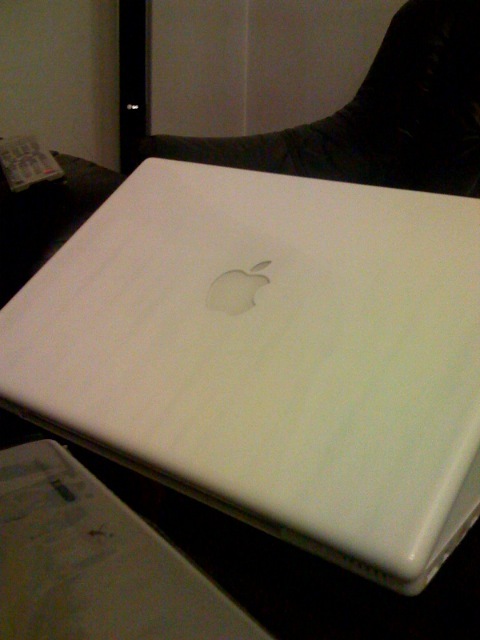
Black marks on white MacBook is a recently debated topic up on Apple Discussions. Dude asks whether anyone else has been experiencing something as strange as faint black lines appearing on, or underneath the glossy surface of the laptop's case. Anyone else having these problems?

"My uncle gave me a Ted Baker laptop case for my birthday, and
it seemed the perfect fit for my Macbook. I have had the notebook for 2 months now and I have gradually noticed that very strange, feint black lines have begun to appear on the surface it. Has anyone else had these problems, and if so how would one go about cleaning the surface of a Macbook properly," says Monkfish, adding that some pictures of his MacBook are also on their way.

The lines are strange, no one can argue there. It looks like the machine is eons old and the plastic is losing its pigment. This image above actually depicts the second such MacBook reported by another user who was able to produce better quality images of his machine. Dhiru has the exact same problem with (check this) BOTH his white MacBooks: "hey monkfish, i have 2 white macbooks and both have the same problem. one of the macs is 9 months old and the black lines are not faint! you can see them all the time, no matter what angle u look at!"

Presuming Hyde244 also owns a white MacBook, here's is just another unhappy user experiencing faint black lines underneath the laptop's case: "Those are the exact same marks on mine!," he posts on the same page.

Normally, Apple should take care of this, as long as said MacBooks are in warranty, but the question still remains unanswered: what could possibly cause this to happen? Think Apple uses cheap plastic? Could high temperature be the cause of this? Surely, the MacBook's inner workings would have been long dead had that been the case, so what do you think is the real issue here? Use the comments column below to express your thoughts.

TAGS:

apple discussions | scratch | MacBook | white | line
Read by 2,266 user(s) | Add comment | Link to this article TWEET THIS


Article rating:
Good (3.5/5) 8 vote(s)    

Subscribe to news | Print article | Send to friend

© Copyright 2001-2009 Softpedia
Contact:


SEARCH THE NEWS ARCHIVE :


Today's News
| Yesterday's News | News Archive


MORE RELATED ARTICLES:


Microsoft and Apple: a Match Made in Heaven

Apple to Grab Multitouch and Keep It for Themselves

Keep an Eye Out for Apple Tuesday!

50% Price Drop in Order for iPods and iPhone

More Multitouch from Apple. Pretend to Write/Draw

Air to Descend Because of Its Own Battery

iPhone/iPod Headphones that Let You Hear Everything

MacBook Air Heavy Competition on the Way

User opinions:


Comment #1 by: John McMillan on 27 Feb 2008, 03:32 GMT reply to this comment

You can clean your macbook with a cotton ball and isopropyl alcohol. This has worked for me and is posted at the apple site following this link:
http://docs.info.apple.com/article.html?artnum=30889
I had asked many times about what I could use to clean and sterilize my macbook. (i don't like germs!) I was quite happy to find this article :))) Hope this helps


Comment #2 by: Jonne Wilkinson on 08 Jul 2008, 23:28 GMT reply to this comment

I have the exact same problem. The black marks referred to in the article appear after normal usage of a laptop sleeve. The texture and mould of the laptop sleeve are for some reason projected and printed onto the white macbook's surface, leaving deep black stains that cannot be removed by any cleaning solution. In my opinion, the white case plastic of the latest macbook constitutes a serious design fault on Apple's behalf, as this material is clearly unable to withstand operating heat and/or contact with other synthetic materials without showing severe discoloration. Apple should fix this issue a.s.a.p. if they want to keep their customers happy.


Comment #3 by: james on 29 Oct 2008, 16:40 GMT reply to this comment

Yes I've had the same problem, except mine appeared horizontally with the keyboard but on the surface. i just got it replaced, and the new one I have is doing the exact same thing!!!

Share your opinion:

Your Name:
Your Email Address:
(will not be used for commercial purposes)
Solve this to prove you're not a bot: =
Your review/opinion:


Windows tabGames tabDrivers tabMac tabLinux tabScripts tabMobile tabHandheld tabGadgets tabNews tab

SUBMIT PROGRAM   |   ADVERTISE   |   GET HELP   |   SEND US FEEDBACK   |   RSS FEEDS   |   ENTER NEWS SITE   |   ENGLISH BOARD   |   ROMANIAN FORUM