
Softpedia
 

NEWS CATEGORIES:


NEWS ARCHIVE >>
SOFTPEDIA REVIEWS >>
MEET THE EDITORS >>
Home > News > Technology and Gadgets > Storage

September 11th, 2009, 07:32 GMT · By

Western Digital Enables New SmartWare Software on My Book Essential Drives

SHARE:

Adjust text size:


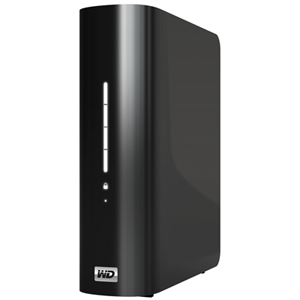
Western Digital unveils new My Book Essential storage solutions
Enlarge picture
Western Digital has gone all out, these days, with the company announcing a couple of updates to its line of internal and external storage solutions. Following the introduction of its new, 640GB, 2.5-inch hard drives for notebook systems and the new, revamped My Passport portable hard drives, the Lake Forest, California-based, storage-product vendor has introduced its new, smaller My Book Essential and My Book for Mack desktop external hard drives.

Like in the case of the new My Passport series, the new My Book family has been featured with the company’s latest WD SmartWare software and hardware-based encryption solution. These features will essentially provide users with a secure, external storage alternative to similar products on the market.

“Keeping an extra copy of your digital life used to be a painstaking, manual task undertaken only by the most expert and diligent of users. WD's new My Book Essential and My Book for Mac external hard drives, powered by WD SmartWare, have finally made it easy enough so that anyone can do it,” Dale Pistilli, vice president of marketing for WD's branded products group, said. “WD's new drives combine massive storage capacity, visual backup, and hardware encryption, so consumers can now actually see their digital life, safe in one place.”

Western Digital’s new WD SmartWave software is designed to work on both Windows PCs and Mac computers, providing users with a choice for backing up their digital data in a secure and visual way. The utility is designed to work so that, after the first backup is performed, the user’s data is automatically backed up every time they change or add a file.

The revamped line of My Book Essential external drives is available in capacities of 500GB, 1TB, 1.5TB and the company’s largest capacity model, boasting a 2TB storage solution. Price-wise, you are looking at products that range from US$99.99 to US$249.99, depending on the model.

TELL US WHAT YOU THINK:

14,423 hits · 11 comments · Link to this article · Print article · Send to friend · Subscribe to news

MUST-READ RELATED ARTICLES:


LaCie and Wuala Merger to Bring People Closer to the Cloud

WhipTails Unveils the 6TB SSD Tier 9 Storage Appliance

Phoenix Unveils SSD-Based Storage Module for the Military

LG Rolls Out N2R1 NAS with Built-In DVD-RW Optical Drive

Hitachi Unveils New CinemaStar 1TB Hard Drives

READER COMMENTS:


Comment #1 by: danegeld on 19 Oct 2009, 18:00 UTC reply to this comment

"Enables New Smartware Software"? Inflicts it is more like it. WD embedded this crap in the firmware so it CANNOT BE REMOVED. Reformatting won't do it. Repartitioning won't do it. I won't buy drives from a company that steals capacity to install their unwanted software. Western Digital should be ashamed.


Comment #2 by: Bob Dobolina on 22 Oct 2009, 19:34 UTC reply to this comment

These are great little drives, but the Smartware software is PURE GARBAGE. And, because it's embedded in the firmware, there's no way to remove it. I bought one of these drives a few days ago. Wasn't happy about the software, but I decided to give it a shot. It's HORRIBLE. Slows your system down, runs at bootup and my anti-virus software reports it as a root kit. Why would WD do something so unbelievably stupid? I'm done with WD drives until they dump this garbage or make it uninstallable.

Comment #2.1 by: Elle on 03 Dec 2009, 23:46 GMT

If you did a bit of search on the internet you would of found this page to remove the software.

http://www.wdc.com/wdproducts/updates/?family=wdsmartwareutilities


Comment #3 by: dZastreux on 05 Jan 2010, 11:29 UTC reply to this comment

If you had a bit of brain, you'd know this "work-around" provided by WD WON'T remove anything : It will only hide the virtual CD drive, but the crapware inside will remain there !
You won't get back your bought disk space and 500Mb is a "ridiculous stolen space" for such a bit of crapware.
Now, you [ remove OR don't have ] an added "smartware" ("smart"?!?) service installed on the computer, window will even popup some annoying messages about a missing driver while pluging the disk.

Some real solution here to erase this rootkit-malware provided by Western Digital :
http://community.wdc.com/t5/forums/forumtopicpage/board-id/smartware/thread-id/65;jsessionid=F706785B5A654FF4CA0407008D29F155
...BUT will void the warranty. Happy ?

Comment #3.1 by: JW on 19 Jan 2010, 04:30 GMT

I just installed this for a friend. Have not hit the "start Backup" yet so according to the documentation it will sit there and not attempt automated backups until/unless you Start Backup for the first time.

Is there really an issue with system speed using this autobackup or Smartware besides wasting a few GB of space ? The installation process offers a box to check that says it will only run when the machine is otherwise in idle. Does that feature not work ?


Comment #4 by: John Smith on 05 Jan 2010, 20:28 UTC reply to this comment

I wish I had read the above comments before I bought the 1TB WD Essential. The Smartware ran 10 hours and failed to back up the Others category. Even the backed up categories can not be retrieved. At the retrieve tab, there is 0 byte to retrieve. WD Tech Support supposed to answer questions within 24 hours, 48 hours later I am still waiting. Canada Computers charges 15% restocking fee. I guess I am stucked with this crapware (Smartware) from the drive.


Comment #5 by: nitin mutkawoa on 22 Mar 2010, 23:32 UTC reply to this comment

remove the sata disk from the case and connect it to a magnetic field...


Comment #6 by: David Moore on 05 Jul 2010, 20:36 UTC reply to this comment

I just bought this for my macbook and am having the same problems. It slows down my laptop and keeps it overheated a good majority of the time. Piece of crap, do NOT BUY!!


Comment #7 by: V10DRIVER on 09 Nov 2010, 03:28 UTC reply to this comment

I just bought a my book essential and I cannot even get it to work. I am a Mac head and I have never seen such crap for a external drive. I did all the prerequisits for operation and nothing happened. Im gonna get my money back. Im glad it is my wife's pc and not my Mac


Comment #8 by: Tom on 19 Dec 2010, 00:14 UTC reply to this comment

An absolute piece of garbage...couldn't get it to work on either my wife's computers or mine. Put a call in to WD support but haven't heard anything now for a full day and from what I read here, don't expect to.

Unbelievable dissapointment and has certainly given WD a huge black eye.


Comment #9 by: Shirley on 23 May 2012, 02:19 UTC reply to this comment

I can't get it setup Shirley Fields I thank mt password is sf72326

Copyright © 2001-2012 Softpedia. Contact/Tip us at

WindowsGamesDriversMacLinuxScriptsMobileHandheldNews

SUBMIT PROGRAM   |   ADVERTISE   |   GET HELP   |   SEND US FEEDBACK   |   RSS FEEDS   |   UPDATE YOUR SOFTWARE   |   ROMANIAN FORUM