

NEWS CATEGORIES:


NEWS ARCHIVE >>
SOFTPEDIA REVIEWS >>
MEET THE EDITORS >>
Home / News / Microsoft / Windows

Windows


Vista 4 Seconds Boot vs. Windows 7 (15 Seconds) and Windows Instant On (8 Seconds)

Courtesy of ASRock

By Marius Oiaga, Technology News Editor

14th of November 2008, 09:34 GMT

Adjust text size:


Windows
Enlarge picture
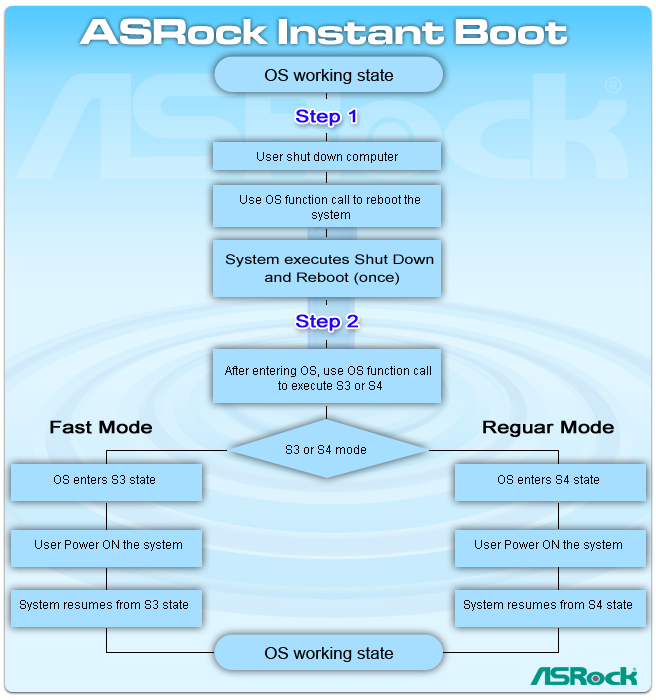
One of Microsoft's focuses in terms of the Windows client's evolution is improving the startup performance. Moving onward, beyond Windows Vista, the software giant is optimizing the boot-process, in order to shave off precious seconds between the moment the user hits the On button and that in which the operating system becomes fully functional. However, Microsoft is yet to come even close to the performance achieved by ASRock via Instant Boot, which already has Windows Vista booting in 4 seconds, and even less, as demonstrated in the video embedded at the bottom of this article.

“Now we have a good news, ASRock has overcome the technical obstacles and exclusively invented a new technology that allows you to turn on your PC in just a blink of an eye! Not only it saves energy, money, it also helps system running speed. This feature is applicable to both Windows XP and Windows Vista,” reads an excerpt of the description of this technology from ASRock (via Hardware 2.0).

ASRock's technology will, indeed, lower the boot-time for Windows Vista and Windows XP down to under 4 seconds, as long as the two operating systems will run on machines equipped with the following motherboards: AMD 790GX (AOD790GX/128M) and AMD 780G (A780GXE/128M), as well as Intel P45 (P45XE-WiFiN; P45XE-R; P45XE); Intel P45 (P45TS-R; P45TS; P45TurboTwins2000) and Intel P43 (P43DE). Instant Boot is intimately connected with the computer's motherboard, and is available via driver/BIOS updates. Users will have the option of choosing between Instant Boot Fast Mode (4 seconds boot) and Regular Mode (20 seconds boot).

Microsoft itself has improved the boot performance in Windows, and an illustrative example of this was offered via the Windows Vista vs. Windows 7 pre-Beta Build 6801 boot drag race. Windows 7, even in the third development milestone, considered by any measure an early stage in the building process, manages a faster startup compared to Windows Vista, beating its precursor by few seconds. The boosted boot times in Windows 7 are catalyzed by the fact that the operating system now loads device drivers in parallel, and by the fact that it makes use of a new mechanism that allows it to start services truly on demand.

Instant Boot
Enlarge picture
Instant Boot
Enlarge picture
Still, the software giant seems to be committed to making Windows boot even faster. And a taste of such a strategy is the “Instant On” concept. Microsoft intends to deliver the bare bones of the installation of Windows, which will be able to boot in just eight seconds. However, the faster boot time means that users will only be able to enjoy limited functionality across the operating system and not the full Windows client.

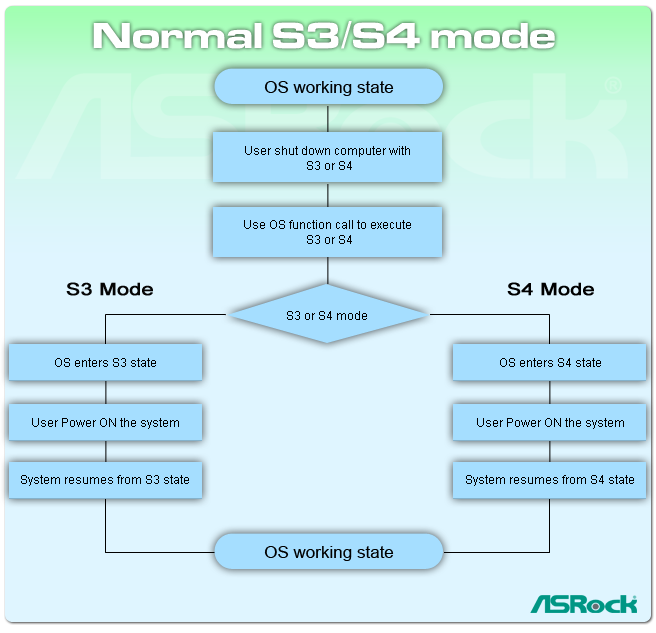
In all fairness, ASRock managed to take Vista boot times down to 4 seconds, not by shutting down and powering up the platform (S5), but by making use of the S3 and S4 Sleeping States. “States S1, S2, S3, and S4 are the sleeping states. A system in one of these states is not performing any computational tasks, and appears to be off. Unlike a system in the shutdown state (S5), however, a sleeping system retains memory state, either in the hardware or on disk. The operating system need not be rebooted to return the computer to the working state,” Microsoft informed.
 

TAGS:

Windows Vista | Windows XP | Windows 7 | boot | startup
Read by 7,829 user(s) | Add comment | Link to this article TWEET THIS


Article rating:
Very Good (4.6/5) 5 vote(s)    

Subscribe to news | Print article | Send to friend

© Copyright 2001-2009 Softpedia
Contact:


SEARCH THE NEWS ARCHIVE :


Today's News
| Yesterday's News | News Archive


MORE RELATED ARTICLES:


Windows Live Essentials for Windows 7

Windows Live Services Wave 3 Update Starts Rolling Out

25GB Free Online Storage – Windows Live SkyDrive

Games for Windows - LIVE Update Redistributable 2.0

Firefox 3.0.4 and Firefox 2.0.0.18 Available for Download

Ultimately, Touch Will Make the Killer Windows 7 Applications

Microsoft Introduces Internet Explorer 6

User opinions:


Comment #1 by: ... on 14 Nov 2008, 10:03 GMT reply to this comment

I dont get this.
From what I understood its not booting but its sleeping
and vista already have the sleeping function so WTH is this??
(When i put my vista to sleep it wake in 2 to 3 second it seem to be the same as this)


Comment #2 by: Anonymus on 14 Nov 2008, 12:01 GMT reply to this comment

When vista sleeps the PC is still powered on and takes electricity. With this you can actually pull the power plug out and after that you'll still be able to boot in 4 seconds.


Comment #3 by: razvan on 14 Nov 2008, 14:53 GMT reply to this comment

anonymus you are not right..you can't plug off the pc....you should carrefully watch the movie...it says that you shouldn't plug out the pc....and after all it's a sleeping state...the whole operating system is loaded on ram and, as you all know, ram means that all information is lost when the computer is turned off


Comment #4 by: Anonymus on 14 Nov 2008, 15:53 GMT reply to this comment

Didn't you see the scheme image?

1. User SHUT DOWN Computer with S3 or S4 (Shutdown means NOT sleep)

2. ...You can now pull the plug OUT and computer will take ZERO electricity because it's shut down and not sleeping.

3. User POWERS ON the system (Powers on does not mean resume from sleep)

Gosh... people do you ever read?
If this was just another sleephibernate trick it wouldn't make all the fuss.


Comment #5 by: GX_Ponzini on 17 Nov 2008, 21:38 GMT reply to this comment

Anonymus- you're the one who better learn to read ..!

Here is what was said..!

"In all fairness, ASRock managed to take Vista boot times down to 4 seconds, not by shutting down and powering up the platform (S5), but by MAKING USEOF THE S3 and S4 SLEEPING STATES. “States S1, S2, S3, and S4 are the sleeping states. A system in one of these states is not performing any computational tasks, and APPEARS to be off."


Comment #6 by: Malachi66 on 27 Apr 2009, 14:23 GMT reply to this comment

Honestly I have to agree with everyone but Anonymus. All it is is an overly advertized sleep trick. And really, if it only took "..." 2 to 3 secs to do this with the built in Vista version, this is slower, and thus a waste of time. Even looking at the supplied jpgs there is no difference in the process between this and the normal sleepstate process. I honestly believe this ought to be deemed "Fail".


Comment #7 by: david on 11 May 2009, 07:07 GMT reply to this comment

If you want to proof it Anonymus you better show a better video than that to proof it more details


Comment #8 by: John on 12 Oct 2009, 11:42 GMT reply to this comment

I am using an ASROCK mini PC as a media center and I can attest that even with a puny Intel Atom chip on the motherboard the device boots in 4 seconds from complete power off (plug removed). It is being used next to a TV and the instant boot feature is essential as I can switch the PC an dTV on at the same time.

Believe the hype... it is real this time.

Share your opinion:

Your Name:
Your Email Address:
(will not be used for commercial purposes)
Solve this to prove you're not a bot: =
Your review/opinion:


Windows tabGames tabDrivers tabMac tabLinux tabScripts tabMobile tabHandheld tabGadgets tabNews tab

SUBMIT PROGRAM   |   ADVERTISE   |   GET HELP   |   SEND US FEEDBACK   |   RSS FEEDS   |   ENTER NEWS SITE   |   ENGLISH BOARD   |   ROMANIAN FORUM