

Search Perform an advanced search query SOFTPEDIA
 
SOFTPEDIA
Updated one minute ago
HomeSubmit a program for being reviewedAdvertise on our websiteGet help on surfing our websitesSend us your feedbackGet information about our XML/RSS backend and how to use itBrowse the news archiveVisit our discussion forumVizitati forumul in limba romana


KLIP
  1. HOME
  2. SCIENCE
  3. TECHNOLOGY
  4. WEBMASTER
  5. SECURITY
  6. MICROSOFT
  7. LINUX
  8. APPLE
  9. GAMES
  10. TELECOMS
  11. REVIEWS
  12. LIFE & STYLE
  13. EDITORIALS
  14. INTERVIEWS
  15. RSS
Welcome!
Hello, Guest

Login if you have a Softpedia.com account.

Otherwise, register for one.

MICROSOFT

Upgrade Paths from Windows XP to Windows Vista

- Your options are limited by the XP and Vista editions

By: Marius Oiaga, Technology News Editor

Upgrading your copy of Windows XP to one of the editions of Windows Vista is not as simple as you might first think. Vista is no Mac OS X after all, so the upgrade paths tend to be a tad
more complex. But hey... straight up is the way I take my Jack not my operating system. As far as upgrading from Windows XP to Windows Vista is concerned, there are a few things that you need to know before you proceed with the process.

For moving to Windows Vista, Microsoft delivers two standard options: either a clean install or an upgrade. The advantage of an upgrade is that you get to keep all your files, settings, and programs. Upgrading a 64-bit version of XP to a 60bit edition of Vista is not possible. You will have to clean install Vista.

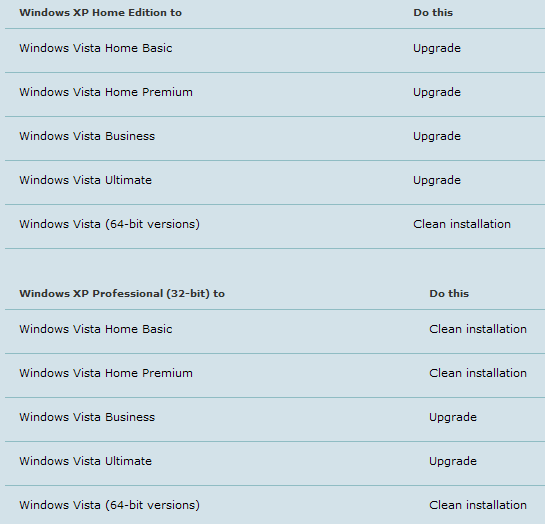
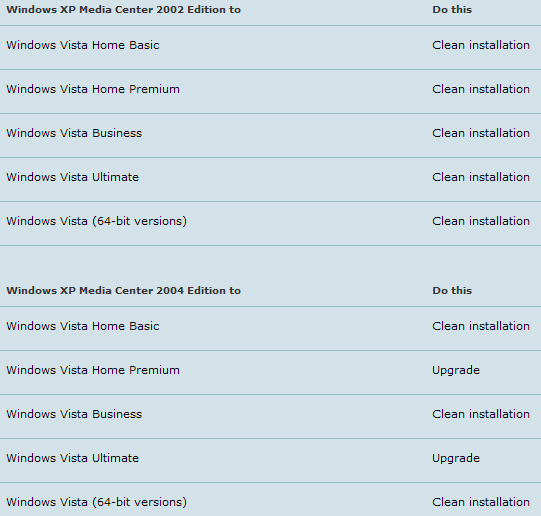
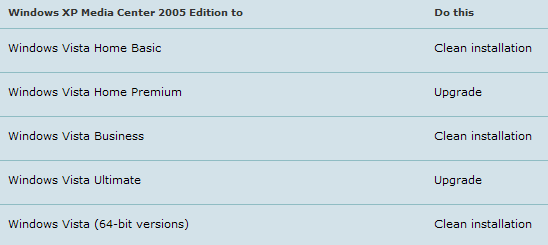
However, with the 32-bit editions, your options are more varied. I have also included a set of images at the bottom of this article that will provide a graphic reference to the upgrade paths available between 32-bit XP and Vista. Just click on each image in order to access a readable variant.

First of all, you have to consider the XP options available. Windows XP Home Edition, Windows XP Professional (32-bit), Windows XP Professional x64 Edition, Windows XP Tablet PC Edition, Windows XP Media Center 2002 Edition, Windows XP Media Center 2004 Edition and Windows XP Media Center 2005 Edition, all have different upgrade paths to Windows Vista. Still, all XP editions share a common characteristic. None of them can upgrade to a 64-bit edition of Vista. Either you start from a 32-bit or a 64-bit Windows XP, you will have to clean install a x64 version of Vista.

Windows XP Home Edition can upgrade to Windows Vista (32-bit) Home Basic, Home Premium, Business, or Ultimate.

Windows XP Professional can upgrade to Windows Vista (32-bit) Business, or Ultimate.

Windows XP Tablet PC Edition can upgrade to Windows Vista (32-bit) Business, or Ultimate.

Windows XP Media Center Edition 2004 or Windows XP Media Center Edition 2005 can upgrade to Windows Vista (32-bit) Premium or Ultimate.

MORE RELATED ARTICLES: Microsoft Will Kill Window Vista Ultimate Early The True Limitations of Windows Vista Virtualization Windows Vista Lives in Full Only with 4 GB RAM Windows Vista Support Lifecycle Windows Vista Is an Obscene Motherf****r Vista, the Fastest-Adopted Version of Windows Ever 32-bit Windows Vista Eats Up RAM
 
Comments | Link here | Subscribe
Print | Send to friend
Today's News | Yesterday's News

Search:


3rd April 2007, 11:39 GMT | Copyright (c) 2007 Softpedia | Contact:
Read by 3,974 user(s) | Rating: | 8 vote(s) so far | Cast your vote:
Upgrade Paths from Windows XP to Windows Vista - USER OPINIONS


We are sorry, there are no opinions available for this article.


SHARE YOUR OPINION ABOUT Upgrade Paths from Windows XP to Windows Vista

Since you are not logged on, your comments will have to be approved before being displayed.
Click here to login, or register.
Your Name:
Your Email:
Type in the result:
Your Opinion:


DO YOU WANT TO CONTACT US?  

If you have some comments or you want to send us some information you can send us an email directly to .
You can use the form below for the same purpose.
Your full name: (at least 3 characters)
Your email address: (at least 5 characters)
Message subject: (at least 5 characters)
Message text:
(at least 10 characters)
Type in the result:


© 2001 - 2008 Softpedia. All rights reserved.
Softpedia™ and Softpedia™ logo are registered trademarks of SoftNews NET SRL.
Copyright Information | Privacy Policy | Terms of Use | Contact Softpedia | Update your software | Archive