Softpedia
 

NEWS CATEGORIES:


NEWS ARCHIVE >>
SOFTPEDIA REVIEWS >>
MEET THE EDITORS >>
Home > News > Linux > Linux Distributions

July 23rd, 2009, 10:45 GMT · By

Ubuntu 9.10 Alpha 3 Comes with Ubuntu One and Linux Kernel 2.6.31

SHARE:

Adjust text size:


Ubuntu 9.10 Alpha 3
Enlarge picture
A few minutes ago, the Ubuntu
developers unleashed the third alpha version of the upcoming Ubuntu 9.10 (Karmic Koala) operating system, which is scheduled for release in late October this year. As usual, we've downloaded a copy of it in order to keep you up to date with the latest changes in the Ubuntu 9.10 development.

What's new in Ubuntu 9.10 Alpha 3? It has been about six weeks since the last alpha release, therefore the developers had some time to introduce new technologies and features to this version. Ubuntu 9.10 Alpha 3 has a new development version of the GNOME desktop environment, 2.27.4, which brings cool new features. Here are the most important features of Ubuntu 9.10 Alpha 3:

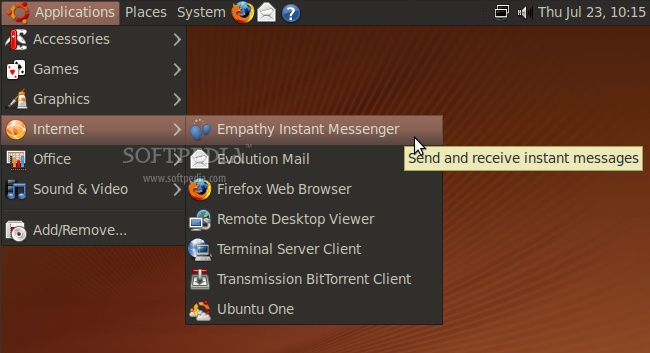
1. Sad news for Pidgin fans, as the development team decided to replace it with the Empathy instant messenger client.

Review image

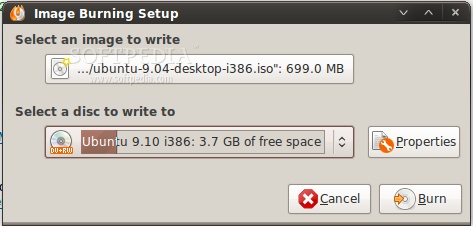
2. Brasero received a few weeks ago a new interesting feature that shows how much data was written on the CD/DVD media and how much free space is available. This is very, very useful for people who have DVD-RW or CD-RW discs and are used to write in the multi-session mode.

Review image
Brasero now shows how much free space is available on the disk

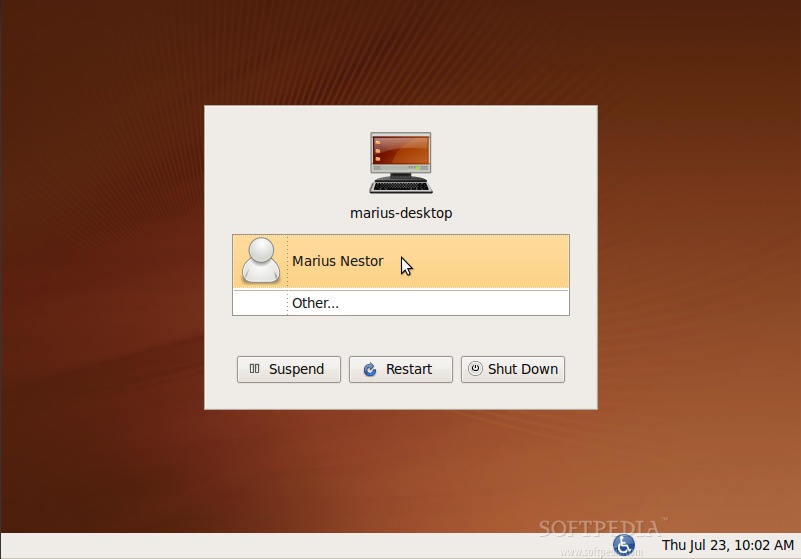
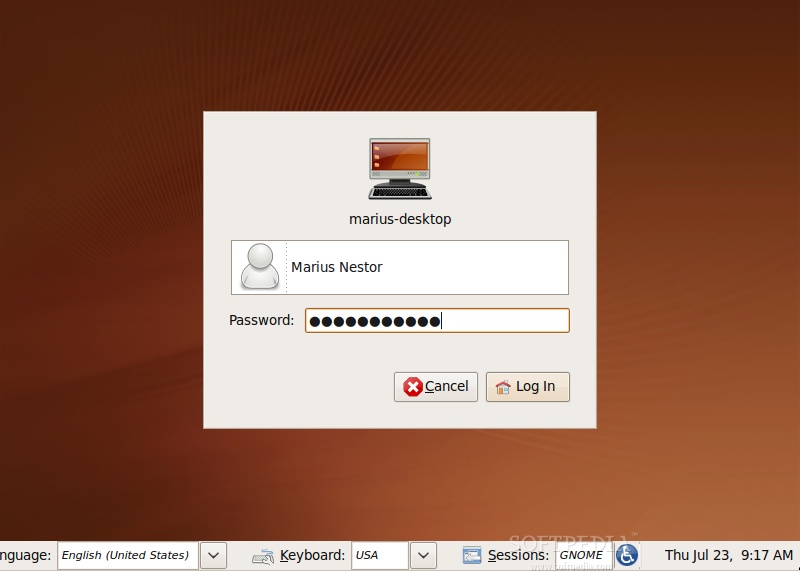
3. Another useful and highly anticipated feature is the completely rewritten login manager (GDM), which works like any other modern login manager (e.g. KDM, the KDE login manager). In short, it means that you don't have to write both your name and password anymore, in order to log in. Just click on your name and you will be immediately prompted for the password (see the picture below for details). However, what you see below is not the final version of the login manager, it will be skinned by the new Ubuntu designers, until the Beta release (hopefully)!

Review image

Review image
The revamped login manager

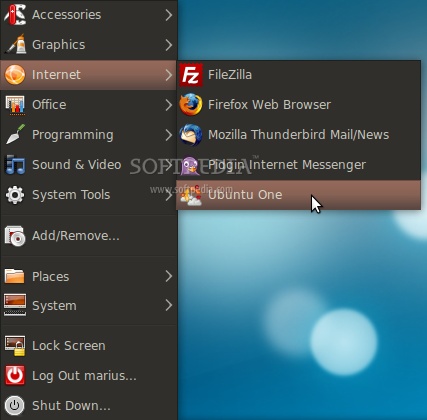
4. Ubuntu One is now part of the Ubuntu operating system! The main features of Ubuntu One, as described on the official website, are: seamless integration and synchronization between multiple machines and a convenient web interface. You will also see a folder named "Ubuntu One" in your home directory.

Review image
Ubutnu One, available from the Internet menu entry

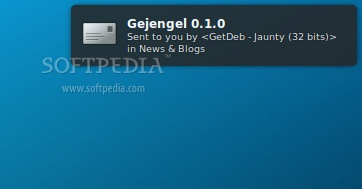
5. The already popular Notify-OSD notification system introduced in Ubuntu 9.04 (Jaunty Jackalope) has been revamped. It is now a little longer, narrower and has smaller fonts... which makes it slicker than before!

Review image
The new notifications

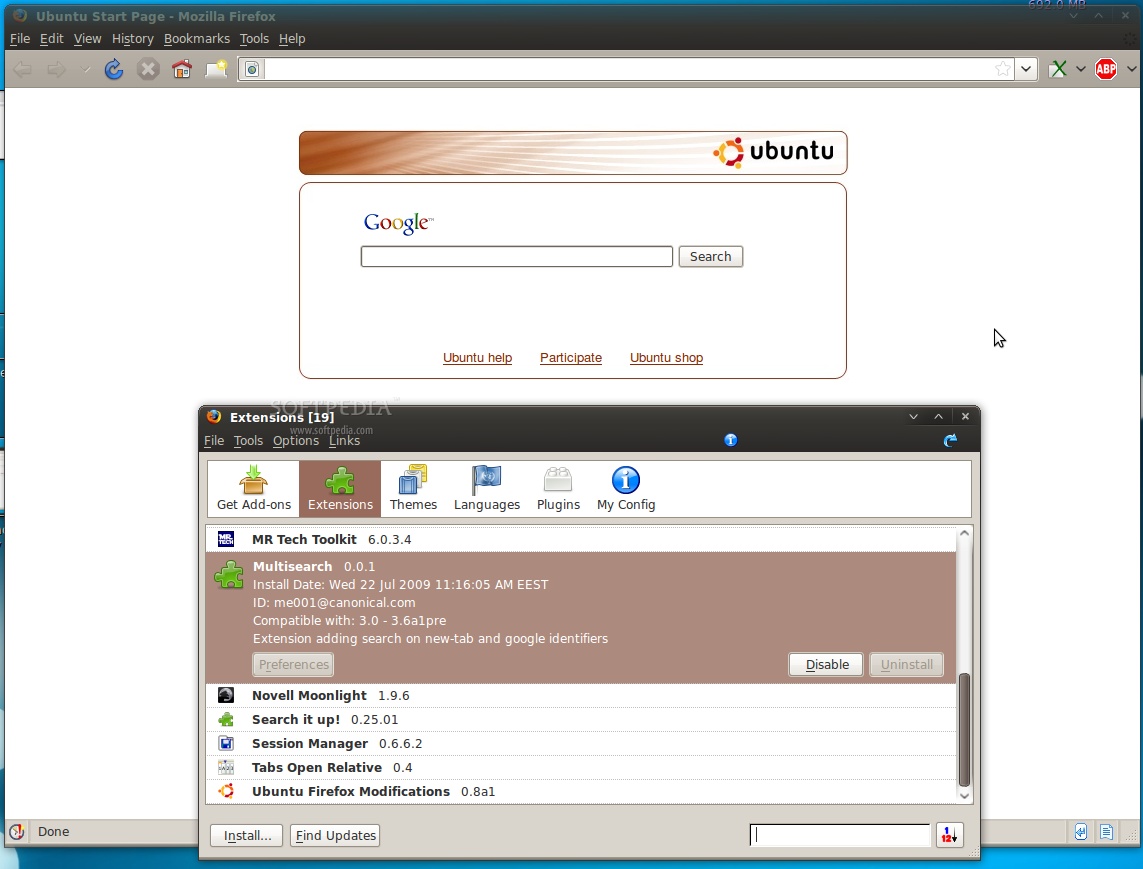
6. The default web browser in Ubuntu, Mozilla Firefox, received a new add-on called Multisearch. The extension is developed by Canonical and it shows a default Ubuntu start page with a search field powered by Google. This appears every time a new tab is opened.

Review image
The Ubuntu start page in Firefox 3

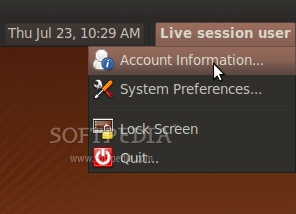
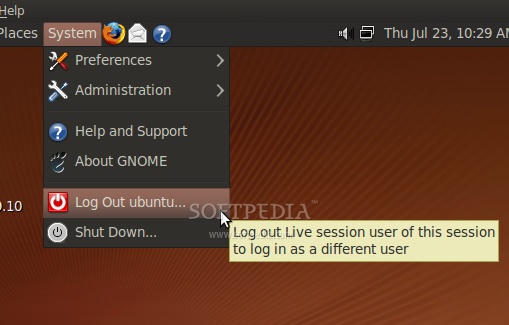
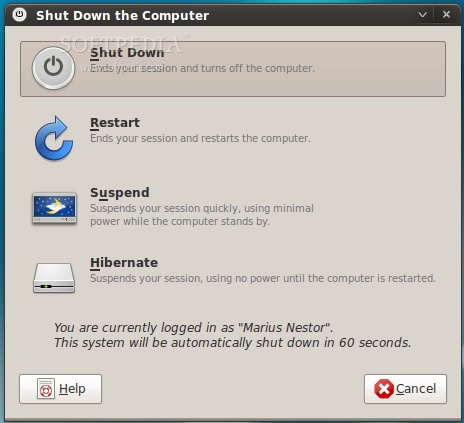
7. The User Switch applet has been modified drastically. It will now offer only information about the account, access to system preferences and lock screen/quit functions. The Log Out, Shut Down, Restart, Suspend and Hibernate functions have been moved to the System menu.

Review image

Review image

Review image

Last but not least, the kernel packages are at version 2.6.31-3.19, based on Linux kernel 2.6.31 RC3, and the Kernel Mode Setting is now enabled by default for Intel graphics!

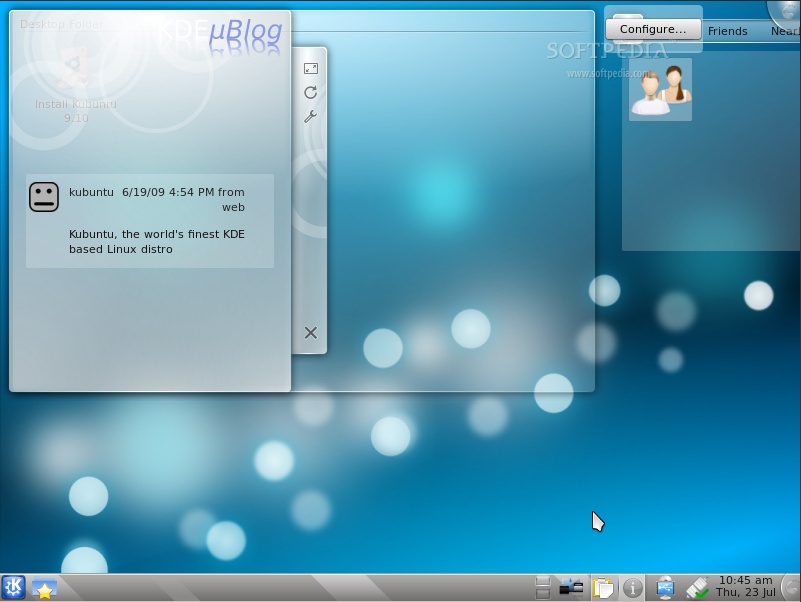
What's new in Kubuntu and Xubuntu 9.10 Alpha 3? The good news is that Kubuntu now has its own "Netbook Remix" Edition (see below for download links). This version contains the KDE 4.3 RC2 desktop environment and the following applications:

· Arora Web Browser (replaces Konqueror)
· Amarok 2.1.1
· KPackageKit 0.4.1.1
· K3b 1.66.0 (alpha 2)
· QtCurve 0.65.1
· kcm-gtk 0.5
· KDE microblogging Plasma widget

Review image
Kubuntu 9.10 (Karmic Koala) Alpha 3 with KDE 4.3 RC2

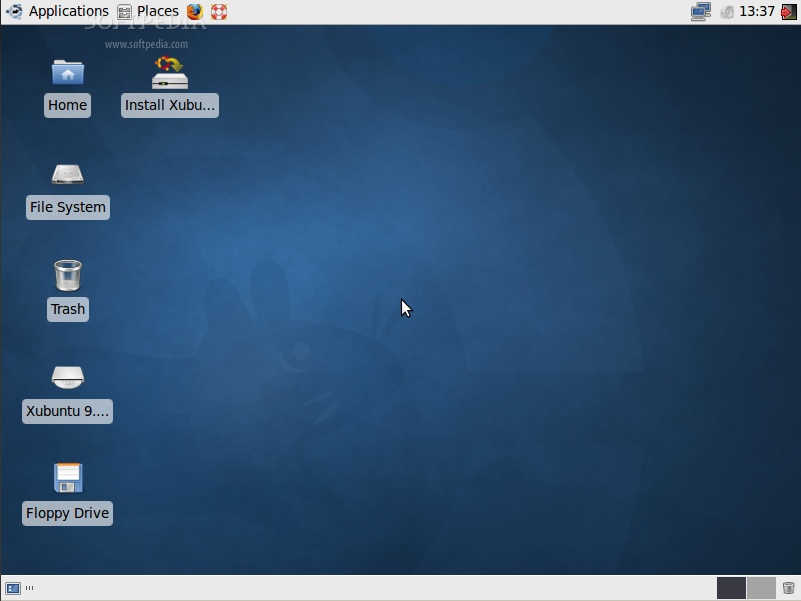
On the other hand, Xubuntu 9.10 Alpha 3 is build on top of the lightweight XFCE 4.6.1 desktop environment and includes updated applications.

Review image
Xubuntu 9.10 Alpha 3

On October 29th, Ubuntu 9.10 (Karmic Koala) will become the eleventh release of the Ubuntu operating system. However, until then, we have another version that should catch our attention and invade our computers, Ubuntu 9.04 (Jaunty Jackalope). See you again on August 13th, for the fourth Alpha release of the upcoming Ubuntu 9.10 (Karmic Koala).

The Karmic Koala Release Schedule:

May 14th, 2009 - Alpha 1 release
June 11th, 2009 - Alpha 2 release
July 23rd, 2009 - Alpha 3 release
August 13th, 2009 - Alpha 4 release
September 3rd, 2009 - Alpha 5 release
September 17th, 2009 - Alpha 6 release
October 1st, 2009 - Beta release
October 22nd, 2009 - Release Candidate
October 29th, 2009 - Final release of Ubuntu 9.10

Download Ubuntu 9.10 Alpha 3 (Karmic Koala) right now from Softpedia.

Download Ubuntu Server 9.10 Alpha 3 (Karmic Koala) right now from Softpedia.

Download Ubuntu Netbook Remix 9.10 Alpha 3 (Karmic Koala) right now from Softpedia.

Download Kubuntu 9.10 Alpha 3 (Karmic Koala) right now from Softpedia.

Download Kubuntu Netbook Remix 9.10 Alpha 3 (Karmic Koala) right now from Softpedia.

Download Xubuntu 9.10 Alpha 3 (Karmic Koala) right now from Softpedia.

Download Ubuntu Studio 9.10 Alpha 3 (Karmic Koala) right now from Softpedia.

Remember that this is an alpha release and it should NOT be installed on production machines. It is intended to be used for testing purposes only. Please report bugs to the Ubuntu Bug Tracker.


TELL US WHAT YOU THINK:

32,234 hits · 18 comments · Link to this article · Print article · Send to friend · Subscribe to news

MUST-READ RELATED ARTICLES:


Ubuntu AppCenter

How to Replace the Volume Control in Ubuntu 9.04

GRUB 2: the New Boot Loader in Ubuntu 9.10

Ubuntu 9.10 Alpha 2 Released

Ubuntu 9.04 Server Edition Certified on New HP ProLiant Servers

READER COMMENTS:


Comment #1 by: Ben on 23 Jul 2009, 11:35 UTC reply to this comment

Hey,

Can you post the picture of the new GDM because I think you forgot to upload it?

Comment #1.1 by: Marius Nestor on 23 Jul 2009, 14:01 GMT

Picture uploaded :)


Comment #2 by: Borsook on 23 Jul 2009, 12:05 UTC reply to this comment

Why is nothing about Xubuntu mentioned?


Comment #3 by: Nikhil Sinha on 23 Jul 2009, 13:04 UTC reply to this comment

Good Article. Good to know about Ubuntu Progress. Any information about the inclusion of recent 100 Paper cuts initiative taken by Ubuntu in the current alpha releases.

Nikhil Sinha.
OS: Linux Mint 7
Browser: Opera 10 b2


Comment #4 by: luke on 23 Jul 2009, 15:19 UTC reply to this comment

is that dust theme default?? if it is, cool!

Comment #4.1 by: Marius Nestor on 31 Jul 2009, 14:33 GMT

Not yet :)


Comment #5 by: Tuan on 23 Jul 2009, 16:27 UTC reply to this comment

It's sad to drop Pidgin which has a lot more features than the baby Empathy.
I can't find the "send file" feature.

Comment #5.1 by: Marius Nestor on 31 Jul 2009, 14:34 GMT

I agree... Pidgin also looks better


Comment #6 by: Mike on 23 Jul 2009, 19:04 UTC reply to this comment

LOVE Ubuntu! Empathy has voice and web cam right??....if so I welcome it! Pidgin needs to get with the times and add these features!!


MIke
OS:Ubuntu (4 EVA)
Browser:Firefox


Comment #7 by: Linux-user on 23 Jul 2009, 21:59 UTC reply to this comment

"In short, it means that you don't have to write both your name and password anymore, in order to log in."

That isn't anything new. In the "Login Windows Preferences" window go to "Local" and select the option "Normal with list of faces" (I don't know the exact translation, as I use a non-English version of Ubuntu). You can now click on your username, instead of having to write it down.

I hope you can still switch back to the old method. I don't like that "Click your username" method as it's less safe. Using this new method someone only has to guess your password to enter your system. Using the old method someone also has to know your username, so it's much safer to not show a list of accounts on the login screen.


Comment #8 by: mday on 24 Jul 2009, 04:33 UTC reply to this comment

I'm using a jaunty jacklope, has not finished yet. howto upgrade from Ubuntu 9.04 on a desktop system?


Comment #9 by: Atomic on 24 Jul 2009, 13:58 UTC reply to this comment

Thank you for this article.

One question: What does this multisearch do? how does ist work?

Comment #9.1 by: Marius Nestor on 31 Jul 2009, 14:32 GMT

Every time you open a new tab in Firefox, you will see that page in the screenshot... with Google search...


Comment #10 by: Zac on 25 Jul 2009, 08:29 UTC reply to this comment

Coming along quite nicely. I hope they release Ubuntu One for version 8.04.


Comment #11 by: Boxx on 26 Jul 2009, 16:08 UTC reply to this comment

New distro (release) for those few minor improvements ??

?


Comment #12 by: nick on 26 Jul 2009, 21:15 UTC reply to this comment

Can someone EVER come out with original names?

There has been a Mandriva One for a few years I bellieve so was there a need for an Ubuntu One.

I know the GPL allows you to use othes code but is it possible to be just a tad original?


Comment #13 by: velinx on 27 Jul 2009, 12:58 UTC reply to this comment

Thanks for your article. Can softpedia support spanish language?


Comment #14 by: rp on 10 Sep 2009, 08:17 UTC reply to this comment

All looks very promising with one exception (in my opinion).

User Switch applet:
It seemed perfectly logical to me to have Restart, Hibernate, Suspend, Log Out, etc all in the same place on the User Switch Applet menu. Why remove them? Why put Log Out in a separate menu? Why make me click extra times to accomplish those things? And why on Earth put System Prefs along side Quit?? Sorry, but seems like a move I'd expect from MS. I'm very rarely disappointed by changes in Ubuntu releases. This change just seems illogical to me. Oh well, maybe I'll see the light... or maybe they'll 'fix' this back again in a future version.

Copyright © 2001-2012 Softpedia. Contact/Tip us at

WindowsGamesDriversMacLinuxScriptsMobileHandheldNews

SUBMIT PROGRAM   |   ADVERTISE   |   GET HELP   |   SEND US FEEDBACK   |   RSS FEEDS   |   UPDATE YOUR SOFTWARE   |   ROMANIAN FORUM