
Softpedia
 

NEWS CATEGORIES:


NEWS ARCHIVE >>
SOFTPEDIA REVIEWS >>
MEET THE EDITORS >>
TRENDING TODAY
Home > News > Editor Blogs > Linux

July 12th, 2012, 10:41 GMT · By

BLOG

Ubuntu 12.10 Gets Revamped Session Menu

SHARE:

Adjust text size:


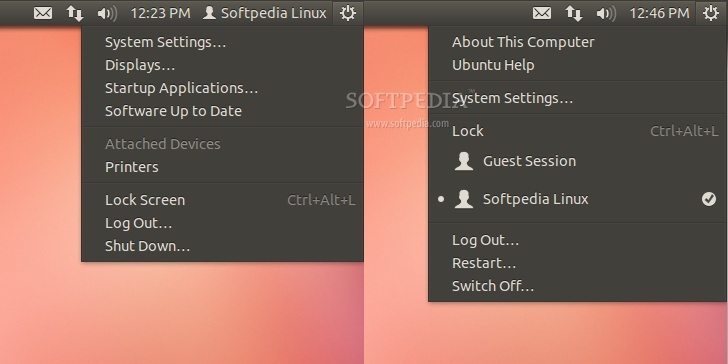
Old and new Ubuntu Session menu indicator Enlarge picture - Old and new Ubuntu Session menu indicator
With yesterday's updates, Canonical made some changes to the upcoming Ubuntu 12.10 (Quantal Quetzal) operating system, regarding the two panel indicators.

More exactly, the Fast-User Switching indicator has been removed and it is now integrated in the existing Session menu indicator.

That's not all, as the Session menu indicator has been completely revamped, and it now features the highly anticipated "Restart" option, and the "Displays", "Startup Applications" and "Software Up to Date" entries have been replaced with the "About This Computer" and "Ubuntu Help" entries.

Moreover, the "Lock Screen" entry has been renamed to "Lock", as you can see in the screenshot above, showing a before and after comparison of the Session menu indicator.

Overall, the panel now looks simple, awaiting new indicators. However, considering that Ubuntu 12.10 is in Alpha development stage, everything is subject to change.

Follow us on Google+

TELL US WHAT YOU THINK:

7,081 hits · 4 comments · Link to this article · Print article · Send to friend · Subscribe to news

MUST-READ RELATED ARTICLES:


Linux Mint 13 RC KDE Edition Has Been Released

CentOS 6.3 Screenshot Tour

Download KDE SC 4.9 Release Candidate 2

LibreOffice 3.5.5 Brings Stability Enhancements

OS4 12.5 Is Powered by Linux Kernel 3.2

READER COMMENTS:


Comment #1 by: Innocent Bystander on 13 Jul 2012, 00:39 UTC reply to this comment

Yeah, it's better this way. In 12.04, the Fast-User Switching indicator is a waste of panel space. Thanks you for taking the time to make the comparison screenshots

Comment #1.1 by: FastKC on 14 Jul 2012, 10:33 GMT

@Innocent Bystander

In Ubuntu 12.04, I installed Classic Menu Indicator 0.0.7:

http://www.liberiangeek.net/2012/05/install-classic-menu-indicator-in-ubuntu-12-04-precise-pangolin/?ModPagespeed=off

Comment #1.2 by: FastKC on 14 Jul 2012, 20:46 GMT

I've installed Classic Menu Indicator 0.0.7 for Ubuntu 12.04, I like its menu.

Same look as Softpedia talk.


Comment #2 by: rdx on 16 Jul 2012, 14:14 UTC reply to this comment

A better step forward. But what is really annoying me is the ellipsis (...) near some of the menu items. Why does "Log Out..." have ... while "Lock" doesn't? Why does "System Settings..." have a ... while "About This Computer" doesn't?

Copyright © 2001-2013 Softpedia. Contact/Tip us at

WindowsGamesDriversMacLinuxScriptsMobileHandheldNews

SUBMIT PROGRAM   |   ADVERTISE   |   GET HELP   |   SEND US FEEDBACK   |   RSS FEEDS   |   UPDATE YOUR SOFTWARE   |   ROMANIAN FORUM