
Softpedia
 

NEWS CATEGORIES:


NEWS ARCHIVE >>
SOFTPEDIA REVIEWS >>
MEET THE EDITORS >>
TRENDING TODAY
Home > News > Linux > Linux & Opensource Blog

July 17th, 2012, 16:15 GMT · By

BLOG

Ubuntu 12.10 Allows Users to Sort Time Zones

SHARE:

Adjust text size:


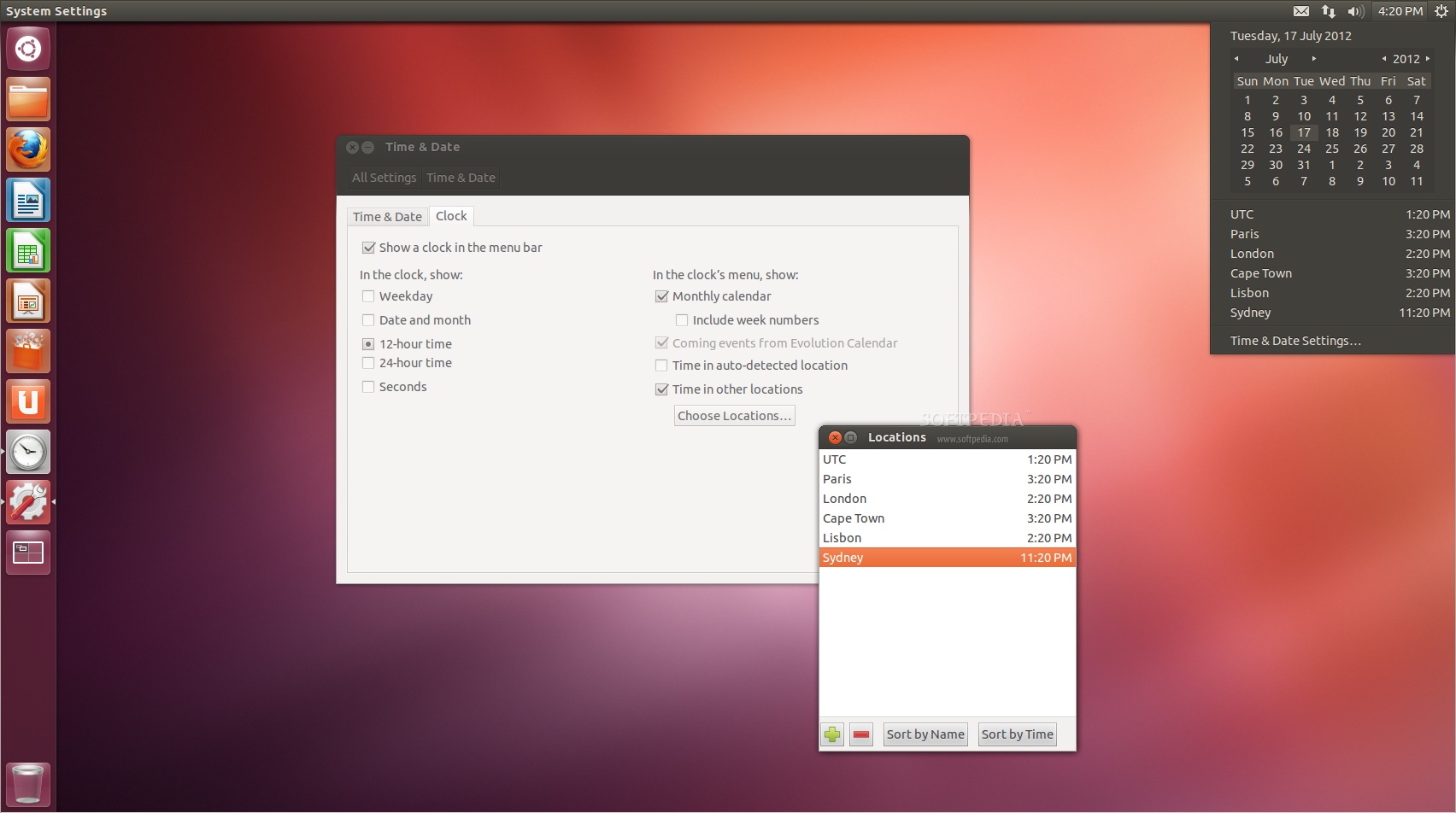
You can now sort time zones in Ubuntu! Enlarge picture - You can now sort time zones in Ubuntu!
With yesterday's updates, Canonical made some changes to the upcoming Ubuntu 12.10 (Quantal Quetzal) operating system, regarding the Date and Time Indicator.

After revamping the Session menu Indicator last week, the Ubuntu developers added sorting support to the multiple time zones function in the Date and Time Indicator of the upcoming Ubuntu 12.10 operating system.

Therefore, users who have added multiple time zones can now easily sort them by name or by time, accessing the "Time & Date Settings -> Clock tab -> Choose Locations" dialog.

Moreover, it appears that a new function has been added to the Date and Time Indicator, called Time in auto-detected location.If checked, it will automatically insert the current location of the Ubuntu machine.

However, considering that Ubuntu 12.10 is in Alpha development stage, everything is subject to change. We will keep you informed about future changes.

TELL US WHAT YOU THINK:

2,769 hits · Link to this article · Print article · Send to friend · Subscribe to news

MUST-READ RELATED ARTICLES:


Linux Kernel 3.4.5 Is Available for Download

Download Firefox and Thunderbird 14 Final for Linux

Valve Officially Confirms Steam for Ubuntu 12.04

Kororaa 17 Is Now Available for Download

GParted Live CD 0.13.0-1 Is Based on GParted 0.13.0

READER COMMENTS:


No user comments yet.
Be the first to express your opinion!
Copyright © 2001-2013 Softpedia. Contact/Tip us at

WindowsGamesDriversMacLinuxScriptsMobileHandheldNews

SUBMIT PROGRAM   |   ADVERTISE   |   GET HELP   |   SEND US FEEDBACK   |   RSS FEEDS   |   UPDATE YOUR SOFTWARE   |   ROMANIAN FORUM