
Softpedia
 

NEWS CATEGORIES:


NEWS ARCHIVE >>
SOFTPEDIA REVIEWS >>
MEET THE EDITORS >>
TRENDING TODAY
Home > News > Linux > Linux & Opensource Blog

August 31st, 2012, 21:41 GMT · By

BLOG

Ubuntu 12.10 Adds Encrypted Installation

SHARE:

Adjust text size:


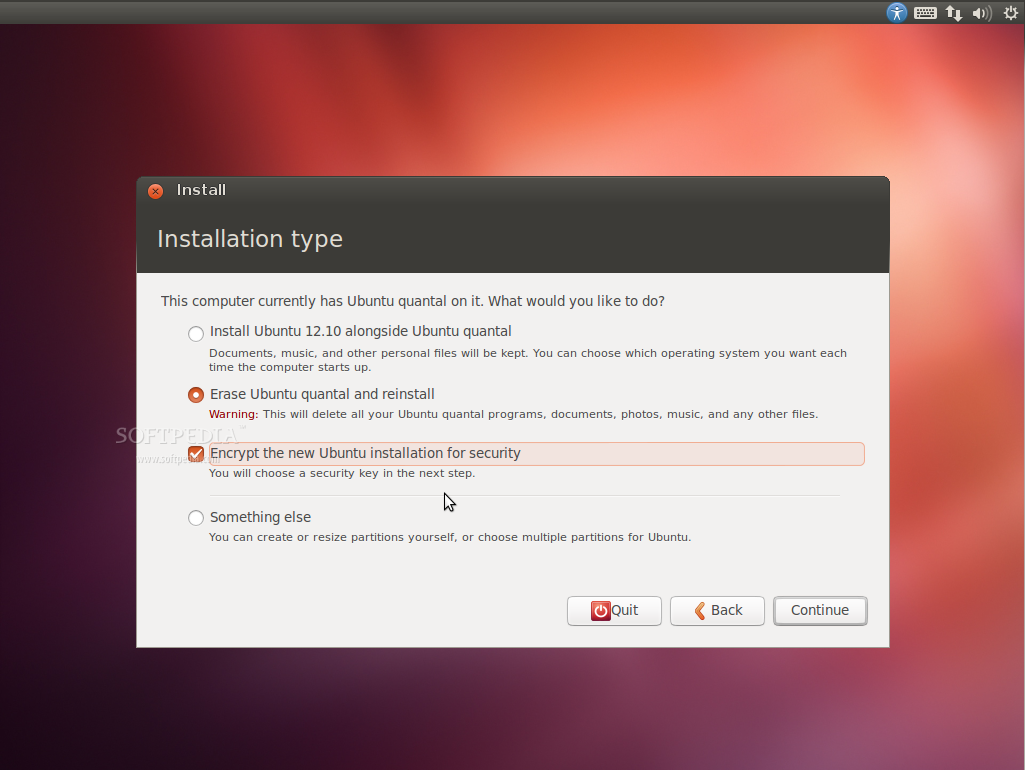
Disk encryption on Ubuntu 12.10 Enlarge picture - Disk encryption on Ubuntu 12.10
Finally! Canonical implemented disk encryption via the Ubuntu installer for enhanced security in the upcoming Ubuntu 12.10 (Quantal Quetzal) operating system.

This is something that should have been added years ago! However, it was possible before via the Alternate CD, which is now gone, of Ubuntu.

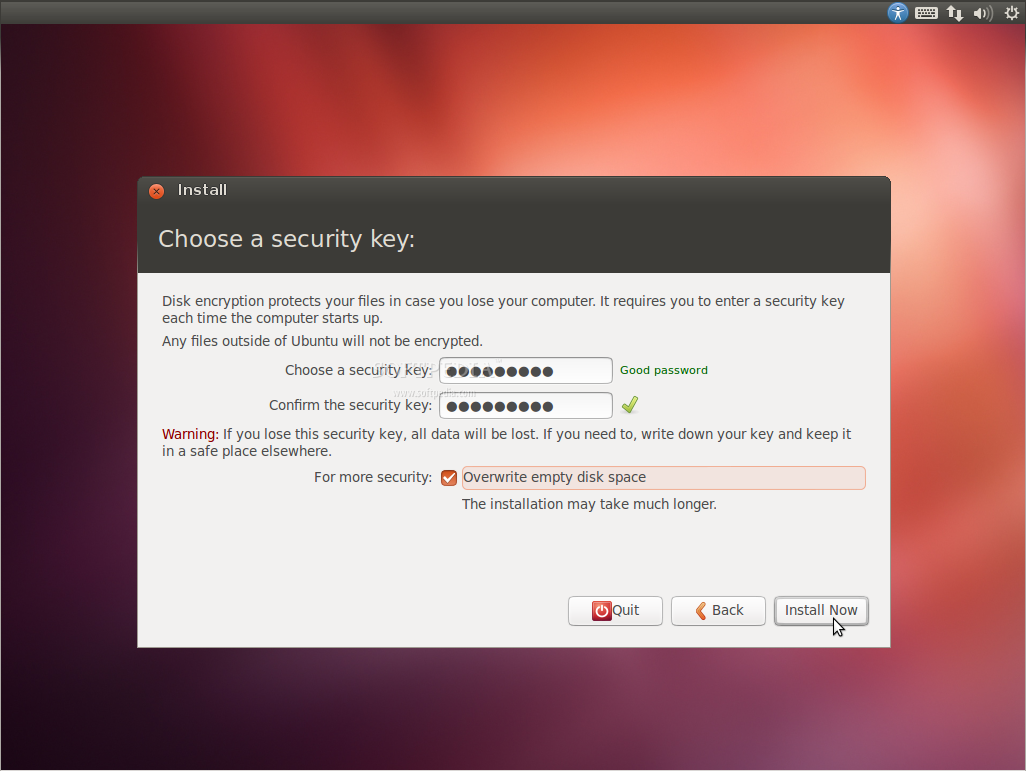
As you can see in the screenshot above (and the one below) the encryption option appears when you choose an installation type for your new Ubuntu system.

If you check the "Encrypt the new Ubuntu installation for security," in the next step you'll have to input a security key.

Moreover, for extra security there's also an option to overwrite empty disk space, which will make the entire installation process a lot longer. Keep in mind though, that any files outside the Ubuntu installation will not be encrypted.

Oh, and please don't confuse this with the "Home encryption" function, which is still available when you setup your username and password!
UBUNTU 12.10 ADDS ENCRYPTED INSTALLATION - PHOTO GALLERY:

TELL US WHAT YOU THINK:

11,509 hits · 7 comments · Link to this article · Print article · Send to friend · Subscribe to news

MUST-READ RELATED ARTICLES:


Wine 1.5.12 Brings D3DX9 and XRandR Improvements

Mozilla Thunderbird 15 Officially Lands in Ubuntu

Descent|OS 3 Is Now Based on Ubuntu 12.04 LTS

First Beta of Snowlinux 3 Enlightenment Is Here

Zenwalk Linux 7.2 RC5 Is Ready for Testing

READER COMMENTS:


Comment #1 by: wolfie012 on 02 Sep 2012, 17:33 UTC reply to this comment

If its strong encryption, this will be an excellent addition to a fantastic operating system.

Comment #1.1 by: alcalde on 04 Sep 2012, 20:19 GMT

The reality is, it was a near-fatal drawback in the operating system, particularly on laptops, but it didn't stop people from doting on it and calling it a fantastic operating system. The same thing happens with Mint, even though it doesn't have full-disk encryption or even LVM in its installer.

Comment #1.2 by: Thomas Wright on 04 Sep 2012, 20:21 GMT

It is. It uses the LUKS encryption infrastructure provided by the Kernel.


Comment #2 by: soleblazer on 04 Sep 2012, 13:53 UTC reply to this comment

Will this slow down the OS?

Comment #2.1 by: Marius Nestor on 04 Sep 2012, 14:43 GMT

Not at all! But you will have to input a passphrase during boot, every time you reboot!

Comment #2.2 by: Thomas Wright on 04 Sep 2012, 20:23 GMT

Yes, to some degree, but as a user of the encryption features for several years, for all of my disks, I do not consider it to do so sufficiently to impact usability.

Comment #2.3 by: MM on 22 Oct 2012, 10:52 GMT

If you have a CPU with the AES_NI Instruction, you will don't recognize it if choosing AES encryption.

ecryptfs, on the other side, which is used when you choose encrypt home directory, slows down your machine significantly.

But the whole disk encryption using dmcrypt doesnt show any performance issue.

Copyright © 2001-2013 Softpedia. Contact/Tip us at

WindowsGamesDriversMacLinuxScriptsMobileHandheldNews

SUBMIT PROGRAM   |   ADVERTISE   |   GET HELP   |   SEND US FEEDBACK   |   RSS FEEDS   |   UPDATE YOUR SOFTWARE   |   ROMANIAN FORUM