
Softpedia
 

NEWS CATEGORIES:


NEWS ARCHIVE >>
SOFTPEDIA REVIEWS >>
MEET THE EDITORS >>
TRENDING TODAY
Home > News > Linux > Linux Distributions

September 22nd, 2011, 22:00 GMT · By

Ubuntu 11.10 Beta 2 Released, Synaptic Removed

SHARE:

Adjust text size:

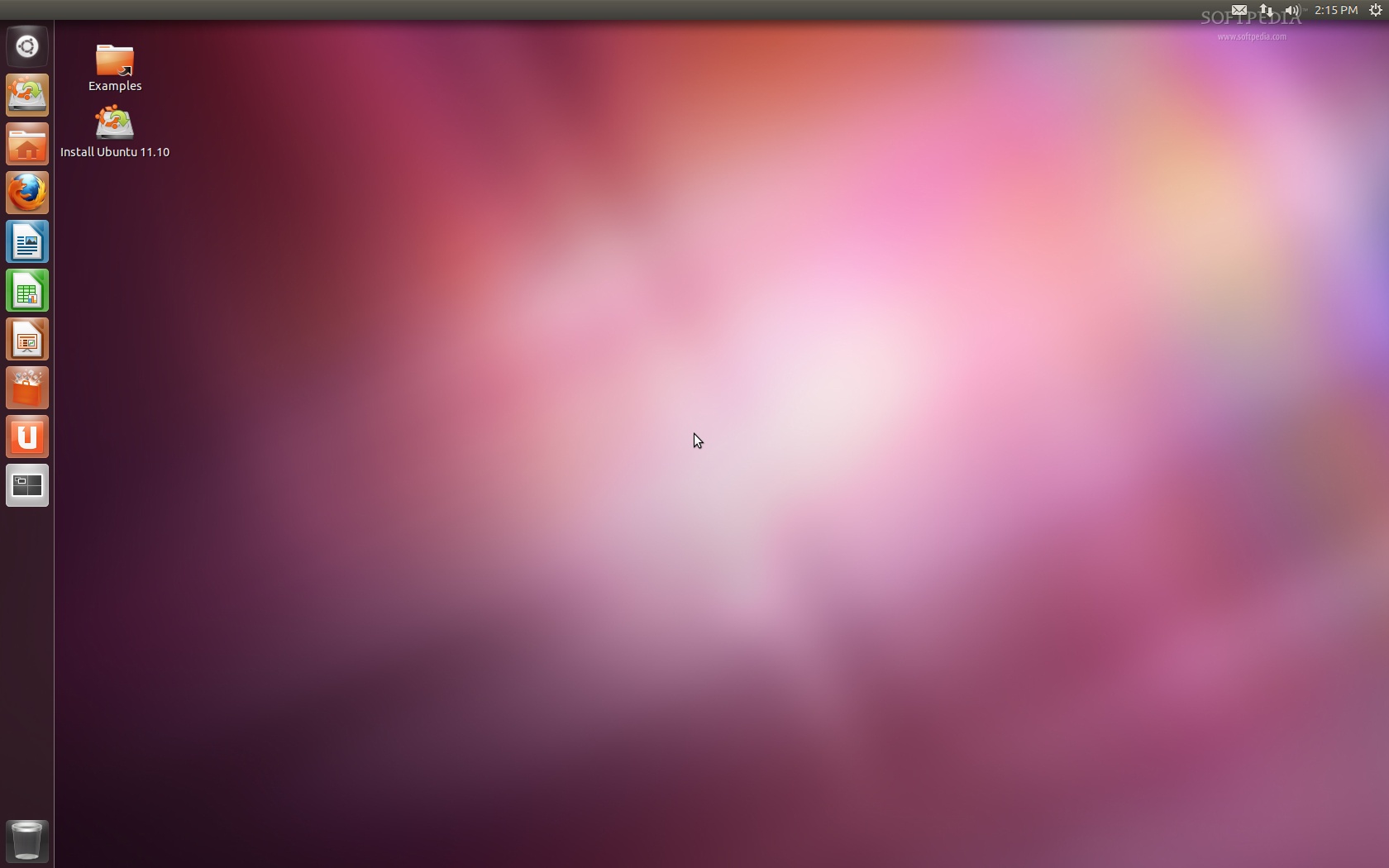
Ubuntu 11.10 Beta 2
Enlarge picture
A few minutes ago, the second and last Beta version, as well as the last development release, of the upcoming Ubuntu 11.10 (Oneiric Ocelot) operating system was made available for testing by the Ubuntu developers. As usual, we've grabbed a copy of it in order to keep you up-to-date with the latest changes in the Ubuntu 11.10 development.

What's new in Ubuntu 11.10 Beta 2? Well, Ubuntu 11.10 Beta 2 includes newer kernel packages based on the stable Linux kernel 3.0.4 upstream release, the newly released GNOME 3.2 Release Candidate desktop environment, LibreOffice 3.4.3, Mozilla Firefox 7.0 Beta 6, and Mozilla Thunderbird 7.0 Beta 3.

Starting with Ubuntu 11.10 (Oneiric Ocelot), Canonical will provide a DVD ISO image that will be considered an extension to the usual CD image. The DVD will contain all the supported translations (language packs) and popular applications, such as The GIMP, Inkscape, PiTiVi, and a complete version of the LibreOffice open source office suite.

Ubuntu 11.10 Beta 2 comes with lots of bugfixes, especially for Unity and Compiz, as well as new features, such as a new music lens for Banshee, nicer LightDM theme, improved Unity 2D and full support for Chinese, Korean, Japanese, and other script languages.

Last but not least, OneConf has been added in Ubuntu 11.10 Beta 2 to keep your installed apps in sync across computers. To activate it, go to "File -> Sync between computers..." option in Ubuntu Software Center.

Synaptic Package Manager and PiTiVi have been removed from Ubuntu 11.10, but their are still supported and available for installation in the default software repositories.
Review image
Ubuntu 11.10 Beta 2

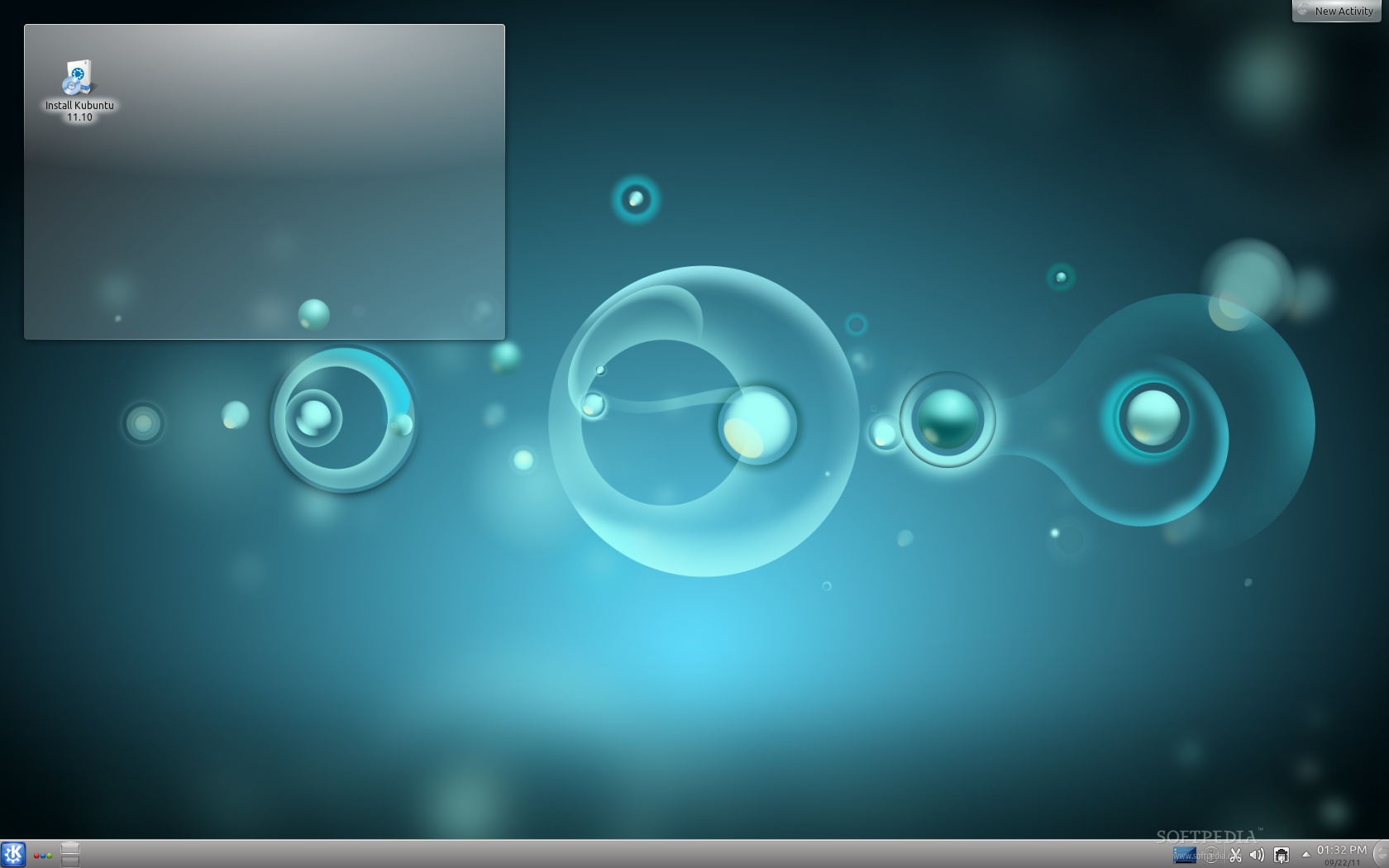
What's new in Kubuntu 11.10 Beta 2? Well, this second Beta release of the upcoming Kubuntu 11.10 (Oneiric Ocelot) operating system, is built on top of the newly released KDE Software Compilation 4.7.1. The new KDEPIM 4.7 suite is also there, including the amazing Kmail 2 mail client and the Amarok 2.4.3 audio player.

Kubuntu 11.10 Beta 2 also includes the Muon Suite 1.2, which contains a set of utilities for installing and managing applications. Muon Suite 1.2 is composed of Muon Software Center and Muon Package Manager, for browsing and installing apps.
Review image
Kubuntu 11.10 Beta 2

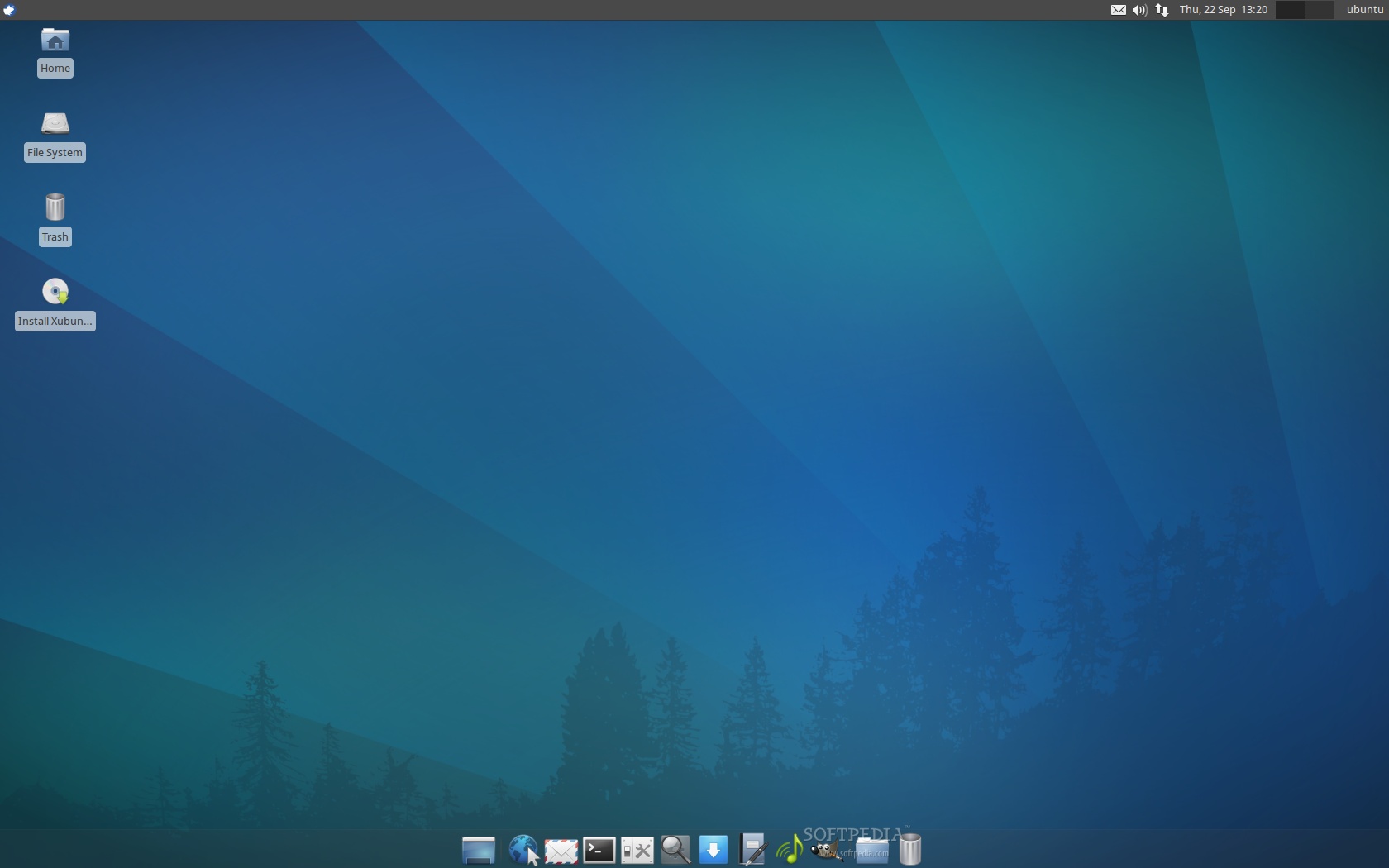
What's new in Xubuntu 11.10 Beta 2? Well, this second Beta release of the upcoming Xubuntu 11.10 is pretty much the same as the first Beta release. The GIMP is still there and it hasn't (yet) been replaced with gThumb, as was supposed to.

Review image
Xubuntu 11.10 Beta 2

On October 13th, 2011, Ubuntu 11.10 (Oneiric Ocelot) will become the fifthteenth release of the Ubuntu operating system. See you again in three more weeks (October 13th), for the final and stable release of the upcoming Ubuntu 11.10 (Oneiric Ocelot) distribution.

The Oneiric Ocelot Release Schedule:

June 2nd, 2011 - Alpha 1 release
July 7th, 2011 - Alpha 2 release
August 4th, 2011 - Alpha 3 release
September 1st, 2011 - Beta 1 release
September 22nd, 2011 - Beta 2 release
October 13th, 2011 - Final release of Ubuntu 11.10

Download Ubuntu 11.10 Beta 2 (Oneiric Ocelot) right now from Softpedia.

Download Ubuntu Server 11.10 Beta 2 (Oneiric Ocelot) right now from Softpedia.

Download Ubuntu Cloud 11.10 Beta 2 (Oneiric Ocelot) right now from Softpedia.

Download Kubuntu 11.10 Beta 2 (Oneiric Ocelot) right now from Softpedia.

Download Xubuntu 11.10 Beta 2 (Oneiric Ocelot) right now from Softpedia.

Download Edubuntu 11.10 Beta 2 (Oneiric Ocelot) right now from Softpedia.

Download Ubuntu Studio 11.10 Beta 2 (Oneiric Ocelot) right now from Softpedia.

Download Mythbuntu 11.10 Beta 2 (Oneiric Ocelot) right now from Softpedia.

Download Lubuntu 11.10 Beta 2 (Oneiric Ocelot) right now from Softpedia.

Remember that this is a beta release and it should NOT be installed on production machines. It is intended to be used for testing purposes only. Please report bugs to the Ubuntu Bug Tracker.


24,220 hits · 17 comments
Link to this article · Print article · Send to friend

MUST-READ RELATED ARTICLES:


Kororaa Linux 15 Released, Based on Fedora 15

Pardus Linux 2011.2 Has Been Released

GeeXboX 2.0 is Based on XBMC Media Center

Softpedia Linux Weekly, Issue 165

Google Releases Chrome 14 Stable for Linux

READER COMMENTS:


Comment #1 by: gasman on 23 Sep 2011, 02:41 UTC reply to this comment

for the noobs like myself an icon with a dictionary style list of the main differences of the different versions and the uses of them would help to decide what one i need


Comment #2 by: supcendawan on 23 Sep 2011, 03:38 UTC reply to this comment

I wonder what software they use to replace Synaptic.

Comment #2.1 by: Greg on 23 Sep 2011, 04:26 GMT

They used the Ubuntu software center.

Comment #2.2 by: Marius Nestor on 23 Sep 2011, 06:06 GMT

Ubuntu Software Center

Comment #2.3 by: voksic on 23 Sep 2011, 07:21 GMT

Synaptic. If you really want it, install it. You can use apt-get, software center, etc... CD is only that big, not everything can fit on it. If you haven't notices, gimp is not on the CD, pitivi is not on the CD, not even full libreoffice is on CD. I mean, it's just an install CD :)

Comment #2.4 by: Foo Bar on 23 Sep 2011, 08:07 GMT

Ubuntu Software Center. And you can, of course, install Synaptic again from USC.

Comment #2.5 by: klim8 on 23 Sep 2011, 08:52 GMT

graphical: software-center
console: aptitude

Comment #2.6 by: syncdram on 23 Sep 2011, 12:09 GMT

The fist and most important thing to do after downloading is to remove software center and re install synaptic


Comment #3 by: green4now on 23 Sep 2011, 07:24 UTC reply to this comment

Linux will finally get a bit of design... although after 5 year I finally got used to the lack of design in Linux apps. Maybe I stay with gnome 2.x :P


Comment #4 by: cos on 23 Sep 2011, 11:25 UTC reply to this comment

Synaptic was nice


Comment #5 by: wanda on 24 Sep 2011, 07:42 UTC reply to this comment

Xubuntu the best of all include Synaptic.


Comment #6 by: Bogdan on 25 Sep 2011, 10:02 UTC reply to this comment

I remember when you said "Don't believe the others, Synaptic won't be removed". Now it's in the title. Very professional!


Comment #7 by: kuvanito on 25 Sep 2011, 17:18 UTC reply to this comment

i am GUI guy,if I don't see it I don't need it.Sypnatic was never one app that I use often,maybe once after installation to install Compiz but that was it.


Comment #8 by: TGM on 26 Sep 2011, 11:51 UTC reply to this comment

Hope I can put a version of Gnome back on it...


Comment #9 by: Ned Flanders is fired! on 07 Oct 2011, 03:12 UTC reply to this comment

its amazing how little I care for screenshots, by the time Im finished changing the desktop to how I WANT IT, it looks nothing like that.

have I mentioned I hate defaults?

I am curious what Muon is thought.

I have Kubuntu 10.04 LTS on my dad's computer, I have Kubuntu 11.04 on my mom's laptop (dad read about Shttleworth years ago but hates Gnome), 10.10 on my son's Dell Mini netbook and 10.10 on my laptop as well as the 11.10 beta. I was telling my dad that while his computer is always updated, we install him 12.04 LTS when it comes out and he tells me "Why? Ive seen mom's laptop and yours what is the difference between them? They all look the same."

I got my folks into Linux when KDE4.2 came out and its been smooth sailing since but I sort of miss (not really) the old days when the jump between each version was something you couldnt wait for but now it seems that the increments are smaller and smaller. But Ive looked back at Kubuntu 5 recently and without any kind of understanding where we were and were we are now, youd be forgiven to think that it was a POS.

Since PCLinuxOS solved my wifi problems about 5years ago, there havent been many big mountains to climb (video cards isnt ideal but ok) and I sometimes long for those days.

"When Alexander saw the breadth of his domain, he wept for there were no more worlds to conquer."
Hans Gruber - Die Hard (1988)


Comment #10 by: Taekdar on 07 Oct 2011, 06:45 UTC reply to this comment

Why would you remove synaptic? It's a great tool and it should stay in there.!

Comment #10.1 by: Elderlyblike on 11 Oct 2011, 03:18 GMT

It is available if you want to use it.
Even an octogenarian like me can manage that.

Copyright © 2001-2013 Softpedia. Contact/Tip us at

WindowsGamesDriversMacLinuxScriptsMobileHandheldNews

SUBMIT PROGRAM   |   ADVERTISE   |   GET HELP   |   SEND US FEEDBACK   |   RSS FEEDS   |   UPDATE YOUR SOFTWARE   |   ROMANIAN FORUM