 14 DAY TRIAL //
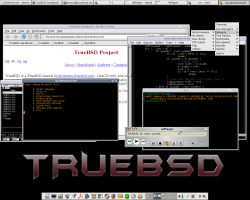
 TrueBSD is a LiveCD powered by the FreeBSD technology. TrueBSD is a LiveCD operation system with many useful applications. All open programs will keep working even when you eject LiveCD in order to get some data from your own CDs, just don't forget to insert the LiveCD again before starting any other programs.
You can login in TrueBSD as root using blank password. TrueBSD can also be installed on your hard drive if you like it; just use the "trueinstall" command and TrueBSD will be installed on your hard disk.
Let's have a look at some of the packages included in this LiveCD
? Compilers for C++, Fortran, Java and NASM; ? Interpreters for Perl, Python, PHP, Lua, m4, tcl; ? Shells: csh, tcsh, zsh; ? Web-server Apache with mod_perl and mod_php; ? File managers: Midnight Commander (mc), Demos Commander (deco); ? Archivers: zip, bzip2, gzip, unzoo, unrar, unace; ? Soft for archive recovery; ? Win-modem support; ? Utilities for filesystem checks and repairs; ? Hardware and network testing utilities; ? Networking software (LAN, modem, Bluetooth, dial-up, VPN, Wireless); ? Software for remote access (ssh, telnet, rdesktop); ? Port ans service scanners (Nessus, nmap); ? Firewalls (ipfw, ipf, pf); ? Browsers (firefox, links2 (with '-g' option and JavaScript support), lynx); ? FTP-clients (ftp, gftp (including gtk2-based GUI gftp-gtk)); ? MySQL & PostgreSQL clients; ? Mail/News-client (sylpheed2); ? IM/IRC-clients (Gaim, micq); ? Editors (emacs (gtk2), vim/gvim (gtk2), nvi, ee, ed); ? Text processor (AbiWord); ? Image viewer (gqview); ? pdf/djvu viewers - (xpdf, djvulibre-nox11); ? Download manager (wget); ? CD/DVD burning utilities; ? Emulators (qemu, dosbox); ? Audio players (beep-media-player, mpg123, moc, mpc); ? Video player (mplayer (with gtk2-based GUI gmplayer)); ? Audio encoding software; ? Window managers (xfce4, ion3, wmii3);
On the TrueBSDs home page, you can find more information regarding how to save and restore your setting and how to configure the system.
You can download TrueBSD now from Softpedia.