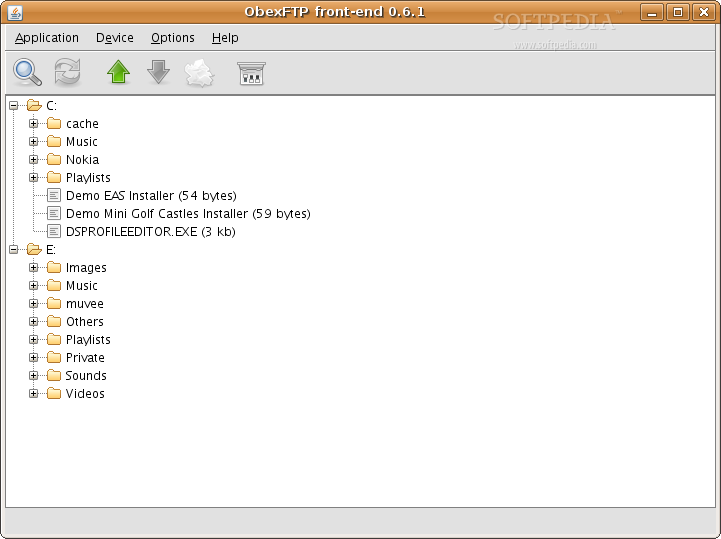

Lately, mobile phones have evolved extremely fast, and whether you need them to access the Internet, record videos, send/receive MMS and SMS messages or e-mails, listen to music or radio stations, cellular phones are the most indispensable devices these days. But today's guide will teach you a very easy way to connect and transfer files to/from your mobile phone using an USB cable through the Pop-Port interface. Many Nokia phones come with this Pop-Port and I just happen to be the proud owner of such a mobile device (Nokia N70).
The problem with the phones that use the Pop-Port is that when you connect the USB cable to your Linux PC, nothing happens. I bet you are (like me) probably used to see an "Open with..." window a few seconds after you connect some multimedia device (camera, phone, hard drive, ipod) in the USB port, but this will not happen with these phones. Don't panic, I have the solution! You just have to follow the next steps:
NOTE:: The following guide was tested with a Nokia N70 phone and Ubuntu 7.04.
Step 1 - Install required software
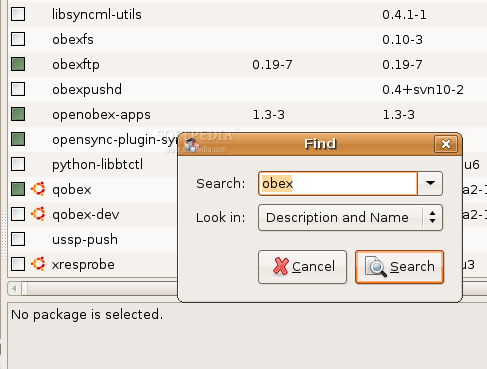
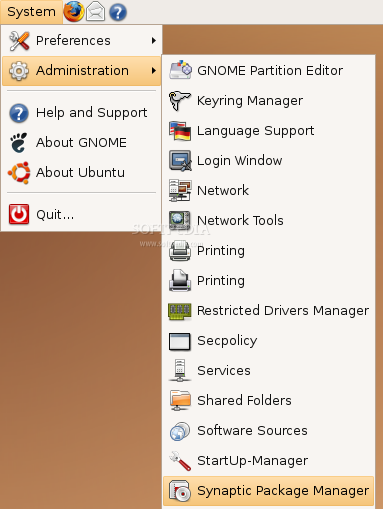
Fire up Synaptic Package Manager (System -> Administration -> Synaptic Package Manager) and search for obex.
Mark for installation the following packages:
- obexftp - openobex-apps
Some other packages, that depend on these ones, will also be installed, so click "Mark" when you'll be asked if you want to install those too. Now click the "Apply" button to install all the required packages. When the installation is over, close Synaptic.
All the above software consists of console-based tools, so we need to install a nice GUI (graphical user interface) for the obexftp package. The ObexFTP Front-end software happens to be a very nice and easy to use obexftp GUI, which requires no installation. Download it from Softpedia, use the "Binary mirror 1 (zip) (1.7 MB)" package and extract it in your home directory.
Step 2 - Advanced Configurations
It is time to connect your phone to the PC using the USB cable. Open a terminal (Applications -> Accessories -> Terminal) and type:
CODE
lsusb
which should output some lines with USB devices connected to your PC. I've easily spotted my Nokia phone:
CODE
Bus 003 Device 003: ID 0421:043a Nokia Mobile Phones
This line shows the VendorID and ProductID of the phone, for my Nokia N70:
VendorID = 0421 ProductID = 043a
Now copy/paste the following line in the Terminal:
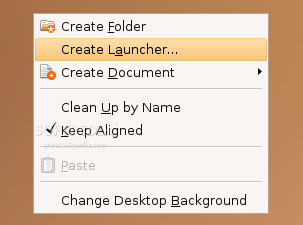
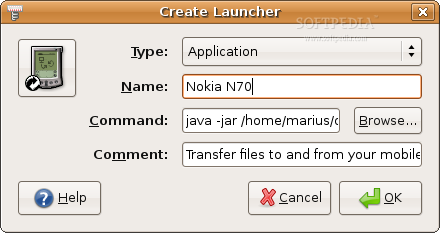
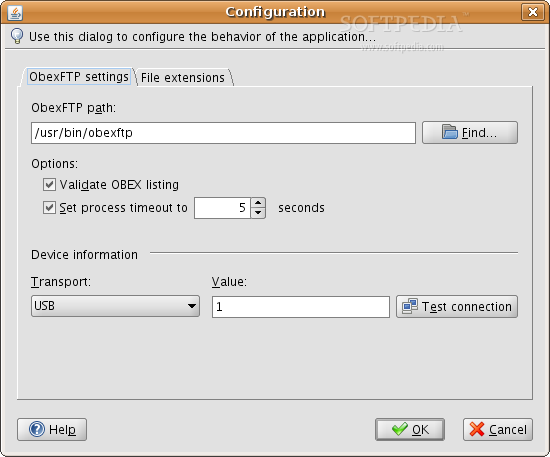
All you have to do now is to double click the launcher you've just created and the ObexFTP Front-end will pop-up asking you to configure it. Follow the next steps:
1. Enter /usr/bin/obexftp in the ObexFTP path field. 2. Select USB on the Transport option and set the Value filed to 1.
To close the configuration window, Click OK when you're done, and then click the first icon on the main window. The C: drive and the memory card of the phone will be listed and you can transfer files to and from your phone. Watch the next video for a quick demonstration where I'm going to upload a wallpaper to my phone's drive:
I would like to thank you for writing us this great tutorial! It's very nice to see that my project - ObexFTP front-end - is helping so many people! When I started coding it I never imagined that it would happen. :-)
Cheers,
Daniel.
Comment #1.1 by: marius.nestor on 20 Sep 2007, 08:02 GMT
Hello Daniel!
You're welcome! ObexFTP front-end is wonderful and easy to use!
Thank you for a very informative tutorial Marius!
I have followed every step of yours but after clicking on the first icon in the main window in OBEX ftp, i get the following error message
'The Following Command has failed: Listing files under the / folder'
I am unsure how to fix this. I am using Ubuntu 7.10 and a Nokia N70
Comment #2.1 by: ashlakim on 31 Jan 2008, 14:53 GMT
At the very last written step by the author, try manipulate the numbers as in instead of 1 as suggested by author, try 001.
If not try 000 or 002.
If all three doesnt apply change your cable to another usb port and do as above again. To know whether you succeed or not, simply test for each trial.
Keep transport as USB if you are using cable connection (do not change).
I amusing DKU2 cable for my Nokia 7600. I was able to connect after manipulating the numbers.
Sorry for the bad English... ;)
I'm using Ubuntu 7.04 and I've got the same problem too:
'The Following Command has failed: Listing files under the / folder'
I tried manipulate the numbers, but it not worked...
I tried using the "Test connection" button on the ObexFTP configuration dialog, and obtained
"Error: Can't connect to the device"
I tried using "lshw" on the terminal, and obtained this:
"...
*-usb:2
description: USB Controller
product: VT82xxxxx UHCI USB 1.1 Controller
vendor: VIA Technologies, Inc.
physical id: 10.1
bus info: pci@00:10.1
version: 81
width: 32 bits
clock: 33MHz
capabilities: uhci bus_master cap_list
configuration: driver=uhci_hcd latency=64
resources: ioport:d880-d89f irq:16
*-usbhost
product: UHCI Host Controller
vendor: Linux 2.6.20-16-generic uhci_hcd
physical id: 1
bus info: usb@2
logical name: usb2
version: 2.06
capabilities: usb-1.10
configuration: driver=hub maxpower=0mA slots=2 speed=12.0MB/s
*-usb UNCLAIMED
description: Generic USB device
product: USB to UART
vendor: ArkMicro
physical id: 1
bus info: usb@2:1
version: 0.01
capabilities: usb-1.10
configuration: maxpower=500mA speed=12.0MB/s
..."
This Generic USB device is my ArkMicro CA-42 cable.
I'm using a Nokia 3220. My cell shows a message confirming the cable connection. I used it on Windows XP SP2 with Nokia PC Suite without problems.
Launch the GUI as root has no effect.
Thanks for the help.
Hi Marius,
Your tutorial really helped. Thanks!
I faced one problem though, i didn't have Java SDK installed and the front-end wouldn't start at all. Was able to figure by a little googling though :).
~Ajay
Hello Marius
Thank you for sharing the knowledge. I have been trying to figure this out with wammu, gnokii..etc without success.
However,with bluetooth connection, can i use the same procedure?
Thanks again,
Paul
Thanks Marius for such a nice post. Now I can say that I can move to linux completely with me being able to connect my nokia N91 to the machine. And also thanks to Luca for pointing that the error can be fixed by sudo'ing. Thanks again and godspeed.
Comment #8 by: vahnderkaum on 30 Oct 2008, 08:08 GMT
Hey, thanks for the tutorial but the GUI didn't work for me either (also N70). Same errors as mentioned previously. With USB "The Following Command has failed: Listing files under the / folder". With Bluetooth, it's "failed to find device".
I tried SUDO launching the GUI. I also tried using Bluetooth as the transport in the Obexftp GUI config. I tested as 1,2 & 3.
(Also with zero's in front, but to honest that makes no sense. Any integer can have as many zero's as you want in front and it makes no difference, obviously).
Anyway, thanks anyway, anyone finding solutions to these issues may end up posting here in the comments.
Regards
Donal
Thank you for the Tutorial it worked with no problem this is the reason I have moved to Linux to learn from the likes of you and all those in the Linux world! My mobile phone is a Nokia6275i.
Thanks again and Best Wishes for Christmas & New Year.
I'm trying this with Ubuntu Intrepid 8.10 and when firing up openftp-frontend all the characters making up the menus are squares only the two tabs are readable.
Thanks
Comment #14 by: tgirookie on 08 Jan 2009, 05:58 GMT
im having trouble with my ubuntu (intrepid) wheen i double click the launcher that i have created it gives me a error message that said "Failed to execute child process "java" (No such file or directory)" can somebody hel please
Comment #15 by: Richard Jones on 08 Jan 2009, 21:49 GMT
Thanks for this tutorial, its saved most of my hair! I had the initial problem with my Nokia N96 of the "Listing under / Files folder" error but changed the connection to PC Suite on my nokia and used 001 instead of 1. Brilliant! 1 million kudos to you!
Thank you very much for this complete tutorial. All links and applications listed here worked OK in Ubuntu 8.10 Server (Intrepid Ibex).
I was trying to connect my 5200 to my notebook running Intrepid but all other solutions I found in other sites (Wammu, Gammu, etc) didn't work. The solution you provided is the only one I can recommend to other Ubuntu Intrepid users.
I one follow carefully the steps you wrote, the application works at once. There are some little details about permissions for some folders/files we have to research on, but the overall functions do their job as expected.
Thank you very much to marius and others! In order for it to work for me I had to run this command. sudo java -jar /home/rizz/obexftp-frontend-0.6.1-bin/OBEXFTPFrontend.jar &
Thanks again.
Comment #19 by: Felipe Conde on 20 May 2009, 20:05 GMT
salut mariu am facut exact ceea ce ai zis de 3 ori si tot nu imi merge , cand dau dublu clik pe aplicatie nu mi se deschide ca sa o configurez :( , folosesc ubunut 9.04
Comment #22.1 by: Marius Nestor on 13 Oct 2009, 07:57 GMT
Salut, incearca sa deschizi aplicatia direct din terminal... cu comanda:
java -jar OBEXFTPFrontend.jar
Cu conditia sa te afli in folderul unde este executabilul...