
Softpedia
 

NEWS CATEGORIES:


NEWS ARCHIVE >>
SOFTPEDIA REVIEWS >>
MEET THE EDITORS >>
TRENDING TODAY
Home > News > Microsoft > Software Blog

December 8th, 2012, 00:50 GMT · By Bogdan Popa

BLOG

This Windows 8 App Brings World Clocks on Your Start Screen

SHARE:

Adjust text size:


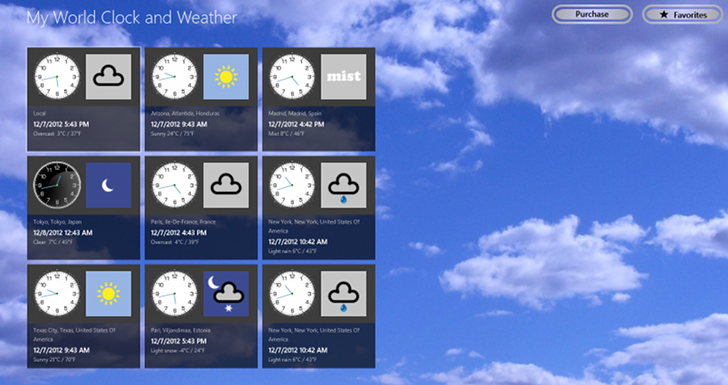
The app lets you configure as many world clocks as you want Enlarge picture - The app lets you configure as many world clocks as you want
My World Clock & Weather is another Windows 8 application that tries to make the most of the Start Screen, providing you with current local time and weather condition for any location in the world.

The program uses the live tiles to display weather and time for the selected cities, while both the time and the weather themes are dynamically changing based on the current conditions.

My World Clock & Weather comes with support for both x86 and x64 Windows 8 versions, but it’s also compatible with ARM devices, which include Windows RT tablets and Microsoft’s very own Surface RT.

The only problem is that it’s not available for free and a full license costs $1.49 (approximately €1). The full license provides access to all the features and removes ads completely.

Click here to view the My World Clock & Weather product page in your browser.

TELL US WHAT YOU THINK:

5,631 hits · Link to this article · Print article · Send to friend · Subscribe to news

MUST-READ RELATED ARTICLES:


Wall Street Firm Slams Poor Windows 8 Sales Report

Angry Dev Blasts Microsoft, Claims His Windows 8 App Made Only $84

British Airways Launches Windows 8 Modern App

Dance Gangnam Style on Windows 8 with This Free Game

Here Are the Ten Best Tweets on #WindowsRage

READER COMMENTS:


No user comments yet.
Be the first to express your opinion!
Copyright © 2001-2013 Softpedia. Contact/Tip us at

WindowsGamesDriversMacLinuxScriptsMobileHandheldNews

SUBMIT PROGRAM   |   ADVERTISE   |   GET HELP   |   SEND US FEEDBACK   |   RSS FEEDS   |   UPDATE YOUR SOFTWARE   |   ROMANIAN FORUM