14 DAY TRIAL //
 There’s a limit to how much users are able to reduce the size of Internet Explorer windows, and the browser will simply not go any smaller. Both Internet Explorer 7 and IE8, including the default browser of Windows 7 are restricted to a minimum window of 250 pixels in width. When it comes down to height however, the limit is a tad smaller, only 100 pixels. According to Microsoft, the IE window size limitations are set in stone.
“One of my customers came to me and asked why IE8 cannot open a 140px wide window. Well, if you drag IE border and resize IE window to the minimum, it can be as small as 250px wide x 100px tall. That's the minimum window, which means you cannot 140px wide window anymore with IE7 or later,” revealed Nam Seungho, technical account manager, Microsoft Korea.
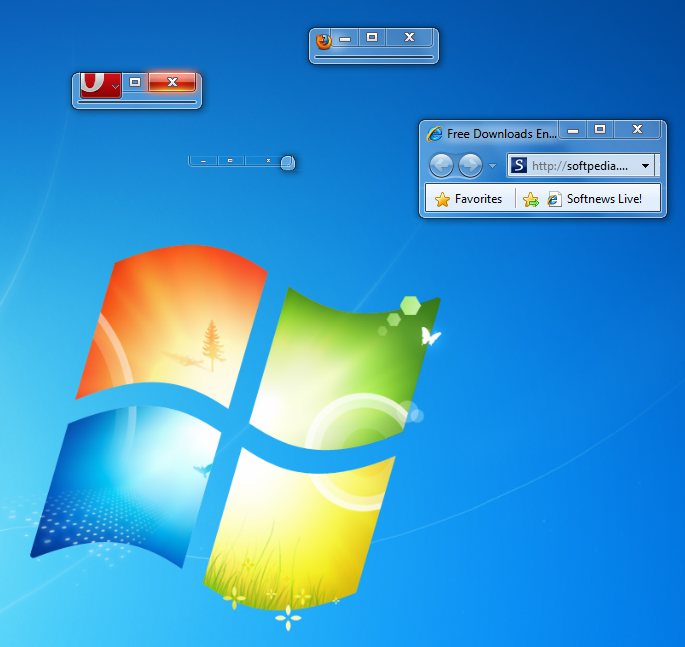
Users can check out the screenshot included with this article in order to get an idea of how IE8 running in Windows 7 Ultimate RTM compares to rival browsers. It’s easy to see that the minimum IE window is by far the bulkiest of them all, when compared with Firefox 3.6, Opera 10.50 and Google Chrome 4.0.
As illustrated in the screenshot, Internet Explorer 8 continues to display the back and forward buttons, as well as a healthy portion of the address bar and even the Favorites bar. The same is not valid for the other browsers. Opera 10.50 and Firefox 3.6 are approximately the same size when shrunk to the maximum, keeping just a small segment of the Title bar and the minimize, restore and close buttons.
Google Chrome is the exception to this rule. The blue dot in between Opera and IE in the screenshot is everything that remains of Chrome, with the minimize, restore and close buttons floating on top of what has left of the window. However, at this size, it is extremely hard to hit any of the three buttons that are left visible of the Chrome window, even though such a task would appear to be simple.
The latest releases of Google Chrome are available for download here.
Internet Explorer 8 is available for download here.
Opera 10.50 is available for download here.
Firefox 3.6 Beta 5 for Windows is available for download here.
Firefox 3.6 Beta 5 for Mac OS X is available for download here.
Firefox 3.6 Beta 5 for Linux is available for download here.