
Search Perform an advanced search query SOFTPEDIA
 
SOFTPEDIA
Updated one minute ago
HomeSubmit a program for being reviewedAdvertise on our websiteGet help on surfing our websitesSend us your feedbackGet information about our XML/RSS backend and how to use itBrowse the news archiveVisit our discussion forumVizitati forumul in limba romana


KLIP
  1. HOME
  2. SCIENCE
  3. TECHNOLOGY
  4. WEBMASTER
  5. SECURITY
  6. MICROSOFT
  7. LINUX
  8. APPLE
  9. GAMES
  10. TELECOMS
  11. REVIEWS
  12. LIFE & STYLE
  13. EDITORIALS
  14. INTERVIEWS
  15. RSS
Welcome!
Hello, Guest

Login if you have a Softpedia.com account.

Otherwise, register for one.

WIRELESS

The WiFi Signal Amplifier

- Wi-Fire USB Booster

By: Alexandru Pancescu, Hardware Editor

hField Technologies company claims that it discovered a way to boost wireless Internet signal in those areas that receive a poor quality WiFi service. According to the manufacturing company, the Wi-Fire USB Booster can increase and expand the wireless signal for over 300 meters. The range offered by the signal booster is at least three times bigger than the range offered by the internal adapter of a laptop or a notebook.

In order to
increase the incoming WiFi signal strength, the Wi-Fire USB Booster uses a "directional antenna, highly sensitive receiver and proprietary software". Since the device can be used as a signal amplifier as well as a range extender, hField Technologies' Wi-Fire USB Booster can help users achieve a better Internet experience by increasing the available WiFi signal strength and even using multiple hotspots that are not detected using the integrated wireless network card usually integrated into mobile computing solutions.

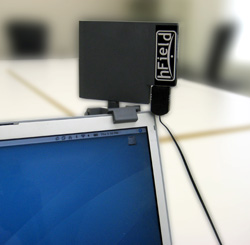
The Wi-Fire USB Booster needs only a tiny amount of power to function so it will not deplete the laptop's battery and it is packed with all the necessary accessories needed to establish a wireless Internet connection. Enabling the device is as simple as installing the provided driver software, plug the booster into an USB port and starting the proprietary specialized software suite that will help users manage their Internet connection. As it is built for use on the road as well as from locations that offer wireless networking services, the Wi-Fire USB Booster can be placed on just about any flat surface or it can be clipped securely on the side of the notebook's screen.

The proprietary software included, the Wi-Fire Connection Manager, can be used to detect all hotspots on a greater range around the user and in order to start surfing the Web all someone has to do is select the strongest "publicly accessible network (or private network for which you have authorization), rotate the Wi-Fire's 360-degree directional antenna to focus the signal and connect".

MORE RELATED ARTICLES: WiFi Phone Sales to Reach USD 145 Billion By 2010 Apple's Transition to Post-PC Devices Asus P750 Set for a Future Release HP iPAQ 600 on Its Way for a Release FCC Approves Three Versions of HTC Kaiser Palm Foleo Finally Sees Official Release Yet Another Fujitsu LifeBook Sony VAIO SZ Series – Refreshed Version
 
Comments | Link here | Subscribe
Print | Send to friend
Today's News | Yesterday's News

Search:


17th August 2007, 08:18 GMT | Copyright (c) 2007 Softpedia | Contact:
Read by 6,436 user(s) | Rating: | 7 vote(s) so far | Cast your vote:
The WiFi Signal Amplifier - USER OPINIONS


We are sorry, there are no opinions available for this article.


SHARE YOUR OPINION ABOUT The WiFi Signal Amplifier

Since you are not logged on, your comments will have to be approved before being displayed.
Click here to login, or register.
Your Name:
Your Email:
Type in the result:
Your Opinion:


DO YOU WANT TO CONTACT US?  

If you have some comments or you want to send us some information you can send us an email directly to .
You can use the form below for the same purpose.
Your full name: (at least 3 characters)
Your email address: (at least 5 characters)
Message subject: (at least 5 characters)
Message text:
(at least 10 characters)
Type in the result:


© 2001 - 2008 Softpedia. All rights reserved.
Softpedia™ and Softpedia™ logo are registered trademarks of SoftNews NET SRL.
Copyright Information | Privacy Policy | Terms of Use | Contact Softpedia | Update your software | Archive