
Search Perform an advanced search query SOFTPEDIA
 
SOFTPEDIA
Updated one minute ago
HomeSubmit a program for being reviewedAdvertise on our websiteGet help on surfing our websitesSend us your feedbackGet information about our XML/RSS backend and how to use itBrowse the news archiveVisit our discussion forumVizitati forumul in limba romana


KLIP
  1. HOME
  2. SCIENCE
  3. TECHNOLOGY
  4. WEBMASTER
  5. SECURITY
  6. MICROSOFT
  7. LINUX
  8. APPLE
  9. GAMES
  10. TELECOMS
  11. REVIEWS
  12. LIFE & STYLE
  13. EDITORIALS
  14. INTERVIEWS
  15. RSS
Welcome!
Hello, Guest

Login if you have a Softpedia.com account.

Otherwise, register for one.

TIPS AND TRICKS

The Miracles of an Automatic Free Scripts Installer

- Fantastico de Luxe Add-on for CPanel

By: Catalin Bocanu, Web News Editor

If you already have a website hosted on an Apache web server, you might notice that cPanel application is widely used by many web hosting companies. The standalone cPanel software allows you to manage all aspects of your web hosting account, such as parked domains, files upload, traffic statistics, MySQL databases, subdomains and
more.

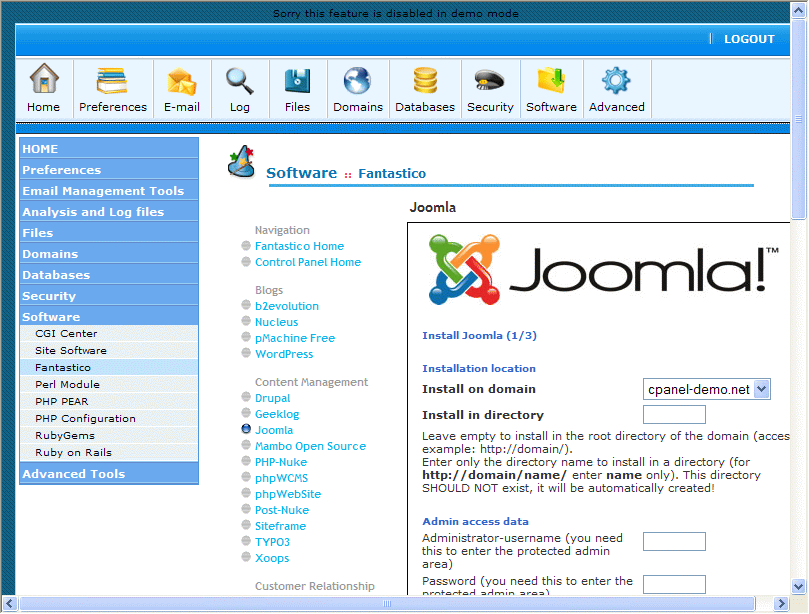
Fantastico de Luxe is an add on for cPanel, that allows you to automatically install many open source scripts like blogs, content management systems, ecommerce applications, customer support scripts, image galleries and more. The advantage is that you will not upload your scripts on server and at the same time all other installation requirements, such as file permissions (chmod options), will be automatically set by the installer.

It provides a very friendly web browser based interface, intuitive and easy to use even by beginners. As a consequence, anyone will be able to install applications like Mambo, PHP-Nuke, OS Commerce, WordPress and others, without having knowledge of FTP (file transfer protocol), CHMOD (file permissions settings), PHP or HTML.

From the cPanel main page you must identify the Fantastico application and then, from the right menu you must select the desired application you want to install. With two or three steps, when you have to fill in some forms for the required data, the installation will finalize in less than one minute. If a MySQL database is required by the application you install, then you must define one first.

In order to create a MySQL database, from the main page of cPanel you will select phpMyAdmin or MySQL Database Wizard, depending on the version of your cPanel application. If you use MySQL Database Wizard, after you provide the database name, user name and password, it is recommended to grant all privileges to that user.

In conclusion, if you want to discover how easy it is to add open source scripts to your website, try to select a hosting service that provides Fantastico de Luxe add on for cPanel in order to experience the most confortable installation methods for your favorite open source applications.

MORE RELATED ARTICLES: Take Advantage of a Reseller Web Hosting Business Google Page Creator What Should You Choose, PHP or ASP ? The Benefits of Chat Services More RSS Feeds Subscribers Build Your Web Site Content With RSS Feeds Site Visitors Return Secrets of Link Popularity Revealed
 
Comments | Link here | Subscribe
Print | Send to friend
Today's News | Yesterday's News

Search:


27th October 2007, 11:32 GMT | Copyright (c) 2007 Softpedia | Contact:
Read by 1,445 user(s) | Rating: | 6 vote(s) so far | Cast your vote:
The Miracles of an Automatic Free Scripts Installer - USER OPINIONS


We are sorry, there are no opinions available for this article.


SHARE YOUR OPINION ABOUT The Miracles of an Automatic Free Scripts Installer

Since you are not logged on, your comments will have to be approved before being displayed.
Click here to login, or register.
Your Name:
Your Email:
Type in the result:
Your Opinion:


DO YOU WANT TO CONTACT US?  

If you have some comments or you want to send us some information you can send us an email directly to .
You can use the form below for the same purpose.
Your full name: (at least 3 characters)
Your email address: (at least 5 characters)
Message subject: (at least 5 characters)
Message text:
(at least 10 characters)
Type in the result:


© 2001 - 2008 Softpedia. All rights reserved.
Softpedia™ and Softpedia™ logo are registered trademarks of SoftNews NET SRL.
Copyright Information | Privacy Policy | Terms of Use | Contact Softpedia | Update your software | Archive