
Search Perform an advanced search query SOFTPEDIA
 
SOFTPEDIA
Updated one minute ago
HomeSubmit a program for being reviewedAdvertise on our websiteGet help on surfing our websitesSend us your feedbackGet information about our XML/RSS backend and how to use itBrowse the news archiveVisit our discussion forumVizitati forumul in limba romana


KLIP
  1. HOME
  2. SCIENCE
  3. TECHNOLOGY
  4. WEBMASTER
  5. SECURITY
  6. MICROSOFT
  7. LINUX
  8. APPLE
  9. GAMES
  10. TELECOMS
  11. REVIEWS
  12. LIFE & STYLE
  13. EDITORIALS
  14. INTERVIEWS
  15. RSS
Welcome!
Hello, Guest

Login if you have a Softpedia.com account.

Otherwise, register for one.

GOOGLE NEWS

TV View - The New Google Video Default Interface

- The newly released interface set as default

By: Bogdan Popa, Security and Search Engines Editor

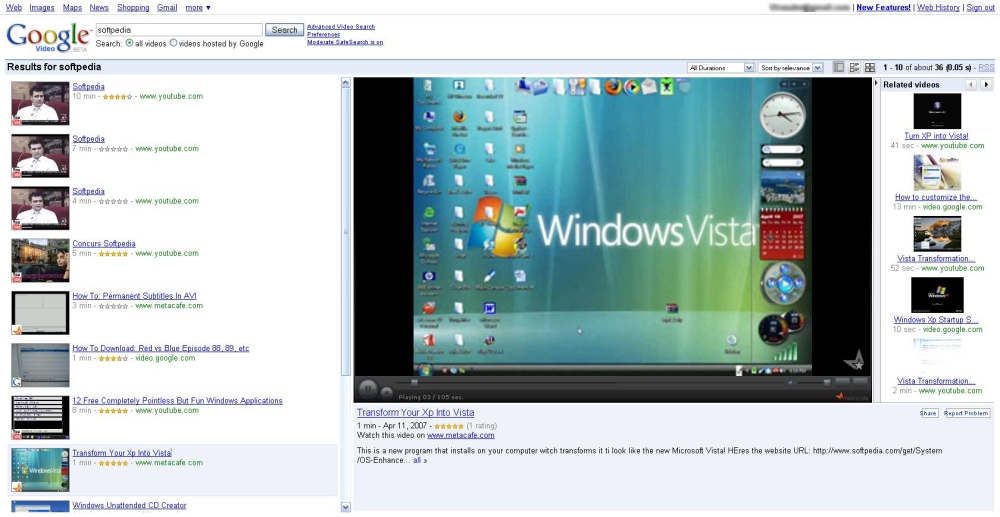
Google has recently rolled out a brand new interface supposed to provide better functionality than anytime before. And it really does that especially
because it allows visitors to view clips, browse among the search results or click on the related videos on the same page. A few days ago, the Mountain View-based company decided to set this new interface as default, so all the users who search for a certain clip will get to see and use it.

According to a blog post published by Steve Gerding, Software Engineer, the new interface is only compatible with the embeddable clips while the non-supported ones, which don't provide the embed code, come with a direct link to the page hosting them. Among the embeddable videos, there are the ones published on YouTube, Google Video, Metacafe or Crackle but, depending on the uploaders' settings, these may be limited, too.

"In addition to playing the video, clicking on a search result will reload the list of related videos on the right hand side of the page. Next time you're watching a video, try flipping through the related videos; you might find something even better than what you originally searched for! Just like search results, most related videos can be played directly in the TV view player," Steve Gerding explained.

As you can see in the adjacent picture, the interface makes the service quite easy to use and, thanks to the large video screen placed in the right part of the page, users may have a better viewing experience than on YouTube.

In the past, Google Video had problems with full length pirated movies which were continuously uploaded by users even if the administrators removed them. Taking into consideration that this new TV-view makes Google Video even more attractive for users who want to enjoy full length movies, an anti-piracy filter would be welcome. But this is one of the main Google problems after all, isn't it?

MORE RELATED ARTICLES: Now You Can: Insert YouTube Clips in Google Docs Presentations YouTube Launches Search Suggest YouTube Latest Innovation: Mute Users! Google Brings Karaoke Closer to YouTube Fans
 
Comments | Link here | Subscribe
Print | Send to friend
Today's News | Yesterday's News

Search:


29th April 2008, 08:28 GMT | Copyright (c) 2008 Softpedia | Contact:
Read by 714 user(s) | Rating: | 7 vote(s) so far | Cast your vote:
TV View - The New Google Video Default Interface - USER OPINIONS


We are sorry, there are no opinions available for this article.


SHARE YOUR OPINION ABOUT TV View - The New Google Video Default Interface

Since you are not logged on, your comments will have to be approved before being displayed.
Click here to login, or register.
Your Name:
Your Email:
Type in the result:
Your Opinion:


DO YOU WANT TO CONTACT US?  

If you have some comments or you want to send us some information you can send us an email directly to .
You can use the form below for the same purpose.
Your full name: (at least 3 characters)
Your email address: (at least 5 characters)
Message subject: (at least 5 characters)
Message text:
(at least 10 characters)
Type in the result:


© 2001 - 2008 Softpedia. All rights reserved.
Softpedia™ and Softpedia™ logo are registered trademarks of SoftNews NET SRL.
Copyright Information | Privacy Policy | Terms of Use | Contact Softpedia | Update your software | Archive